Apple Magic Mouse (USB-C) vs Apple Mighty Mouse (wired)
Better figure, where one is clearly better
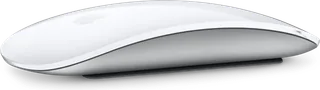
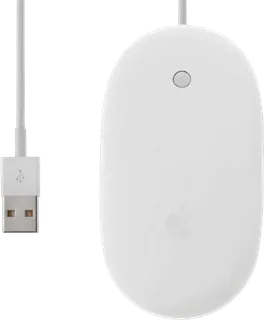
| AppleMagic Mouse (USB-C) | AppleMighty Mouse (wired) | |
|---|---|---|
| Overview | ||
| Released | October 2024 | August 2005 |
| Tracking | ||
| Shape | Standard | Standard |
| Hand | Either hand | Either hand |
| Sensor | – | Optical |
| Buttons | 2 | 4 (better) |
| Sensor | – | Optical tracking; Apple did not publish a DPI figure. |
| Scroll wheel | – | Clickable Scroll Ball scrolls vertically, horizontally and diagonally. |
| Free-spinning wheel | No | – |
| Thumb wheel | No | – |
| Gestures | Multi-Touch surface with no separate buttons; click anywhere, with secondary click on the side you choose; scroll, smart zoom (one-finger double-tap), swipe between pages, swipe between full-screen apps (two fingers), Mission Control (two-finger double-tap) | Touch sensors distinguish left and right clicks; the two side contacts act together as one squeeze control. |
| Connections and battery | ||
| Connects by | Bluetooth | Cable |
| Devices it switches between | 1 | – |
| Power | Rechargeable | Cable |
| Charging port | USB-C | – |
| Charging | USB-C port on the underside; about a month or more between charges; plugging it into a Mac also pairs it | – |
| Works with | Mac with macOS 15.1 or later; iPad with iPadOS 18.1 or later | USB 1.1 or 2.0; Apple listed Mac OS X, Windows 2000 and Windows XP. Mac OS X 10.4.2 was required for custom button assignments at launch. |
| Software | – | Mac OS X Mouse preferences assign Spotlight, Dashboard, Exposé or an application to the four controls. Macworld found no keystroke or modifier-click assignment. |
| Design | ||
| Weight | 99 g | 77 g (better) |
| Materials | – | White plastic shell with a single seamless top surface. |
| Size | Height 2.16 cm, width 5.71 cm, depth 11.35 cm | – |
| Colours | White Multi-Touch Surface, Black Multi-Touch Surface | – |
| In the box | Magic Mouse, woven USB-C Charge Cable | Wired Mighty Mouse. ITmedia measured 77 g without the cable, or 92 g including it; Apple did not publish a weight. |
| Warranty | 1 year (Apple One Year Limited Warranty) | – |
More comparisons
- Apple USB Mouse (1998) vs Apple Magic Mouse (USB-C)
- Apple Magic Mouse (USB-C) vs Apple Pro Mouse (2000)
- Apple Magic Mouse (USB-C) vs Apple Wireless Mouse (2003)
- Apple Magic Mouse 2 (Lightning) vs Apple Magic Mouse (USB-C)
- Apple Magic Mouse (USB-C) vs Apple Wireless Mighty Mouse
- Apple Magic Mouse (2009) vs Apple Magic Mouse (USB-C)
- Apple Magic Mouse (USB-C) vs Logitech Signature M650
- Apple Magic Mouse (USB-C) vs Razer Viper V3 Pro
- Apple Magic Mouse (USB-C) vs Logitech PRO X SUPERLIGHT 2
- Apple Magic Mouse (2009) vs Apple Mighty Mouse (wired)
- Apple Mighty Mouse (wired) vs Apple Wireless Mighty Mouse
- Apple Mighty Mouse (wired) vs Apple Pro Mouse (2000)
- Apple Mighty Mouse (wired) vs Apple Wireless Mouse (2003)
- Apple Mighty Mouse (wired) vs Logitech G5 Laser Mouse (2005)