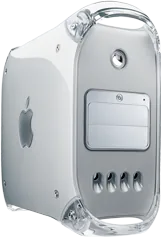
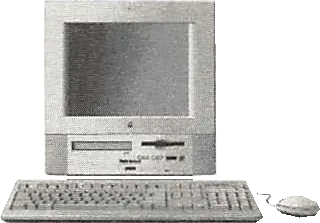
Apple Power Mac G4 (FW800) vs Apple Power Macintosh 5400/180
Better figure, where one is clearly better
| ApplePower Mac G4 (FW800) | ApplePower Macintosh 5400/180 | |
|---|---|---|
| Overview | ||
| Released | January 2003 | 1996 |
| Performance | ||
| Processor | PowerPC G4 1000 MHz (Power Mac FW800), 2 × PowerPC G4 1250 MHz (Power Mac FW800) or 2 × PowerPC G4 1420 MHz (Power Mac FW800) | PowerPC 603e 180 MHz (Power Macintosh 5400) |
| CPU cores | 1 or 2 | 1 |
| Graphics | NVIDIA GeForce4 MX (64 MB) or ATI Radeon 9000 Pro (64 MB) | – |
| Memory | 256 MB, 512 MB or 2 GB (better) | 16 MB |
| Storage | 60 GB to 120 GB (better) | 1.2 GB to 1.6 GB |
| CPU | Single 1 GHz, dual 1.25 GHz or dual 1.42 GHz PowerPC G4; each physical processor has 256 KB on-chip L2 cache. L3 cache is 1 MB on the single 1 GHz, 1 MB per processor on dual 1.25 GHz and 2 MB per processor on dual 1.42 GHz. Bus is 133 MHz on the single model, 167 MHz on dual models. | 180 MHz PowerPC 603e with integrated floating-point unit, 32 KB L1 cache and 64-bit 40 MHz bus; optional 256 KB L2 cache. The shared service narrative also uses the 603ev name. An optional PC Compatibility Card is separate hardware, not part of the standard CPU. |
| GPU | Single 1 GHz: NVIDIA GeForce4 MX with 64 MB DDR. Dual 1.25/1.42 GHz: ATI Radeon 9000 Pro with 64 MB DDR. Optional NVIDIA GeForce4 Titanium and ATI Radeon 9700 Pro, each 128 MB DDR; independent CTO options stay in details. | 1 MB built-in DRAM framebuffer independent of system RAM. Apple's Service Source supports 640 × 480 at 60 or 67 Hz with 16-bit colour, 800 × 600 at 60 or 72 Hz with 16-bit colour, and 832 × 624 at 75 Hz with 8-bit colour; video input is unavailable at 832 × 624. The exact support database also lists 1024 × 768, but the brochure and shared service manual restrict the built-in display to 832 × 624; 1024 × 768 is not used as its headline resolution. |
| Memory type | Single 1 GHz: 256 MB PC2100 DDR at 266 MHz; dual 1.25 GHz: 256 MB PC2700 DDR at 333 MHz; dual 1.42 GHz: 512 MB PC2700. Four DIMM slots support up to 2 GB. Configurations retain stock drives and GPUs at base and maximum supported memory. | Original 16 MB configuration has 8 MB soldered on the logic board and an 8 MB DIMM; two 168-pin DIMM sockets permit up to 136 MB using 70 ns or faster memory. The shared service table also documents 180 MHz boards with 16 MB soldered RAM; that is not the original 8 MB board configuration. |
| Storage type | Stock 60/80/120 GB 7200 rpm Ultra ATA/100 drives on 1/1.25/1.42 GHz respectively. Lower models have Combo DVD-ROM/CD-RW; top model has SuperDrive (DVD-R 4x, CD-R 16x). Four bays support two ATA/100 and two ATA/66 drives; two optical bays, one occupied. Optional 180 GB drive, SuperDrive on lower models and second Combo drive are not assumed in every configuration. | November 1996 Apple Facts and the exact support database list a 1.6 GB IDE hard drive, 8× CD-ROM and 1.44 MB SuperDrive floppy. Apple's June 1997 US education ordering brochure lists 5400/180 M5686LL/B with 16 MB, a 1.2 GB drive and 8× CD-ROM. The shared service manual documents some US education configurations with 12× CD-ROM and Mac OS 7.6.1. These are distinct bundles, not storage figures transferred from the 5400/200. |
| Expansion slots | Four open full-length 64-bit 33 MHz PCI slots and AGP 4x graphics slot. | One PCI slot for a card up to 6.88 inches long and 15 W, Communications Slot II, video-input slot and TV/FM tuner position. Optional Apple Video System supports NTSC, PAL and SECAM input; optional Apple TV/FM Radio System supplies television and FM reception. Original K–12 channel configurations described by Apple include the Video System and External Video Connector; neither is assumed standard in every bundle. |
| Display | ||
| Screen | None built in | 12.8″ |
| Resolution | – | 832 × 624 |
| Panel | – | CRT |
| Refresh rate | – | 75 Hz |
| Display type | – | Multiple-scan flat-square shadow-mask CRT, 15-inch nominal tube with a 12.8-inch diagonal viewable image and 0.28 mm dot pitch. Tilt-and-swivel base tilts from −5° to +15° and swivels 360°. |
| Connections | ||
| Ports | 2 × USB-A, Ethernet, headphone jack | Headphone jack |
| Ethernet | 1 Gb/s | – |
| External displays | Up to 2 | – |
| Front ports | Headphone minijack and built-in speaker. | Headphone output, sound-volume and display controls; infrared receiver for the optional TV/FM remote. |
| Back ports | One FireWire 800 and two FireWire 400 (15 W total), two chassis USB 1.1, Gigabit Ethernet, V.92 modem, ADC/DVI, audio line-in/out and Apple Pro Speakers minijack. Maker four-port USB total includes two ports on the keyboard. Optional AirPort Extreme 54 Mbps 802.11g card and Bluetooth 1.1 module. | ADB, external DB-25 SCSI, two LocalTalk/GeoPort-compatible serial ports, PlainTalk-compatible sound input and stereo speaker output. November 1996 education configuration includes Ethernet in the communications slot, replaceable by a 28.8 Kbit/s modem. The June 1997 brochure makes Ethernet optional on the 180 MHz version, while the exact support database lists none; no universal Ethernet headline is assigned. Apple Facts specifies six external SCSI devices, whereas the shared service table says up to seven devices without the same external qualification. |
| External displays | Two displays in extended desktop or mirroring modes. ADC and DVI connectors with included DVI-to-VGA adapter; digital up to 1920 × 1200, analogue up to 1600 × 1200. A second ADC display needs a separately sold adapter. | Optional Apple External Video Connector enables video mirroring to a compatible display; the shared service lists 640 × 480, 800 × 600 and 832 × 624 external modes. Optional Apple Presentation System converts output to NTSC or PAL. A connector and compatible display are required. |
| Speakers | Built-in speaker; optional Apple Pro Speakers. | Built-in stereo speakers, 16-bit stereo sound input/output and SRS 3D surround processing, with rear stereo speaker output. |
| Microphones | – | Built-in microphone; PlainTalk-compatible external sound input. |
| Keyboard and mouse | Apple Pro Keyboard, Apple Pro Mouse, USB keyboard extension, DVI-to-VGA adapter and modem cable. | Keyboard, mouse, cables and preinstalled software in the education ordering brochure; video input, TV/FM hardware, Ethernet and PC Compatibility Card vary by bundle or are optional. Shared-family gallery photograph shows the beige 5400 with supplied keyboard and mouse; it is not the international graphite Performa 5420. |
| Design and power | ||
| Type | Tower | All-in-one |
| Weight | 19.1 kg (better) | 21 kg |
| Width × depth × height | 227 × 468 × 432 mm | 383 × 406 × 445 mm |
| Operating system | macOS | macOS |
| Size and weight detail | Maker reference 19.1 kg varies with configuration and manufacturing. Height 43.2 cm, width 22.7 cm, depth 46.8 cm. | Apple Facts and the ordering brochure give 44.5 × 38.3 × 40.6 cm (height × width × depth), and 21 kg / 47 lb, varying with installed devices. The shared service physical table swaps width/depth and prints internally inconsistent pound/kilogram weights; the exact maker brochure dimensions and complete-unit mass are used. |
| Power supply | 100–125 V or 200–240 V AC, 50–60 Hz; maximum current 6.5 A at low voltage or 7.5 A at high voltage. No wattage is supplied by this sheet. | Brochure and exact support database specify 220 W maximum continuous, 110–240 V AC, 50–60 Hz. The shared service gives 100–240 V at 47–63 Hz, a separate 125 W entry and 220 W maximum for all line/load conditions; these are power ratings, not measured operating consumption. |
| In the box | Mac OS X with Classic environment rather than native Mac OS 9 boot; iLife and productivity software. Single 1 GHz and dual 1.25 GHz were available on 28 January 2003; dual 1.42 GHz was announced for the following month and subsequently reviewed. Its later availability does not change the generation’s first on-sale date. | Exact support database lists System 7.5.3 with Enabler 410; later education brochure and some service configurations use Mac OS 7.6.1. Apple records introduction on 1 October 1996, and its November 1996 current education catalogue establishes sale in 1996. The actual first-sale month is unresolved, so the date remains year precision. |
More comparisons
- Apple Mac mini (M4 or M4 Pro) vs Apple Power Mac G4 (FW800)
- Apple Mac Pro (2006) vs Apple Power Mac G4 (FW800)
- Apple Power Mac G4 (FW800) vs Apple Power Mac G5 (Late 2005)
- Apple Power Mac G5 (Late 2005) vs Apple Power Macintosh 5400/180
- Apple Power Mac G4 (FW800) vs Apple Power Mac G5 (Early 2005)
- Apple Power Mac G5 (Early 2005) vs Apple Power Macintosh 5400/180
- Apple Power Mac G4 (FW800) vs Apple Power Mac G5 (Late 2004)
- Apple Power Mac G5 (Late 2004) vs Apple Power Macintosh 5400/180
- Apple Power Mac G4 (FW800) vs Apple Power Mac G5 (June 2004)
- Apple Power Mac G5 (June 2004) vs Apple Power Macintosh 5400/180
- Apple Power Mac G4 (FW800) vs Apple Power Mac G5 (2003)
- Apple Power Mac G5 (2003) vs Apple Power Macintosh 5400/180
- Apple Power Mac G4 (FW800) vs Apple Power Mac G4 (Mirrored Drive Doors 2003)
- Apple Power Mac G4 (Mirrored Drive Doors 2003) vs Apple Power Macintosh 5400/180
- Apple iMac G4 (17-inch, Early 2003) vs Apple Power Mac G4 (FW800)
- Apple Power Mac G4 (FW800) vs Apple Power Mac G4 (Mirrored Drive Doors 2002)