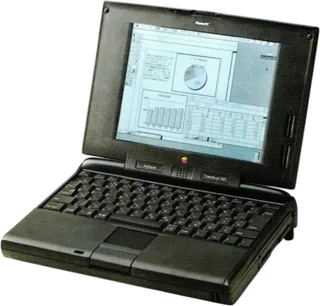
Apple Macintosh PowerBook 150 vs Apple Macintosh PowerBook 5300/100
Better figure, where one is clearly better
| AppleMacintosh PowerBook 150 | AppleMacintosh PowerBook 5300/100 | |
|---|---|---|
| Overview | ||
| Released | July 1994 | August 1995 |
| Display | ||
| Screen size | 9.5″ | 9.5″ |
| Resolution | 640 × 480 | 640 × 480 |
| Touchscreen | No | No |
| Display type | 9.5-inch backlit FSTN passive-matrix LCD with four grey shades; Apple's Japanese sheet and April 1995 Apple Facts give 640 × 480, while its English support table lists 640 × 400 | 9.5-inch backlit FSTN passive-matrix LCD with 16 grey levels |
| Performance | ||
| Processor | Motorola 68030 33 MHz (PowerBook 165) | PowerPC 603e 100 MHz (PowerBook 5300c) |
| CPU cores | 1 | 1 |
| Memory | 4 MB or 8 MB | 16 MB (better) |
| Storage | 120 MB to 250 MB | 500 MB (better) |
| CPU | 33 MHz Motorola 68030, with no floating-point unit | 100 MHz PowerPC 603e with a 33.3 MHz bus, 32 KB L1 cache and no L2 cache |
| Memory type | Apple's Japanese configuration has 8 MB and lists a 24 MB maximum; the English support sheet and April 1995 Apple Facts give 4 MB on the logic board and a 40 MB maximum | Japanese bundled configuration has 16 MB, expandable to 64 MB; English support gives an 8 MB base configuration |
| Storage type | Internal IDE hard drive and 1.4 MB Apple SuperDrive floppy drive; Japanese bundled configuration has 120 MB, while April 1995 Apple Facts specifies a 250 MB drive with 4 MB RAM | 500 MB internal IDE hard drive and removable 1.4 MB Apple SuperDrive floppy module |
| Battery and size | ||
| Battery life (maker's claim) | Up to 4 hours | Up to 4.5 hours |
| Weight | 2.5 kg (better) | 2.8 kg |
| Thickness | 57 mm | 51.4 mm (better) |
| Width × depth | 286 × 236 mm | 293 × 217 mm |
| Battery life detail | Removable nickel-cadmium battery; Apple claims 2–4 hours. Backup battery preserves RAM for up to four minutes while swapping the main battery in sleep. Japanese maker dimensions and 2.5 kg weight used; English support lists 5.8 lb, while Apple Facts lists 5.5 lb (2.5 kg) | Removable nickel-metal hydride battery; Apple claims 3–4.5 hours. Charging takes two hours while asleep or unused, four hours during use. Japanese maker 2.8 kg includes the floppy module; replacing it with the PC Card tray reduces weight by about 180 g |
| Connections | ||
| Operating system | macOS | macOS |
| Port detail | RS-422 serial/LocalTalk, HDI-30 SCSI, power input and optional internal modem slot; no ADB, Ethernet or video port | Two Type I/II PC Card slots or one Type III, ADB, RS-422 serial/LocalTalk, HDI-30 SCSI, stereo sound input/output, external video, infrared and power input; Ethernet requires a PC Card |
| External displays | – | Video output supports 256 colours; third-party hardware can provide greater colour depth |
| Trackpad | 30 mm trackball with two buttons | Built-in solid-state trackpad |
| Speakers | Built-in mono speaker | Built-in speaker and omnidirectional microphone with 16-bit stereo audio input/output |
| In the box | Japanese 8 MB/120 MB bundle includes battery, battery case, power adapter, KanjiTalk 7 CD-ROM and preinstalled ClarisWorks and PowerBook Mobility Bundle | Japanese 16 MB/500 MB bundle includes nickel-metal hydride battery, power adapter, PC Card tray, KanjiTalk 7.5.2 CD-ROM and PowerBook Mobility Bundle |
More comparisons
- Apple MacBook Air 13″ (M5) vs Apple Macintosh PowerBook 150
- Apple MacBook Air 13″ (M5) vs Apple Macintosh PowerBook 5300/100
- Apple Macintosh PowerBook 5300/100 vs Apple PowerBook G4 (15-inch, Double-Layer SD)
- Apple Macintosh PowerBook 5300/100 vs Apple PowerBook G4 (17-inch, Double-Layer SD)
- Apple Macintosh PowerBook 150 vs Apple PowerBook G4 (15-inch, Double-Layer SD)
- Apple Macintosh PowerBook 150 vs Apple PowerBook G4 (17-inch, Double-Layer SD)
- Apple Macintosh PowerBook 5300/100 vs Apple PowerBook G4 (15-inch, 1.67/1.5GHz)
- Apple Macintosh PowerBook 5300/100 vs Apple PowerBook G4 (17-inch, 1.67GHz)
- Apple Macintosh PowerBook 150 vs Apple PowerBook G4 (15-inch, 1.67/1.5GHz)
- Apple Macintosh PowerBook 150 vs Apple PowerBook G4 (17-inch, 1.67GHz)
- Apple Macintosh PowerBook 5300/100 vs Apple PowerBook G4 (12-inch, 1.5GHz)
- Apple Macintosh PowerBook 150 vs Apple PowerBook G4 (12-inch, 1.5GHz)
- Apple Macintosh PowerBook 5300/100 vs Apple PowerBook G4 (12-inch, 1.33GHz)
- Apple Macintosh PowerBook 5300/100 vs Apple PowerBook G4 (15-inch, 1.5/1.33GHz)
- Apple Macintosh PowerBook 150 vs Apple PowerBook G4 (12-inch, 1.33GHz)
- Apple Macintosh PowerBook 150 vs Apple PowerBook G4 (15-inch, 1.5/1.33GHz)