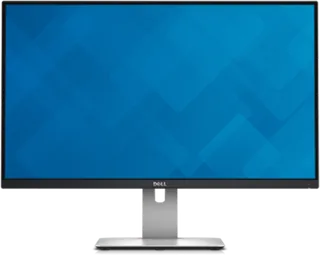
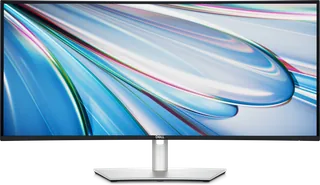
Dell UltraSharp U2715H vs Dell UltraSharp 34 Curved Thunderbolt Hub (U3425WE)
Better figure, where one is clearly better
| DellUltraSharp U2715H | DellUltraSharp 34 Curved Thunderbolt Hub (U3425WE) | |
|---|---|---|
| Overview | ||
| Released | 2014 | February 2024 |
| Display | ||
| Screen size | 27″ | 34.14″ |
| Resolution | 2560 × 1440 (QHD) | 3440 × 1440 (UWQHD) (better) |
| Sharpness | 109 pixels per inch | 109 pixels per inch |
| Panel | IPS | IPS (IPS Black) |
| Refresh rate | 60 Hz | 120 Hz (better) |
| Response time (grey to grey) | 6 ms | 5 ms (better) |
| Brightness (typical) | 350 nits (better) | 300 nits |
| Contrast ratio | 1,000:1 | 2,000:1 |
| Colour range | 99% sRGB | 98% DCI-P3, 98% Display P3, 100% sRGB |
| DCI-P3 coverage | – | 98% |
| Colour accuracy (Delta E) | Below 3 | Below 2 (better) |
| Screen finish | Matte | Matte |
| Shape | Flat | Curved (1900R) |
| Colour depth | 16.78 million colours | 1.07 billion colours |
| sRGB coverage | 99% | 100% (CIE 1931) |
| Colour accuracy | Factory calibrated to average Delta E ≤ 3. | Delta E < 2 (average) (DCI-P3, Display P3, sRGB, BT.709); factory calibration report in the box |
| Response time detail | 6 ms grey-to-grey in Fast mode; 8 ms in Normal mode (Dell). TFTCentral found Fast introduced overshoot on its sample. | 5 ms (Fast), 8 ms (Normal) |
| Variable refresh range | – | 48–120 Hz over DisplayPort and Thunderbolt 4; 48–100 Hz over HDMI (vertical scan range) |
| Viewing angles | 178° horizontal and vertical (typical). | 178° horizontal, 178° vertical (typical) |
| Pixel pitch | 0.2331 mm. | 0.2325 mm x 0.2325 mm |
| Eye care | Analogue backlight dimming for a flicker-free display, according to Dell. | ComfortView Plus hardware low blue light; TÜV Rheinland Eye Comfort 3.0 (5 star); ambient light sensor (Auto Brightness); flicker-free |
| Connections | ||
| Video inputs | 2 × HDMI 1.4, 2 × DisplayPort 1.2 | HDMI 2.1 (TMDS), DisplayPort 1.4, Thunderbolt 4 |
| USB-C charging | None | Up to 90 W (better) |
| USB ports | 5 × USB-A | 2 × USB-C, 5 × USB-A, Thunderbolt 4 |
| KVM switch | – | Yes |
| Ethernet | – | Yes |
| Speakers | No | Yes |
| HDMI detail | Two HDMI 1.4 inputs with MHL 2.0 support. | 1 x HDMI (HDCP 1.4 & 2.2), up to 3440 x 1440 at 100 Hz TMDS as specified in HDMI 2.1 |
| DisplayPort detail | One DisplayPort 1.2 input, one Mini DisplayPort input and one DisplayPort 1.2 MST output. | 1 x DisplayPort 1.4 (HDCP 1.4 & 2.2), up to 3440 x 1440 at 120 Hz |
| USB-C detail | – | Thunderbolt 4 upstream (40Gbps, DisplayPort 1.4 Alt Mode, Power Delivery up to 90 W); USB-C 10Gbps upstream (data only); 2 x USB-C 10Gbps downstream quick-access ports (15 W) |
| Daisy chaining | DisplayPort 1.2 MST output; Dell lists one additional QHD 60 Hz display or two lower-resolution displays. | Thunderbolt 4 downstream port (video and data, 15 W) |
| USB hub detail | Five downstream USB 3.0 Type-A ports and one upstream USB 3.0 Type-B port; one downstream port supports BC 1.2 charging. | 4 x USB-A 10Gbps rear; quick access ports with 1 x USB-A 10Gbps (BC 1.2) and 2 x USB-C 10Gbps (15 W) |
| Picture by picture | – | Picture by Picture and Picture in Picture |
| Audio out | Audio line out for external speakers; Dell says it does not support headphones. | 3.5 mm audio line out |
| Speaker detail | – | 2 x 5 W |
| Design | ||
| Stand adjusts | Height, tilt, swivel, pivot (better) | Height, tilt, swivel |
| VESA mount | Yes | Yes |
| Weight with stand | – | 10.81 kg |
| Height adjustment | 115 mm. | 150 mm |
| Tilt | -5° to 21°. | -5° to 21° |
| Swivel | -45° to 45°. | -30° to 30° |
| Pivot | -90° to 90°. | – |
| VESA pattern | 100 × 100 mm. | 100 x 100 mm |
| Size with stand | 612.7 × 205.0 × 409.9–524.9 mm (width × depth × height). | 813.46 x 240.43 x 392.83–542.83 mm (W x D x H) |
| Size without stand | 612.7 × 46.4 × 363.4 mm (width × depth × height). | 813.46 x 105.08 x 359.15 mm (W x D x H) |
| Weight without stand | 4.91 kg, without cables. | 7.78 kg |
| Controls | Touch-sensitive front buttons and on-screen display. | – |
| Colours | Black front frame and silver stand. | Silver |
| Power and support | ||
| Power use | 36 W typical, 88 W maximum with USB active; less than 0.5 W in standby. | 31.5 W on mode, 0.5 W standby, 1.9 W networked standby, 0.3 W off, 250 W maximum |
| Energy class | – | F |
| Power supply | 100–240 V AC, 50/60 Hz. | 100–240 VAC, 50/60 Hz, 3.2 A (typical) |
| Software | Dell Display Manager. | Dell Display and Peripheral Manager (Easy Arrange) |
| Certifications | EPEAT Gold and TCO Certified Displays, according to Dell. | TÜV Rheinland Eye Comfort 3.0 (5 star), TÜV Rheinland hardware low blue light |
| Warranty | – | 3 years limited hardware with Advanced Exchange Service and Premium Panel Exchange (UK) |
| In the box | Stand, power cable, Mini DisplayPort-to-DisplayPort cable, USB 3.0 upstream cable, factory calibration report and documentation. | Stand, power cable, DisplayPort 1.4 cable (1.8 m), HDMI cable (1.8 m), Thunderbolt 4 passive cable (1 m), USB-A to USB-C cable (1 m), factory calibration report |
More comparisons
- Dell Alienware 34 240Hz (AW3426DWM) vs Dell UltraSharp 34 Curved Thunderbolt Hub (U3425WE)
- Dell UltraSharp 32 4K QD-OLED (U3226Q) vs Dell UltraSharp 34 Curved Thunderbolt Hub (U3425WE)
- Dell UltraSharp U2715H vs Dell UltraSharp 32 4K QD-OLED (U3226Q)
- Dell UltraSharp 34 Curved Thunderbolt Hub (U3425WE) vs Dell UltraSharp 52 Thunderbolt Hub (U5226KW)
- Dell UltraSharp U2715H vs Dell UltraSharp 52 Thunderbolt Hub (U5226KW)
- Dell UltraSharp 34 Curved Thunderbolt Hub (U3425WE) vs Samsung Odyssey G7 G75F (37″)
- Dell UltraSharp 34 Curved Thunderbolt Hub (U3425WE) vs MSI MPG 346CQRF X24
- Dell UltraSharp 34 Curved Thunderbolt Hub (U3425WE) vs Samsung ViewFinity S8 S80UD (37″)
- Dell UltraSharp 27 4K Thunderbolt Hub (U2725QE) vs Dell UltraSharp 34 Curved Thunderbolt Hub (U3425WE)
- Dell UltraSharp U2715H vs Dell UltraSharp 27 4K Thunderbolt Hub (U2725QE)
- Dell UltraSharp 32 4K Thunderbolt Hub (U3225QE) vs Dell UltraSharp 34 Curved Thunderbolt Hub (U3425WE)
- Dell UltraSharp U2715H vs Dell UltraSharp 32 4K Thunderbolt Hub (U3225QE)
- Dell UltraSharp 34 Curved Thunderbolt Hub (U3425WE) vs MSI MAG 342CQR E2
- Dell UltraSharp 34 Curved Thunderbolt Hub (U3425WE) vs Dell UltraSharp 40 Curved Thunderbolt Hub (U4025QW)
- Dell UltraSharp 27 Monitor (U2724D) vs Dell UltraSharp 34 Curved Thunderbolt Hub (U3425WE)
- Dell UltraSharp 27 Thunderbolt Hub (U2724DE) vs Dell UltraSharp 34 Curved Thunderbolt Hub (U3425WE)