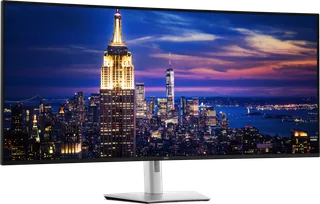
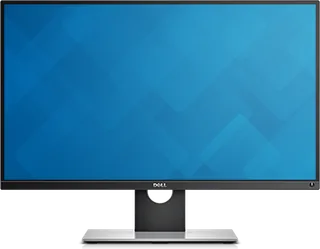
Dell UltraSharp 52 Thunderbolt Hub (U5226KW) vs Dell UltraSharp 27 Monitor with PremierColor (UP2716D)
Better figure, where one is clearly better
| DellUltraSharp 52 Thunderbolt Hub (U5226KW) | DellUltraSharp 27 Monitor with PremierColor (UP2716D) | |
|---|---|---|
| Overview | ||
| Released | January 2026 | October 2015 |
| Display | ||
| Screen size | 51.5″ | 27″ |
| Resolution | 6144 × 2560 (better) | 2560 × 1440 (QHD) |
| Sharpness | 129 pixels per inch (better) | 109 pixels per inch |
| Panel | IPS (IPS Black) | IPS |
| Refresh rate | 120 Hz (better) | 60 Hz |
| Response time (grey to grey) | 5 ms (better) | 6 ms |
| Brightness (typical) | 400 nits (better) | 300 nits |
| Contrast ratio | 2,000:1 | 1,000:1 |
| Colour range | 99% DCI-P3, 99% Display P3, 100% BT.709 | 100% Adobe RGB, 100% sRGB, 100% Rec.709, 98% DCI-P3 |
| DCI-P3 coverage | 99% (better) | 98% |
| Colour accuracy (Delta E) | Below 1.5 (better) | Below 2 |
| Screen finish | Matte | Matte |
| Shape | Curved (4200R) | Flat |
| Adaptive sync | HDMI VRR | – |
| Colour depth | 1.07 billion colours (8-bit + FRC) | 1.07 billion colours with 14-bit lookup table |
| sRGB coverage | 100% (CIE 1931) | 100% sRGB and 100% Rec.709 claimed by Dell |
| Colour accuracy | Delta E < 1.5 (average) (sRGB, BT.709, DCI-P3, Display P3) | – |
| Colour modes | Standard, Movie, Game, Color Temp. (5,000K to 10,000K), Color Space (sRGB, BT.709, DCI-P3, Display P3), Custom Color | Adobe RGB, sRGB, Rec.709, DCI-P3 and two user calibration slots |
| Response time detail | 5 ms GTG (Fast mode), 8 ms GTG (Normal mode) | 6 ms Fast, 14 ms Normal, grey-to-grey |
| Viewing angles | 178° horizontal, 178° vertical (typical) | 178° horizontal and vertical |
| Pixel pitch | 0.19644 mm x 0.19644 mm | 0.2331 mm |
| Calibration | – | Factory average Delta E below 2, according to Dell; hardware calibration supported with an optional X-Rite i1Display Pro colorimeter |
| Eye care | ComfortView Plus (blue light ≤20%), TÜV Rheinland Eye Comfort 3.0 5-star, flicker-free, ambient light sensor with Auto Brightness and Auto Color Temp. | – |
| Connections | ||
| Video inputs | 2 × HDMI 2.1, 2 × DisplayPort 1.4, Thunderbolt 4 | 2 × HDMI 1.4, 2 × DisplayPort 1.2 |
| USB-C charging | Up to 140 W (better) | None |
| USB ports | 2 × USB-C, 5 × USB-A | 4 × USB-A |
| KVM switch | Yes | Yes |
| Ethernet | Yes | No |
| Speakers | Yes | No |
| HDMI detail | 2 x HDMI (HDCP 2.2), up to 6144 x 2560 at 120 Hz FRL with VRR as specified in HDMI 2.1; no ARC/eARC or ALLM | – |
| DisplayPort detail | 2 x DisplayPort 1.4 in (HDCP 2.2), up to 6144 x 2560 at 120 Hz with DSC | One full-size DisplayPort 1.2 input, one Mini DisplayPort input and one DisplayPort MST output. |
| Daisy chaining | – | DisplayPort MST output for another compatible display. |
| USB-C detail | Thunderbolt 4 upstream (40Gbps, DisplayPort 1.4 with DSC, Power Delivery up to 140 W EPR); 3 x USB-C 10Gbps upstream (data only); 2 x USB-C 10Gbps downstream with 27 W charging | – |
| USB hub detail | 4 x USB-A 10Gbps (rear); pop-out quick access module with 2 x USB-C 10Gbps (27 W) and 1 x USB-A 10Gbps with BC1.2 charging | Four USB-A 3.0 downstream ports and two USB 3.0 upstream ports for KVM switching. |
| Audio out | – | 3.5 mm audio line output |
| Picture by picture | Picture by Picture with Screen Partition (internal MST) and Picture in Picture; USB KVM for up to four PCs, Auto KVM | – |
| Speaker detail | 2 x 9 W | – |
| Design | ||
| Stand adjusts | Height, tilt, swivel | Height, tilt, swivel, pivot (better) |
| VESA mount | Yes | Yes |
| Weight with stand | 18.23 kg | 7.42 kg |
| Height adjustment | 90 mm | 130 mm |
| Tilt | -5° to 10° | -4° to 21° |
| Swivel | -20° to 20° | -45° to 45° |
| Pivot | No pivot; slant -2° to 2° | -90° to 90° |
| VESA pattern | 100 x 100 mm, 200 x 100 mm, 200 x 200 mm | 100 × 100 mm |
| Size with stand | 1223.32 x 255 x 576.79–666.79 mm (W x D x H) | 611.4 × 200.3 × 410.3–540.3 mm (W × D × H) |
| Size without stand | 1223.32 x 111.94 x 529.05 mm (W x D x H) | – |
| Weight without stand | 12.95 kg | 4.56 kg |
| Controls | Joystick; power and OSD button lock | – |
| Colours | Platinum Silver | – |
| Power and support | ||
| Power use | 63.6 W on mode, 0.5 W standby, 2.0 W networked standby, 0.3 W off, 430 W maximum | 45 W typical, 40 W ENERGY STAR, below 0.3 W active-off |
| Energy class | G | – |
| Power supply | 100–240 VAC, 50/60 Hz, 5.5 A (maximum) | 100–240 V AC, 50–60 Hz |
| Software | Dell Display and Peripheral Manager (Easy Arrange, KVM), Dell Color Management, Dell Device Management Console | Dell Display Manager and Dell UltraSharp Color Calibration Solution |
| Certifications | ENERGY STAR 8.0, EPEAT Gold with Climate+, TCO Certified 10.0 and TCO Certified Edge, TÜV Rheinland Eye Comfort 3.0 (5 star) | ENERGY STAR and TCO Certified; EPEAT Gold registration varies by country |
| Warranty | 3 years with Advanced Exchange Service and Premium Panel Exchange (UK) | Dell three-year Advanced Exchange Service and Premium Panel Guarantee |
| In the box | Stand (not with the WOST version), power cable, DisplayPort 1.4 cable (1.8 m), HDMI 2.1 cable (1.8 m), USB-C to USB-A 10Gbps cable (1 m), Thunderbolt 4 40Gbps cable (2 m) | Stand, power cable, Mini DisplayPort to DisplayPort cable, USB upstream cable and factory calibration report |
More comparisons
- Dell UltraSharp 32 4K QD-OLED (U3226Q) vs Dell UltraSharp 52 Thunderbolt Hub (U5226KW)
- Dell UltraSharp 32 4K QD-OLED (U3226Q) vs Dell UltraSharp 27 Monitor with PremierColor (UP2716D)
- Dell UltraSharp 52 Thunderbolt Hub (U5226KW) vs Samsung Odyssey G9 (G91F)
- Dell UltraSharp 52 Thunderbolt Hub (U5226KW) vs Samsung Odyssey Neo G9 G95NC
- Dell UltraSharp 52 Thunderbolt Hub (U5226KW) vs Samsung Odyssey OLED G9 G95SC
- Dell UltraSharp 27 4K Thunderbolt Hub (U2725QE) vs Dell UltraSharp 52 Thunderbolt Hub (U5226KW)
- Dell UltraSharp 32 4K Thunderbolt Hub (U3225QE) vs Dell UltraSharp 52 Thunderbolt Hub (U5226KW)
- Dell UltraSharp 34 Curved Thunderbolt Hub (U3425WE) vs Dell UltraSharp 52 Thunderbolt Hub (U5226KW)
- Dell UltraSharp 40 Curved Thunderbolt Hub (U4025QW) vs Dell UltraSharp 52 Thunderbolt Hub (U5226KW)
- Dell UltraSharp 27 Monitor (U2724D) vs Dell UltraSharp 52 Thunderbolt Hub (U5226KW)
- Dell UltraSharp 27 Thunderbolt Hub (U2724DE) vs Dell UltraSharp 52 Thunderbolt Hub (U5226KW)
- Dell UltraSharp 24 (U2424H) vs Dell UltraSharp 52 Thunderbolt Hub (U5226KW)
- Dell UltraSharp 24 USB-C Hub (U2424HE) vs Dell UltraSharp 52 Thunderbolt Hub (U5226KW)
- Dell UltraSharp 27 4K USB-C Hub Monitor (U2723QE) vs Dell UltraSharp 52 Thunderbolt Hub (U5226KW)
- Dell UltraSharp 27 Monitor (U2722D) vs Dell UltraSharp 52 Thunderbolt Hub (U5226KW)
- Dell UltraSharp 27 USB-C Hub Monitor (U2722DE) vs Dell UltraSharp 52 Thunderbolt Hub (U5226KW)