Keychron Q1 HE vs Keychron V1 Max
Better figure, where one is clearly better
| KeychronQ1 HE | KeychronV1 Max | |
|---|---|---|
| Overview | ||
| Released | December 2023 | November 2023 |
| Typing | ||
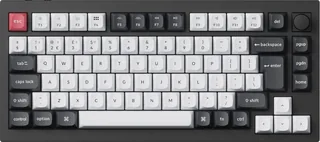
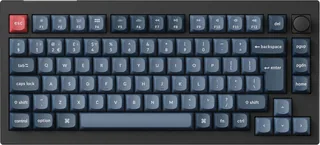
| Layout | Compact | Compact |
| Switches | Magnetic (Hall effect) | Mechanical |
| Backlight | RGB | RGB |
| Keys labelled for | Mac, Windows and more | Mac, Windows and more |
| Touch ID | No | No |
| Switches | Gateron Double-Rail Magnetic Nebula switches with a TMR sensor under each key; hot-swappable with Gateron double-rail magnetic switches only; actuation adjustable from 0.2 to 3.8 mm with 0.1 mm sensitivity; screw-in PCB stabilisers | Gateron Jupiter switches (Red, Brown or Banana); hot-swappable with most 3-pin and 5-pin MX-style switches; screw-in PCB stabilisers |
| Keycaps | OSA-profile double-shot PBT, not shine-through; keycaps for Windows and macOS | OSA-profile double-shot PBT, not shine-through; keycaps for Windows and macOS |
| Layouts | 75% with a knob; ANSI (keychron.com); UK ISO (keychron.uk); a Japanese JIS version is also sold | 75% with a knob; ANSI (keychron.com); UK ISO (keychron.uk) |
| Backlight | South-facing RGB LEDs | South-facing RGB LEDs |
| Special keys | Programmable rotary knob; Rapid Trigger; four-in-one Dynamic Keystrokes; Mac/Windows system toggle that keeps a separate layout for each; N-key rollover wireless and wired | Programmable rotary knob; Mac/Windows system toggle that keeps a separate layout for each; N-key rollover wireless and wired |
| Connections and battery | ||
| Connects by | Bluetooth, USB receiver and Cable | Bluetooth, USB receiver and Cable |
| Devices it switches between | 3 | 3 |
| Power | Rechargeable | Rechargeable |
| Battery life (maker's claim) | Up to 100 hours | Up to 190 hours |
| Receiver | 2.4 GHz USB receiver at 1,000 Hz polling; Bluetooth 5.2 at 90 Hz to up to three devices; USB-C wired at 1,000 Hz | 2.4 GHz USB receiver at 1,000 Hz polling; Bluetooth 5.1 at 90 Hz to up to three devices; USB-C wired at 1,000 Hz |
| Battery life detail | 4,000 mAh lithium-polymer battery; up to 100 hours with the backlight off | 4,000 mAh lithium-polymer battery; up to 190 hours with the backlight off and up to 100 hours with RGB at its lowest brightness (Keychron's lab tests) |
| Charging | USB-C; 1.8 m Type-C cable with a Type-A to Type-C adapter | USB-C; around 5 hours to charge; Type-C cable with a Type-A to Type-C adapter |
| Works with | macOS, Windows and Linux | Windows, macOS and Linux |
| Software | QMK firmware; Keychron Launcher web app for actuation, Rapid Trigger, key remapping and macros | QMK firmware with VIA and the Keychron Launcher web app |
| Design | ||
| Weight | 1735 g | 770 g (better) |
| Size | 327.5 × 145 mm; 22.6 mm high at the front and 35.8 mm at the back without keycaps; 2.4 mm feet; 5.2° typing angle; 1,735 g ± 10 g fully assembled | 328.5 × 148.7 mm; 21.5 mm high at the front and 29.4 mm at the back without keycaps; 2 mm feet; typing angles of 3.5°, 7.1° and 9.5°; 770 g ± 10 g fully assembled |
| Materials | Aluminium body and plate; double-gasket design with silicone pads between the cases; removable acoustic pad | ABS plastic body; PC plate; gasket mount; sound-absorbing foam |
| Colours | Carbon Black, Shell White (keychron.com); Carbon Black (keychron.uk UK ISO) | Carbon Black |
More comparisons
- Keychron Q1 HE vs Keychron Q6 HE
- Keychron Q1 HE vs Keychron Q3 HE
- Keychron V1 Max vs Logitech PRO X 60
- Keychron V1 Max vs Keychron V3 Max
- Keychron V1 Max vs Keychron V6 Max
- Keychron Q1 HE vs Keychron Q2 Max
- Keychron Q1 HE vs Keychron Q1 Max
- Keychron Q1 Max vs Keychron V1 Max
- Keychron V1 Max vs Keychron V5 Max
- Keychron K3 Max vs Keychron V1 Max
- Keychron V1 Max vs Logitech MX Mechanical Mini
- Keychron V1 Max vs Logitech POP Keys