LG UltraGear 27G850A-B vs LG UltraGear 27GL850-B
Better figure, where one is clearly better
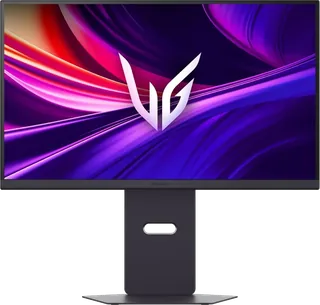
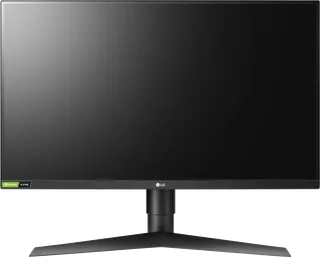
| LGUltraGear 27G850A-B | LGUltraGear 27GL850-B | |
|---|---|---|
| Overview | ||
| Released | February 2025 | July 2019 |
| Display | ||
| Screen size | 27″ | 27″ |
| Resolution | 3840 × 2160 (4K) (better) | 2560 × 1440 (QHD) |
| Sharpness | 163 pixels per inch (better) | 109 pixels per inch |
| Panel | IPS (Nano IPS Black; dual mode switches to 1920 x 1080 at 480Hz) | IPS (Nano IPS) |
| Refresh rate | 240 Hz (better) | 144 Hz |
| Response time (grey to grey) | 1 ms | 1 ms |
| Brightness (typical) | 450 nits (better) | 350 nits |
| HDR certification | DisplayHDR 600 | – |
| HDR formats | HDR10 | HDR10 |
| Contrast ratio | 2,000:1 | 1,000:1 |
| Colour range | 99% DCI-P3 (CIE 1976) | 98% DCI-P3 (CIE 1976) |
| DCI-P3 coverage | 99% (better) | 98% |
| Shape | Flat | Flat |
| Adaptive sync | G-Sync Compatible, FreeSync Premium Pro, VESA AdaptiveSync | G-Sync Compatible, FreeSync |
| Colour depth | 1.07 billion colours; 8-bit plus FRC (PCW and DisplayNinja) | 1.07 billion colours; 8-bit plus FRC (TFTCentral) |
| sRGB coverage | – | 135% sRGB (LG Korea) |
| Colour accuracy | – | Factory colour calibration |
| Colour modes | – | sRGB and Reader modes; Gamer, FPS and RTS presets (TFTCentral) |
| HDR detail | Eight dimming zones (PCW and DisplayNinja); LG Korea lists 750 nits typical peak brightness and 600 nits minimum peak brightness | HDR10 input support; no local dimming (TFTCentral) |
| Response time detail | 1ms grey to grey in Faster mode | 1ms grey to grey in Faster mode; LG warns this setting can cause visible trails and recommends Fast if they occur |
| Variable refresh range | – | 48–144Hz over DisplayPort; 48–100Hz over HDMI with adaptive sync (TFTCentral) |
| Viewing angles | 178° horizontal and vertical, CR ≥ 10 | 178° horizontal and vertical, CR ≥ 10 |
| Pixel pitch | 0.1554 x 0.1554 mm | 0.2331 x 0.2331 mm |
| Eye care | Flicker Safe, Reader Mode and Live Color Low Blue Light with TÜV Rheinland Eyesafe certification | Flicker Safe and Reader Mode |
| Calibration | Factory colour calibration and hardware calibration support | – |
| Connections | ||
| Video inputs | 2 × HDMI 2.1, DisplayPort 2.1 | 2 × HDMI 2.0, DisplayPort 1.4 |
| USB-C charging | None | None |
| USB ports | 2 × USB-A | 2 × USB-A |
| Speakers | No | No |
| HDMI detail | 2 x HDMI 2.1; 3840 x 2160 at 240Hz or 1920 x 1080 at 480Hz | 2 x HDMI 2.0; 2560 x 1440 at 144Hz with 8-bit colour in LG's specification; adaptive-sync operation has a lower maximum |
| DisplayPort detail | 1 x DisplayPort 2.1; 3840 x 2160 at 240Hz or 1920 x 1080 at 480Hz | 1 x DisplayPort 1.4; 2560 x 1440 at 144Hz with 10-bit colour |
| USB hub detail | USB 3.2 Gen 1; one USB-B upstream and two USB-A downstream ports | USB 3.0; one upstream and two downstream ports |
| Picture by picture | No picture in picture or picture by picture | – |
| Audio out | Four-pole headphone and microphone jack with DTS Headphone:X | Headphone output |
| Design | ||
| Stand adjusts | Height, tilt, swivel, pivot (better) | Height, tilt, pivot |
| VESA mount | Yes | Yes |
| Weight with stand | 9.4 kg | 6.1 kg |
| Height adjustment | 110 mm | 110 mm |
| Tilt | -8° to +15° | – |
| Swivel | -30° to +30° | – |
| Pivot | Counter-clockwise portrait rotation | – |
| VESA pattern | 100 x 100 mm | 100 x 100 mm |
| Size with stand | 614.7 x 249.1 x 471.8–581.8 mm (W x D x H) | 614.2 x 274.4 x 464.8–574.8 mm (W x D x H) |
| Size without stand | 614.7 x 68.1 x 365.4 mm (W x D x H) | 614.2 x 56.3 x 364.8 mm (W x D x H) |
| Weight without stand | 5.2 kg | 4.2 kg |
| Controls | Rear joystick; user-defined shortcut key | – |
| Colours | Black with Unity Hexagon Lighting | Black with red trim |
| Power and support | ||
| Power use | 44 W on mode (LG Korea); ≤ 0.5 W sleep; ≤ 0.3 W off | 51 W on mode; 65 W maximum; ≤ 0.5 W sleep; ≤ 0.3 W off |
| Power supply | External adapter; 100–240V, 50/60Hz | External adapter; 100–240V, 50/60Hz |
| Software | LG Switch, LG Calibration Studio and Dual Controller | OnScreen Control |
| In the box | Adapter, power cable, HDMI cable, DisplayPort cable and USB A to B cable | Adapter, power cable, HDMI cable, DisplayPort cable and USB 3.0 upstream cable |
More comparisons
- LG UltraGear 27G850A-B vs LG UltraGear evo GX9 (39GX950B)
- LG UltraGear 27GL850-B vs LG UltraGear evo GX9 (39GX950B)
- Dell 27 QHD Monitor (SE2726D) vs LG UltraGear 27GL850-B
- LG UltraGear 27G850A-B vs LG UltraGear OLED GX7 (27GX790B)
- LG UltraGear 27GL850-B vs LG UltraGear OLED GX7 (27GX790B)
- Dell Pro 27 QHD Monitor (E2726DS) vs LG UltraGear 27GL850-B
- ASUS ProArt Display PA278CGRV vs LG UltraGear 27GL850-B
- Dell 27 Plus QHD Monitor (S2725DSM) vs LG UltraGear 27GL850-B
- Dell 27 Plus QHD USB-C (S2725DC) vs LG UltraGear 27GL850-B
- LG UltraGear 27G850A-B vs LG UltraGear OLED 34GX900A
- LG UltraGear 27GL850-B vs LG UltraGear OLED 34GX900A
- LG UltraGear 27GL850-B vs LG UltraGear OLED 27GX700A
- LG UltraGear 27G850A-B vs LG UltraGear OLED 27GX700A
- Gigabyte M27UP vs LG UltraGear 27G850A-B
- LG UltraGear 27G850A-B vs Samsung Odyssey OLED G8 G81SF 27-inch
- LG UltraGear 27G850A-B vs LG UltraGear OLED 45GX950A