Logitech Brio 4K vs Logitech MX Brio
Better figure, where one is clearly better
| LogitechBrio 4K | LogitechMX Brio | |
|---|---|---|
| Overview | ||
| Released | February 2017 | March 2024 |
| Video | ||
| Highest resolution | 4K (4096 × 2160) at 30 fps (better) | 4K (3840 × 2160) at 30 fps |
| Highest frame rate | 90 fps (better) | 60 fps |
| Sensor | 13 MP | 8.5 MP Sony STARVIS |
| Field of view | 90° diagonal | 90° diagonal |
| Autofocus | Yes | Yes |
| HDR | Yes | Yes |
| Sensor | 13 MP image sensor; infrared sensor for Windows Hello | – |
| Resolutions and frame rates | 4K at 30 fps (up to 4096 × 2160); 1080p at 60 fps (up to 1920 × 1080); 720p at 90 fps (up to 1280 × 720) | 4K (3840 × 2160) at 30 fps; 1080p (1920 × 1080) at 60 fps |
| Lens | Glass lens; diagonal field of view 90°, 78° or 65°; 5x digital zoom | Glass lens; diagonal field of view 90°, 78° or 65°; up to 4x digital zoom |
| Focus | Autofocus | Advanced autofocus |
| Image features | RightLight 3 with HDR | RightLight 5 with face-based image enhancement (autofocus, HDR, white balance, exposure); Show Mode for sharing things on the desk by tilting the webcam down; fine controls for white balance, ISO, shutter speed, tint and vibrance |
| Audio | ||
| Microphones | 2 | 2 |
| Microphones | Dual omnidirectional microphones; range up to 1.2 m | Dual beamforming microphones with noise reduction; range up to 1.2 m |
| Connections and software | ||
| Connector | USB-A | USB-C |
| Connection | USB-C on the camera; USB-A to USB-C cable; USB 2.0 or 3.0 (4K recording and streaming need USB 3.0 and compatible third-party software) | Detachable USB-C to USB-C cable, USB 3.0; needs a USB-C port supporting USB 3.0 |
| Works with | Windows 8 or later (8.1 or later above 1080p), macOS 10.10 or later, ChromeOS; Windows Hello; Microsoft DirectShow | Windows 10 or later, macOS 10.15 or later; ChromeOS and Linux with basic UVC support (no Logitech software) |
| Certifications | Zoom, Google Meet, Works With Chromebook, Microsoft Teams | Microsoft Teams, Zoom, Google Meet, Works With Chromebook, Streamlabs |
| Software | Logi Options+ for colour and brightness | Logi Options+, Logi Tune or G HUB (Windows and macOS) |
| Design | ||
| Privacy shutter | Yes | Yes |
| Weight | 85 g (better) | 137 g |
| Mount | Detachable universal mounting clip for monitors and laptops; ¼-inch tripod thread | Detachable universal mounting clip for laptops and monitors; standard ¼-inch tripod thread |
| Privacy | Attachable privacy shutter, included | Built-in privacy shutter, rotated to cover the lens |
| Cable | 1.5 m USB-A to USB-C | 1.5 m USB-C to USB-C (USB 3.0), detachable |
| Size | 27 × 102 × 26.5 mm (height × width × depth), webcam only; mounting clip 69.2 g | 44 × 98 × 36 mm (height × width × depth), webcam only; 176 g with mount |
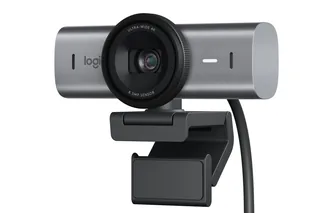
| Colours | – | Graphite, Pale Grey |
| In the box | Webcam, removable mounting clip, privacy shutter, USB-A to USB-C cable, user documentation | MX Brio, mount clip with removable adapter, USB-C to C 3.0 cable, user documentation |

More comparisons
- Logitech MX Brio vs Razer Kiyo V2 X
- Elgato Facecam 4K vs Logitech MX Brio
- Logitech MX Brio vs OBSBOT Meet 2
- Logitech MX Brio vs OBSBOT Tiny 2 Lite
- Logitech MX Brio vs Razer Kiyo Pro Ultra
- Elgato Facecam Pro vs Logitech MX Brio
- Logitech Brio 100 vs Logitech MX Brio
- Logitech Brio 300 vs Logitech MX Brio
- Logitech Brio 500 vs Logitech MX Brio
- Logitech Brio 100 vs Logitech Brio 4K
- Logitech Brio 300 vs Logitech Brio 4K
- Elgato Facecam Pro vs Logitech Brio 4K
- Logitech Brio 4K vs Logitech Brio 500
- Logitech Brio 4K vs Razer Kiyo
- Logitech Brio 4K vs Logitech C922 Pro Stream