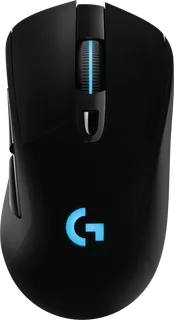
Logitech G MX518 Gaming Mouse vs Logitech G703 LIGHTSPEED
Better figure, where one is clearly better
| LogitechG MX518 Gaming Mouse | LogitechG703 LIGHTSPEED | |
|---|---|---|
| Overview | ||
| Released | February 2019 | June 2019 |
| Tracking | ||
| Shape | Ergonomic | Ergonomic |
| Hand | Right hand | Right hand |
| Sensitivity | Up to 16,000 DPI | Up to 25,600 DPI (better) |
| Sensor | HERO 16K optical | HERO 25K |
| Buttons | 8 (better) | 6 |
| Free-spinning wheel | – | No |
| Thumb wheel | – | No |
| Sensor | Logitech states 100–16,000 dpi, more than 400 inches per second tracking and no smoothing, filtering or acceleration. | HERO 25K sensor, 100–25,600 DPI; over 400 IPS; over 40 G; 1,000 Hz (1 ms) report rate wireless and wired (launched in 2019 with the HERO 16K sensor, up to 16,000 DPI) |
| Scroll wheel | Clickable stepped wheel; no free-spin mode. | – |
| Connections and battery | ||
| Connects by | Cable | USB receiver and Cable |
| Power | Cable | Rechargeable |
| Battery life (maker's claim) | – | Up to 60 hours |
| Receiver | – | LIGHTSPEED wireless USB receiver and receiver extension adapter included |
| Charging | – | Rechargeable; up to 60 hours with lighting off and 35 hours of constant motion; 1.8 m charging and data cable; POWERPLAY wireless charging compatible (sold separately) with the included POWERCORE disc |
| Works with | USB computer; Logitech G HUB or Logitech Gaming Software is optional for custom controls. | – |
| Software | Logitech G HUB or Logitech Gaming Software; settings can be kept in onboard memory. | Logitech G HUB (LIGHTSYNC RGB lighting, button programming) |
| Design | ||
| Weight | – | 95 g |
| Size | – | 124 × 68 × 43 mm (length × width × height); 95 g, plus an optional 10 g weight |
| Materials | Plastic case with the original MX518 shape. | Mechanical button tensioning system with metal springs; dual-injected rubber side grips; LIGHTSYNC RGB lighting |
| Colours | Dark grey and black. | Black |
| In the box | – | Gaming mouse, LIGHTSPEED wireless receiver, charging/data cable, receiver extension adapter, optional 10 g weight, user documentation |
| Warranty | – | 2-year limited hardware warranty |

More comparisons
- Logitech G703 LIGHTSPEED vs Logitech PRO X3 SUPERSTRIKE
- Logitech G703 LIGHTSPEED vs Logitech PRO X2 SUPERSTRIKE
- Logitech G703 LIGHTSPEED vs Logitech PRO 2 LIGHTSPEED
- Logitech G502 X PLUS vs Logitech G703 LIGHTSPEED
- Logitech G703 LIGHTSPEED vs Logitech PRO X SUPERLIGHT
- Logitech G703 LIGHTSPEED vs SteelSeries Rival 3
- Logitech G MX518 Gaming Mouse vs SteelSeries Rival 3
- Logitech G MX518 Gaming Mouse vs Logitech MX Master 3
- Logitech G703 LIGHTSPEED vs Logitech MX Master 3
- Logitech G502 HERO vs Logitech G703 LIGHTSPEED
- Logitech G502 Proteus Spectrum vs Logitech G703 LIGHTSPEED
- Logitech G502 Proteus Core vs Logitech G703 LIGHTSPEED
- Logitech G703 LIGHTSPEED vs Logitech MX Vertical
- Logitech G500s Laser Gaming Mouse vs Logitech G703 LIGHTSPEED
- Logitech Gaming Mouse G500 vs Logitech G703 LIGHTSPEED
- Logitech G5 Laser Mouse /2007 vs Logitech G703 LIGHTSPEED