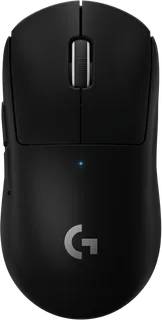
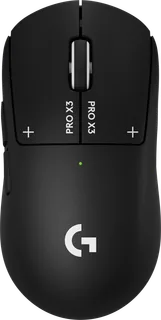
Logitech PRO X SUPERLIGHT vs Logitech PRO X3 SUPERSTRIKE
Better figure, where one is clearly better
| LogitechPRO X SUPERLIGHT | LogitechPRO X3 SUPERSTRIKE | |
|---|---|---|
| Overview | ||
| Released | December 2020 | September 2026 |
| Tracking | ||
| Shape | Standard | Standard |
| Hand | Right hand | Right hand |
| Sensitivity | Up to 25,600 DPI | Up to 48,000 DPI (better) |
| Sensor | HERO 25K | HERO 2 |
| Buttons | 5 | 5 |
| Free-spinning wheel | No | No |
| Thumb wheel | No | No |
| Sensor | 100–25,600 DPI, 400 IPS and over 40 G on the current maker specification; no smoothing, acceleration or filtering; 1,000 Hz report rate. An older indexed US page lists a conflicting 88 G figure | 100–48,000 DPI; over 930 IPS and 90 G tested on a Logitech G640 pad; no smoothing, acceleration or filtering; up to 8,000 Hz wired or wireless polling |
| Scroll wheel | Notched wheel with middle click; two fixed left-side buttons and no dedicated DPI button (PC Gamer) | Notched wheel with middle click; no free-spin or tilt; no dedicated DPI button |
| Haptic feedback | – | Haptic Inductive Trigger System on both main buttons; ten actuation levels, five rapid-trigger reset options and six haptic feedback settings; almost silent main clicks (The Shortcut) |
| Connections and battery | ||
| Connects by | USB receiver and Cable | USB receiver and Cable |
| Power | Rechargeable | Rechargeable |
| Battery life (maker's claim) | Up to 70 hours | Up to 135 hours |
| Charging port | Micro-USB | USB-C |
| Receiver | LIGHTSPEED USB-A receiver and extension adapter; receiver storage beneath the base cover (PC Gamer) | Included LIGHTSPEED USB receiver and extension adapter; NxLOGI chipset; wired USB-A to USB-C data cable |
| Charging | Micro-USB charging and wired use (Tom's Hardware); up to 70 hours of constant motion; compatible with the separately sold POWERPLAY charging mat | USB-C charging; up to 135 hours of constant motion, varying with use and settings; compatible with separately sold POWERPLAY wireless charging |
| Works with | USB port; Windows 8 or later and macOS 10.11 or later; internet access for optional software download | Windows or macOS with a USB 2.0 or later port |
| Software | Logitech G HUB for sensitivity, button assignments and macros; onboard memory | Logitech G HUB for advanced settings; onboard storage of configured settings, DPI presets, button assignments and BHOP scroll filtering (Club386) |
| Design | ||
| Weight | 63 g | 61 g (better) |
| Size | 125 × 63.5 × 40 mm (length × width × height); maker states less than 63 g, so the main weight figure is its published upper limit | 125 × 63.5 × 40 mm (length × width × height); 61 g in the UK and EMEA, compared with the maker's 59 g global version |
| Materials | No-additive PTFE feet; spring-tensioned primary buttons; optional aperture cover with an additional PTFE foot | Plastic shell; PTFE skates (Club386); optional grip tape |
| Colours | Black and White at launch; no RGB lighting | Midnight Black and Magenta Eclipse; no RGB lighting |
| In the box | Mouse, LIGHTSPEED receiver, charging/data cable, receiver extension adapter, optional grip tape, cleaning wipe, optional aperture cover with PTFE foot and user documentation | Mouse, LIGHTSPEED receiver, USB-A to USB-C charging/data cable, receiver extension adapter, POWERPLAY aperture cover, optional grip tape, cleaning cloth and documentation |
| Warranty | Two-year limited hardware warranty | Two-year limited hardware warranty |
More comparisons
- Logitech PRO X2 SUPERSTRIKE vs Logitech PRO X3 SUPERSTRIKE
- Logitech PRO X3 SUPERSTRIKE vs Razer Viper V4 Pro
- Logitech PRO X3 SUPERSTRIKE vs Razer DeathAdder V4 Pro
- Logitech PRO X SUPERLIGHT 2 vs Logitech PRO X3 SUPERSTRIKE
- Logitech PRO X3 SUPERSTRIKE vs Razer Viper V3 Pro
- Logitech PRO 2 LIGHTSPEED vs Logitech PRO X3 SUPERSTRIKE
- Logitech G502 X PLUS vs Logitech PRO X3 SUPERSTRIKE
- Logitech G703 LIGHTSPEED vs Logitech PRO X3 SUPERSTRIKE
- Logitech G502 HERO vs Logitech PRO X3 SUPERSTRIKE
- Logitech G502 Proteus Spectrum vs Logitech PRO X3 SUPERSTRIKE
- Logitech G502 Proteus Core vs Logitech PRO X3 SUPERSTRIKE
- Logitech G500s Laser Gaming Mouse vs Logitech PRO X3 SUPERSTRIKE
- Logitech Gaming Mouse G500 vs Logitech PRO X3 SUPERSTRIKE
- Logitech G5 Laser Mouse /2007 vs Logitech PRO X3 SUPERSTRIKE
- Logitech G5 Laser Mouse (2005) vs Logitech PRO X3 SUPERSTRIKE
- Logitech PRO X SUPERLIGHT vs Logitech PRO X2 SUPERSTRIKE