Razer Kiyo vs Razer Kiyo Pro
Better figure, where one is clearly better
| RazerKiyo | RazerKiyo Pro | |
|---|---|---|
| Overview | ||
| Released | October 2017 | February 2021 |
| Video | ||
| Highest resolution | 1080p (1920 × 1080) at 30 fps | 1080p (1920 × 1080) at 60 fps |
| Highest frame rate | 60 fps | 60 fps |
| Sensor | 4 MP | 2.1 MP Sony STARVIS CMOS |
| Field of view | 81.6° diagonal | 103° diagonal |
| Autofocus | Yes | Yes |
| HDR | – | Yes |
| Sensor | 4 MP still-image sensor; captures stills up to 2688 × 1520 | Type 1/2.8 Sony STARVIS CMOS sensor; 2.1 MP stills up to 1920 × 1080 |
| Resolutions and frame rates | 1080p at 30 fps; 720p at 60 fps; 480p and 360p at 30 fps | 1080p at 60, 30 or 24 fps; 720p at 60 fps; 480p and 360p at 30 fps; HDR at up to 30 fps |
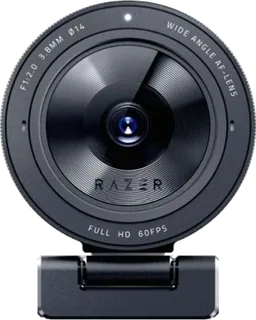
| Lens | 81.6° diagonal field of view | Selectable 103°, 90° or 80° diagonal field of view; Corning Gorilla Glass 3 lens cover |
| Focus | Autofocus | Autofocus, with manual adjustment through Razer Synapse |
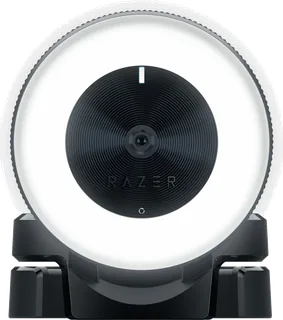
| Image features | Twelve-LED ring light with twelve brightness steps, 5600 K colour temperature and 10 lux at 1 m; YUY2, MJPEG or H.264 video encoding | Uncompressed YUY2 or NV12 over USB 3.0; H.264 over USB 2.0; HDR at 30 fps |
| Audio | ||
| Microphones | 1 | 2 |
| Microphones | Built-in omnidirectional microphone, 16-bit/48 kHz | Built-in omnidirectional stereo microphones, 16-bit/48 kHz |
| Connections and software | ||
| Connector | USB-A | USB-A |
| Connection | USB 2.0 with a fixed USB-A cable | Removable USB-C camera cable with USB-A host plug; USB 3.0 needed for full uncompressed video |
| Works with | – | Windows 8 or later; OBS and XSplit supported |
| Software | Current Razer Synapse offers image-setting profiles; OBS and XSplit also supported | Razer Synapse 3 for image settings and selectable viewing angles |
| Design | ||
| Privacy shutter | No | No |
| Mount | Foldable monitor and desk stand with tripod thread | Detachable L-shaped monitor and desk stand with tripod thread |
| Privacy | No physical lens cover | Separate removable lens cover supplied; no built-in shutter |
| Cable | 1.5 m braided USB-A cable | 1.5 m braided cable |
| Colours | – | Black |
More comparisons
- Razer Kiyo Pro vs Razer Kiyo V2 Pro
- Razer Kiyo vs Razer Kiyo V2 Pro
- Razer Kiyo Pro vs Razer Kiyo V2
- Razer Kiyo vs Razer Kiyo V2
- Razer Kiyo Pro vs Razer Kiyo V2 X
- Razer Kiyo vs Razer Kiyo V2 X
- Logitech Brio 100 vs Razer Kiyo Pro
- Razer Kiyo Pro vs Razer Kiyo Pro Ultra
- Razer Kiyo vs Razer Kiyo Pro Ultra
- Logitech Brio 300 vs Razer Kiyo Pro
- Logitech Brio 500 vs Razer Kiyo Pro
- Razer Kiyo Pro vs Razer Kiyo X
- Razer Kiyo vs Razer Kiyo X
- Logitech C920s Pro HD vs Razer Kiyo Pro
- Logitech StreamCam vs Razer Kiyo Pro
- Logitech C920s Pro HD vs Razer Kiyo