Photo 1 of 11
Dell Alienware 34 280Hz QD-OLED (AW3426DW) · Photo source
Dell · Alienware
Alienware 34 280Hz QD-OLED (AW3426DW)
Alienware's 2026 34-inch curved ultrawide gaming monitor, with a 3440 x 1440 Penta Tandem QD-OLED panel with RGB-stripe subpixels, a 280Hz refresh rate and Dolby Vision.
- Size
- 34″
- Resolution
- 3440 × 1440
- PPI
- 110
- Panel
- QD-OLED
- Refresh
- 280 Hz
- Brightness
- 300 nits
- HDR
- True Black 500
- USB-C power
- –
What reviewers say
Reviewers agree it is a strong, well-priced update, praising the brighter picture, better contrast and much clearer text from the new subpixel layout, along with Dell's accurate calibration and fast gaming performance. The common complaints are the missing USB-C, KVM switch and blur reduction; TFTCentral noted 360Hz rivals, and PC Gamer found the pixel density mediocre.
From tftcentral.co.uk, tomshardware.com and pcgamer.com
Specifications
Report a wrong or missing specDisplay
- Screen size
- 34″
- Resolution
- 3440 × 1440 (UWQHD)
- Sharpness
- 110 pixels per inch
- Panel
- QD-OLED (Penta Tandem QD-OLED)
- Refresh rate
- 280 Hz
- Response time (grey to grey)
- 0.03 ms
- Brightness (typical)
- 300 nits
- HDR peak brightness
- 1,300 nits
- HDR certification
- DisplayHDR True Black 500
- HDR formats
- HDR10, Dolby Vision
- Contrast ratio
- 1,500,000:1
- Colour range
- 99% DCI-P3
- DCI-P3 coverage
- 99%
- Colour accuracy (Delta E)
- Below 2
- Screen finish
- Glossy
- Shape
- Curved (1800R)
- Adaptive sync
- G-Sync Compatible, FreeSync Premium Pro, VESA AdaptiveSync, HDMI VRR
- Subpixel layout
- RGB stripe
- Colour depth
- 1.07 billion colours (10-bit)
- Colour accuracy
- Delta E < 2 (average) (sRGB, DCI-P3)
- Colour modes
- Standard, Creator (DCI-P3 or sRGB), FPS, MOBA/RTS, RPG, Sports, three custom game modes
- HDR detail
- 1300 cd/m² HDR peak at 3% APL; Smart HDR modes Desktop, Movie HDR, Game HDR, Custom Color HDR, DisplayHDR True Black (500 cd/m²), HDR Peak 1300 and HDR Peak 1300 Bright
- Variable refresh range
- 48–280 Hz (vertical scan range)
- Viewing angles
- 178° horizontal, 178° vertical (typical)
- Pixel pitch
- 0.2315 mm x 0.2315 mm
- Eye care
- Hardware low blue light (TÜV Rheinland Hardware Solution); flicker-free
- Burn-in protection
- Anti-burn-in algorithm, graphite heat-dispersion sheet, pixel refresh, pixel shift and panel health indicator; 3-year warranty includes burn-in
Connections
- Video inputs
- 2 × HDMI 2.1, DisplayPort 1.4
- USB-C charging
- None
- USB ports
- USB-C, USB-A
- Ethernet
- No
- Speakers
- No
- HDMI detail
- 2 x HDMI 2.1 FRL (HDCP 1.4 & 2.3), up to 3440 x 1440 at 280 Hz with HDR, VRR and DSC; up to 3840 x 2160 at 120 Hz in Console Mode
- DisplayPort detail
- 1 x DisplayPort 1.4 (HDCP 1.4 & 2.3), up to 3440 x 1440 at 280 Hz with DSC and HDR
- USB-C detail
- 1 x USB-C 5Gbps downstream port with 15 W charging (data only, no video)
- USB hub detail
- USB 5Gbps; 1 x Type-B upstream; 1 x Type-A downstream; 1 x USB-C downstream (15 W)
- Picture by picture
- Picture by Picture and Picture in Picture
Design
- Stand adjusts
- Height, tilt, swivel
- VESA mount
- Yes
- Weight with stand
- 7.91 kg
- Height adjustment
- 110 mm
- Tilt
- -5° to 21°
- Swivel
- -20° to 20°
- VESA pattern
- 100 x 100 mm
- Size with stand
- 814.15 x 232 x 445.08–555.08 mm (W x D x H)
- Size without stand
- 814.15 x 111.23 x 361.55 mm (W x D x H)
- Weight without stand
- 4.88 kg
- Controls
- Joystick
- Colours
- Black
Power and support
- Power use
- 31.0 W on mode, 0.5 W standby, 0.3 W off, 190 W maximum
- Energy class
- F
- Power supply
- 100–240 VAC, 50/60 Hz, 2.8 A (typical)
- Software
- Alienware Command Center
- Warranty
- 3 years limited hardware with Advanced Exchange Service and Premium Panel Exchange, including burn-in (UK)
- In the box
- Stand, power cable, DisplayPort 1.4 cable (1.8 m), HDMI 2.1 FRL cable (1.8 m), USB-A to USB-B 5Gbps cable (1.8 m), microfibre cloth
Pros and cons
Pros
- RGB-stripe subpixels for cleaner text than earlier QD-OLED panels, with 280Hz over DisplayPort or either of two HDMI 2.1 ports
- 1,300-nit HDR peak (3% window), VESA DisplayHDR True Black 500 and Dolby Vision
- 3-year warranty includes OLED burn-in
Cons
- 110 ppi, the usual sharpness for a 34-inch ultrawide
- No USB-C video input or laptop charging, no speakers and no headphone jack
- Stand has no pivot; Dell says the panel must not be used in portrait
Closest rivals
Model | Size | Resolution | PPI | Panel | Refresh | Brightness | HDR | USB-C power | Released |
|---|---|---|---|---|---|---|---|---|---|
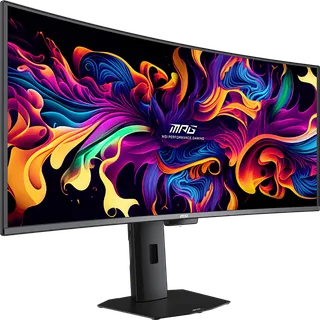
| 34″ | 3440 × 1440 | 110 | OLED | 240 Hz | 275 nits | True Black 400 | 65 W | Sept 2025 | |
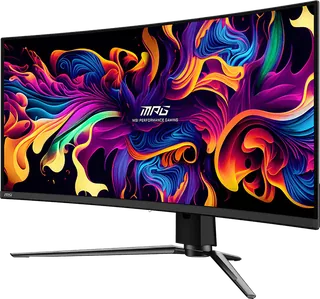
| 34.18″ | 3440 × 1440 | 109 | QD-OLED | 240 Hz | 250 nits | True Black 400 | 98 W | May 2024 | |
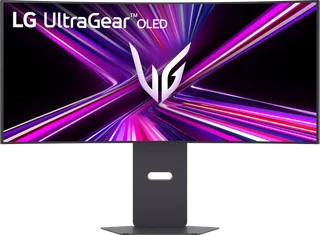
| 34″ | 3440 × 1440 | 110 | QD-OLED | 360 Hz | 300 nits | True Black 500 | 98 W | Apr 2026 |
Sources
- dell.com/en-gb/shop/monitors/apd/alienware-34-280hz-qd-oled-gaming-monitor-aw34…
- dl.dell.com/content/manual12353199-alienware-34-280hz-qd-oled-gaming-monitor-aw…
- eprel.ec.europa.eu/fiches/electronicdisplays/Fiche_2609824_EN.pdf
- tftcentral.co.uk/news/dell-announce-the-alienware-aw3426dw-a-new-34-ultrawide-p…
Photo: i.dell.com
- View right-facing AW3426DW; official Dell image: i.dell.com/is/image/DellContent/content/dam/ss2/product-images/dell-client-prod…
- View AW3426DW Alienware Monitor; official Dell image: i.dell.com/is/image/DellContent/content/dam/ss2/product-images/dell-client-prod…
- View AW3426DW Alienware Monitor; official Dell image: i.dell.com/is/image/DellContent/content/dam/ss2/product-images/dell-client-prod…
- View rear-facing Alienware AW3426DW Gaming Monitor; official Dell image: i.dell.com/is/image/DellContent/content/dam/ss2/product-images/dell-client-prod…
- View underside AW3426DW Alienware Monitor; official Dell image: i.dell.com/is/image/DellContent/content/dam/ss2/product-images/dell-client-prod…
- View left-facing AW3426DW Alienware Monitor; official Dell image: i.dell.com/is/image/DellContent/content/dam/ss2/product-images/dell-client-prod…
- View AW3426DW Alienware Monitor; official Dell image: i.dell.com/is/image/DellContent/content/dam/ss2/product-images/dell-client-prod…
- View right-profile AW3426DW Alienware Monitor; official Dell image: i.dell.com/is/image/DellContent/content/dam/ss2/product-images/dell-client-prod…
- View left-profile AW3426DW Alienware Monitor; official Dell image: i.dell.com/is/image/DellContent/content/dam/ss2/product-images/dell-client-prod…
- Alienware AW3426DW, isolated front and rear views with on-screen controls; official Dell image: i.dell.com/is/image/DellContent/content/dam/ss2/product-images/dell-client-prod…