Photo 1 of 16
Dell Alienware 39 5K OLED (AW3926QW) · Photo source
Dell · Alienware
Alienware 39 5K OLED (AW3926QW)
Alienware's 39-inch curved ultrawide gaming monitor with a 5120 x 2160 RGB-stripe Tandem WOLED panel, 165Hz at native resolution or 330Hz at 2560 x 1080, and a glossy finish.
- Size
- 38.9″
- Resolution
- 5120 × 2160
- PPI
- 143
- Panel
- OLED
- Refresh
- 165 Hz
- Brightness
- 300 nits
- HDR
- True Black 500
- USB-C power
- 90 W
What reviewers say
Reviewers agree it is among the best gaming monitors available, praising the very sharp 5K2K picture, accurate colour, good brightness and smooth, low-lag gaming. The common caveats are the high price and the powerful graphics card needed at native resolution; Tom's Hardware found gamma slightly light, and Club386 noted some uniformity issues and high power draw.
From tomshardware.com, club386.com and stuff.tv
Specifications
Report a wrong or missing specDisplay
- Screen size
- 38.9″
- Resolution
- 5120 × 2160 (5K2K)
- Sharpness
- 143 pixels per inch
- Panel
- OLED (Tandem WOLED with RGB stripe; dual mode 2560 x 1080 at 330 Hz)
- Refresh rate
- 165 Hz
- Response time (grey to grey)
- 0.03 ms
- Brightness (typical)
- 300 nits
- HDR peak brightness
- 1,300 nits
- HDR certification
- DisplayHDR True Black 500
- HDR formats
- HDR10, Dolby Vision
- Contrast ratio
- 1,750,000:1
- Colour range
- 99% DCI-P3
- DCI-P3 coverage
- 99%
- Colour accuracy (Delta E)
- Below 2
- Screen finish
- Glossy
- Shape
- Curved (1500R)
- Adaptive sync
- G-Sync Compatible, FreeSync Premium Pro, VESA AdaptiveSync, HDMI VRR
- Subpixel layout
- RGB stripe
- Colour depth
- 1.07 billion colours (10-bit)
- Colour accuracy
- Delta E < 2 (average) (sRGB, DCI-P3)
- Colour modes
- Standard, Creator (DCI-P3 or sRGB), FPS, MOBA/RTS, RPG, Sports, three custom game modes
- HDR detail
- 1300 cd/m² HDR peak at 3% APL; Smart HDR modes Desktop, Movie HDR, Game HDR, Custom Color HDR, DisplayHDR True Black (500 cd/m²), HDR Peak 1300 and HDR Peak 1300 Bright
- Viewing angles
- 178° horizontal, 178° vertical (typical)
- Pixel pitch
- 0.1776 mm x 0.1776 mm
- Eye care
- Flicker-free
- Burn-in protection
- AI-based pixel usage algorithm, pixel refresh, pixel shift and panel health indicator; 3-year warranty includes burn-in
Connections
- Video inputs
- 2 × HDMI 2.1, DisplayPort 2.1, USB-C
- USB-C charging
- Up to 90 W
- USB ports
- USB-C, 2 × USB-A
- KVM switch
- Yes
- Ethernet
- No
- Speakers
- No
- HDMI detail
- 2 x HDMI 2.1 FRL (HDCP 1.4 & 2.3), up to 5120 x 2160 at 165 Hz or 2560 x 1080 at 330 Hz with HDR and VRR; one with eARC/ARC audio pass-through
- DisplayPort detail
- 1 x DisplayPort 2.1 UHBR20 (HDCP 1.4 & 2.3), up to 5120 x 2160 at 165 Hz or 2560 x 1080 at 330 Hz
- USB-C detail
- USB-C upstream with DisplayPort 2.1 Alt Mode and Power Delivery up to 90 W; 1 x USB-C 5Gbps downstream with 15 W charging
- USB hub detail
- USB 5Gbps; Type-B and USB-C upstream (KVM for two computers); 2 x Type-A downstream (one with BC 1.2 charging); 1 x USB-C downstream (15 W)
- Picture by picture
- Picture by Picture and Picture in Picture
- Audio out
- 3.5 mm headphone jack; HDMI eARC/ARC
Design
- Stand adjusts
- Height, tilt, swivel
- VESA mount
- Yes
- Weight with stand
- 11.22 kg
- Height adjustment
- 110 mm
- Tilt
- -5° to 21°
- Swivel
- -20° to 20°
- VESA pattern
- 100 x 100 mm
- Size with stand
- 920.49 x 242.50 x 470.10–580.10 mm (W x D x H)
- Size without stand
- 920.49 x 129.65 x 408.24 mm (W x D x H)
- Weight without stand
- 7.76 kg
- Controls
- Joystick
- Colours
- Nova Black
Power and support
- Power use
- 40.3 W on mode, 0.5 W standby, 0.3 W off, 360 W maximum
- Energy class
- G
- Power supply
- 100–240 VAC, 50/60 Hz, 4 A (typical)
- Software
- Alienware Command Center
- Warranty
- 3 years limited hardware with Advanced Exchange Service and Premium Panel Exchange, including burn-in (UK)
- In the box
- Stand, power cable, USB-C to USB-C 10Gbps 100 W cable (1 m), DisplayPort cable (1.8 m), HDMI 2.1 FRL cable (1.8 m), USB-A to USB-B cable (1.8 m), microfibre cloth
Pros and cons
Pros
- 5120 x 2160 on a 38.9-inch panel gives 143 ppi, with RGB-stripe subpixels for clean text
- Dual mode runs 2560 x 1080 at 330Hz; DisplayPort 2.1 (UHBR20) and HDMI 2.1 FRL
- USB-C input with 90W charging, a KVM switch and a headphone jack
Cons
- 165Hz at native resolution, lower than 34-inch 1440p ultrawides
- Stand has no pivot; Dell says the panel must not be used in portrait
- Heavy at 11.22 kg with the stand; energy class G
Closest rivals
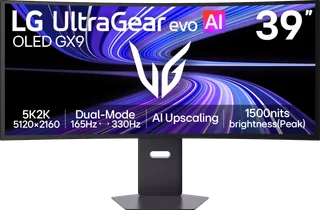
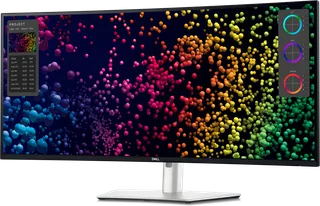
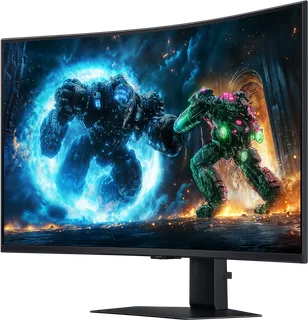
Model | Size | Resolution | PPI | Panel | Refresh | Brightness | HDR | USB-C power | Released |
|---|---|---|---|---|---|---|---|---|---|
| 38.9″ | 5120 × 2160 | 143 | OLED | 165 Hz | 335 nits | True Black 500 | 90 W | Jun 2026 | |
| 39.7″ | 5120 × 2160 | 140 | IPS | 120 Hz | 450 nits | 600 | 140 W | Jan 2024 | |
| 37″ | 3840 × 2160 | 119 | VA | 165 Hz | 350 nits | 600 | – | Sept 2025 |
Sources
- dell.com/en-gb/shop/monitors/apd/alienware-39-5k-oled-gaming-monitor-aw3926qw/a…
- dl.dell.com/content/manual37488095-alienware-39-5k-oled-gaming-monitor-aw3926qw…
- eprel.ec.europa.eu/fiches/electronicdisplays/Fiche_2726294_EN.pdf
- tftcentral.co.uk/news/dell-release-the-alienware-aw3926qw-with-a-glossy-39-ultr…
- tftcentral.co.uk/news/alienwares-aw3926qw-available-to-buy-now-in-us-uk-and-eur…
Photo: i.dell.com
- View left-facing Alienware AW3926QW Monitor; official Dell image: i.dell.com/is/image/DellContent/content/dam/ss2/product-images/dell-client-prod…
- View Alienware AW3926QW Monitor; official Dell image: i.dell.com/is/image/DellContent/content/dam/ss2/product-images/dell-client-prod…
- Alienware AW3926QW, isolated product detail; official Dell image: i.dell.com/is/image/DellContent/content/dam/ss2/product-images/dell-client-prod…
- Alienware AW3926QW, isolated product detail; official Dell image: i.dell.com/is/image/DellContent/content/dam/ss2/product-images/dell-client-prod…
- Alienware AW3926QW, official prelaunch product render, press member Alienware 39 5K OLED Gaming Monitor_2.png; official Dell image: dell.egnyte.com/dd/YpFKg4vdV7y4
- Alienware AW3926QW, official prelaunch product render, press member Alienware 39 5K OLED Gaming Monitor_3.png; official Dell image: dell.egnyte.com/dd/YpFKg4vdV7y4
- Alienware AW3926QW, official prelaunch product render, press member Alienware 39 5K OLED Gaming Monitor_4.png; official Dell image: dell.egnyte.com/dd/YpFKg4vdV7y4
- Alienware AW3926QW, official prelaunch product render, press member Alienware 39 5K OLED Gaming Monitor_5.png; official Dell image: dell.egnyte.com/dd/YpFKg4vdV7y4
- Alienware AW3926QW, official prelaunch product render, press member Alienware 39 5K OLED Gaming Monitor_6.png; official Dell image: dell.egnyte.com/dd/YpFKg4vdV7y4
- Alienware AW3926QW, official prelaunch product render, press member Alienware 39 5K OLED Gaming Monitor_7.png; official Dell image: dell.egnyte.com/dd/YpFKg4vdV7y4
- Alienware AW3926QW, official prelaunch product render, press member Alienware 39 5K OLED Gaming Monitor_8.png; official Dell image: dell.egnyte.com/dd/YpFKg4vdV7y4
- Alienware AW3926QW, official prelaunch product render, press member Alienware 39 5K OLED Gaming Monitor_9.png; official Dell image: dell.egnyte.com/dd/YpFKg4vdV7y4
- Alienware AW3926QW, official prelaunch product render, press member Alienware 39 5K OLED Gaming Monitor_10.png; official Dell image: dell.egnyte.com/dd/YpFKg4vdV7y4
- Alienware AW3926QW, official prelaunch product render, press member Alienware 39 5K OLED Gaming Monitor_11.png; official Dell image: dell.egnyte.com/dd/YpFKg4vdV7y4
- Alienware AW3926QW, official prelaunch product render, press member Alienware 39 5K OLED Gaming Monitor_12.png; official Dell image: dell.egnyte.com/dd/YpFKg4vdV7y4