Photo 1 of 19
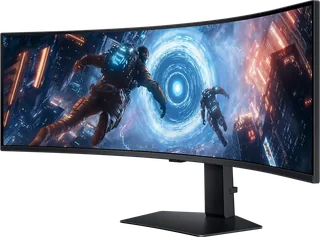
Samsung Odyssey OLED G9 G95SC · Samsung
Samsung · Odyssey
Odyssey OLED G9 G95SC
A 49-inch curved QD-OLED gaming monitor with a 5120 x 1440 resolution, 240Hz refresh rate, built-in speakers and Tizen smart services.
- Size
- 49″
- Resolution
- 5120 × 1440
- PPI
- 109
- Panel
- QD-OLED
- Refresh
- 240 Hz
- Brightness
- 250 nits
- HDR
- True Black 400
- USB-C power
- –
What reviewers say
Reviewers praise its immersive width, fast response, rich colours and deep blacks for gaming. Both find the smart interface intrusive when used as a PC monitor. TechSpot also highlights text fringing and poor default picture settings, while PCGamesN values the built-in speakers. The wide format needs suitable games and desk space.
From techspot.com and pcgamesn.com
Specifications
Report a wrong or missing specDisplay
- Screen size
- 49″
- Resolution
- 5120 × 1440 (DQHD)
- Sharpness
- 109 pixels per inch
- Panel
- QD-OLED
- Refresh rate
- 240 Hz
- Response time (grey to grey)
- 0.03 ms
- Brightness (typical)
- 250 nits
- HDR certification
- DisplayHDR True Black 400
- HDR formats
- HDR10+ Gaming
- Contrast ratio
- 1,000,000:1
- Colour range
- 99% DCI-P3 (CIE 1976)
- DCI-P3 coverage
- 99%
- Shape
- Curved (1800R)
- Adaptive sync
- FreeSync Premium Pro, G-Sync Compatible, VESA AdaptiveSync
- Subpixel layout
- Second-generation triangular RGB QD-OLED layout; some text fringing remains (TechSpot)
- Colour depth
- Up to 1 billion colours
- Colour modes
- Standard, Dynamic, Movie, Graphic, Entertain and Eco
- HDR detail
- DisplayHDR True Black 400 and HDR10+ Gaming
- Viewing angles
- 178° horizontal and vertical
- Eye care
- Eye Saver Mode and Flicker Free
- Calibration
- Factory tuning with calibration report
Connections
- Video inputs
- 2 × HDMI 2.1, DisplayPort 1.4
- USB-C charging
- None
- USB ports
- 2 × USB-C
- Speakers
- Yes
- HDMI detail
- One full-size HDMI 2.1 and one Micro HDMI 2.1 input
- DisplayPort detail
- 1 x DisplayPort 1.4
- USB-C detail
- Three USB-C ports for the USB hub only; no display connection or laptop power delivery (TechSpot)
- USB hub detail
- USB 3.0; one USB-C upstream and two USB-C downstream ports, including one for software updates; Samsung's product table counts all three connectors as USB Hub
- Picture by picture
- Multi View supports up to two videos
- Speaker detail
- 2 x 5 W stereo speakers with Adaptive Sound Pro
Design
- Stand adjusts
- Height, tilt
- VESA mount
- Yes
- Weight with stand
- 12.9 kg
- Height adjustment
- 120 mm
- Tilt
- -2° to +15°
- VESA pattern
- 100 x 100 mm
- Size with stand
- 1194.7 x 236.9 x 529.3 mm (W x D x H)
- Size without stand
- 1194.7 x 180.8 x 365 mm (W x D x H)
- Weight without stand
- 9.2 kg
- Colours
- Silver; CoreSync and Core Lighting+
Power and support
- Power use
- 75 W typical; 220 W maximum; 0.5 W standby
- Energy class
- G
- Power supply
- External adapter; AC 100–240V, 50/60Hz
- Software
- Tizen, Gaming Hub and smart TV apps; Wi-Fi 5 and Bluetooth 5.2; SmartThings Hub and Wireless DeX
- In the box
- HDMI to Micro HDMI cable, DisplayPort cable, remote control and 1.5 m power cable
Pros and cons
Pros
- 49-inch QD-OLED panel with 240Hz refresh rate
- FreeSync Premium Pro and G-Sync Compatible support
- Built-in stereo speakers, remote control and smart apps
Cons
- USB-C ports serve the hub without video or laptop charging
- Stand has height and tilt adjustment only
- OLED burn-in remains a consideration with static content
Closest rivals
Model | Size | Resolution | PPI | Panel | Refresh | Brightness | HDR | USB-C power | Released |
|---|---|---|---|---|---|---|---|---|---|
| 49″ | 5120 × 1440 | 109 | VA | 144 Hz | 350 nits | 600 | – | Apr 2025 | |
| 44.5″ | 5120 × 2160 | 125 | OLED | 165 Hz | 275 nits | True Black 400 | 90 W | Apr 2025 | |
| 51.5″ | 6144 × 2560 | 129 | IPS | 120 Hz | 400 nits | – | 140 W | Jan 2026 |

Sources
- samsung.com/uk/business/monitors/gaming/odyssey-oled-g9-g95sc-49-inch-240hz-cur…
- news.samsung.com/uk/samsung-opens-new-era-of-oled-gaming-with-global-launch-of-…
- org.downloadcenter.samsung.com/downloadfile/ContentsFile.aspx
- techspot.com/review/2795-samsung-odyssey-oled-g9
Photo: Samsung
- Odyssey OLED G9 G95SC silver back1; native physical display/hardware lighting preserved: Samsung
- Odyssey OLED G9 G95SC silver l-perspective; native physical display/hardware lighting preserved: Samsung
- Odyssey OLED G9 G95SC silver r-dynamic; native physical display/hardware lighting preserved: Samsung
- Odyssey OLED G9 G95SC silver l-dynamic; native physical display/hardware lighting preserved: Samsung
- Odyssey OLED G9 G95SC silver back-dynamic-left; native physical display/hardware lighting preserved: Samsung
- Odyssey OLED G9 G95SC silver top1; native physical display/hardware lighting preserved: Samsung
- Odyssey OLED G9 G95SC silver front-over; native physical display/hardware lighting preserved: Samsung
- Odyssey OLED G9 G95SC silver r-side; native physical display/hardware lighting preserved: Samsung
- Odyssey OLED G9 G95SC silver r-side-down; native physical display/hardware lighting preserved: Samsung
- Odyssey OLED G9 G95SC silver tilt-backward; native physical display/hardware lighting preserved: Samsung
- Odyssey OLED G9 G95SC silver tilt-forward; native physical display/hardware lighting preserved: Samsung
- Odyssey OLED G9 G95SC silver back-dynamic-right; native physical display/hardware lighting preserved: Samsung
- Odyssey OLED G9 G95SC silver back2; native physical display/hardware lighting preserved: Samsung
- Odyssey OLED G9 G95SC silver back-dynamic-high; native physical display/hardware lighting preserved: Samsung
- Odyssey OLED G9 G95SC silver detail-bezel physical bezel close-up; native physical display/hardware lighting preserved: Samsung
- Odyssey OLED G9 G95SC silver detail; native physical display/hardware lighting preserved: Samsung
- Original front photo with maker model label displayed inside physical screen; exact existing sharper pair preserved: images.samsung.com/is/image/samsung/p6pim/ae/ls49cg954smxue/gallery/ae-odyssey-…
- Odyssey OLED G9 G95SC silver rear connectivity cover and CoreLighting — photographed physical hardware close-up: Samsung