Photo 1 of 11
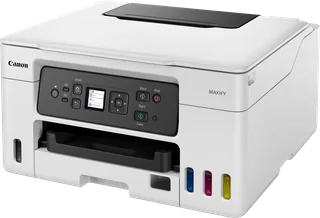
Canon MAXIFY GX4050 · Photo source
Canon · MAXIFY
MAXIFY GX4050
Canon's four-colour pigment ink tank all-in-one for home offices and small businesses, with fax, a 35-sheet document feeder, a 250-sheet cassette plus 100-sheet rear tray, and Ethernet.
- Type
- Ink tank
- Colour
- Yes
- Does
- Print, Scan, Copy, Fax
- Pages a minute
- 18
- Both sides
- Yes
What reviewers say
Reviewers agree it is a well-equipped office all-in-one that prints, scans, copies and faxes well, with generous ink in the box and very low running costs. The common criticisms are the high purchase price and modest speed; Trusted Reviews and Digital Camera World also found it weak at photo printing.
From trustedreviews.com, digitalcameraworld.com and techradar.com
Specifications
Report a wrong or missing specPrinting
- Type
- Ink tank
- Colour
- Yes
- Speed, black
- 18 pages a minute
- Speed, colour
- 13 pages a minute
- Resolution
- 600 × 1200 dpi
- Prints both sides
- Yes
- Printing detail
- One print head; refillable ink tanks; automatic 2-sided printing on A4 and Letter plain paper from the rear tray and cassette
- First page out
- 8 seconds black, 9 seconds colour (from ready)
- Ink or toner
- Four-colour pigment ink; GI-56 bottles (black, cyan, magenta, yellow); MC-G03 maintenance cartridge, user replaceable
- Page yield
- Bottles print 6,000 pages black and 14,000 colour (9,000 and 21,000 in economy mode)
- Duty cycle
- Up to 33,000 pages
Scanning and copying
- Does
- Print, Scan, Copy and Fax
- Document feeder
- Yes
- Scanner
- CIS colour scanner with flatbed (A4/Letter) and 35-sheet document feeder (A4/Letter/Legal); 1,200 × 2,400 dpi optical; 7.1 ipm colour from the feeder
- Copying
- First colour copy in about 17 seconds; 11.1 ipm colour from the glass; 15.2 ipm black and 7.4 ipm colour from the feeder; 2-sided copying; ID copy; 25–400% zoom
- Fax
- Super G3 colour fax at up to 33.6 kbps; about 3 seconds a page black; 250-page memory; 100 speed dials, 99 groups
Paper
- Largest paper
- A4
- Paper tray
- 250 sheets
- Paper sizes
- Rear tray A4, A5, A6, B5, Letter, Legal, 10 × 15 cm, 13 × 18 cm, 18 × 25 cm, 20 × 25 cm, 127 × 127 mm, envelopes (DL, COM10) and custom sizes 89–216 mm wide by 127–1,200 mm long; cassette A4, A5, B5, Letter; document feeder A5, A4, Letter, Legal
- Paper types
- Plain paper 64–105 g/m²; Canon photo papers up to about 265 g/m² from the rear tray; paperboard 0.1–0.7 mm from the rear flat tray
Connections
- Connects by
- Wi-Fi, Ethernet, Wi-Fi Direct and USB
- Connection detail
- Hi-Speed USB; Ethernet (10/100); Wi-Fi 5 (802.11a/b/g/n/ac) on 2.4 and 5 GHz; Wireless Direct; WPA3
- Printing from phones
- Apple AirPrint, Mopria, Canon Print Service plug-in (Android), PIXMA Cloud Link; Amazon Alexa and Google Assistant
- App
- Canon PRINT Inkjet/SELPHY, Easy-PhotoPrint Editor
- Control panel
- 6.7 cm colour touchscreen
Design
- Weight
- 9.5 kg
- Power use
- About 20 W copying, 1.4 W standby (all ports connected), 0.1 W off; TEC 0.15 kWh
- Noise
- About 49 dB(A)
- Size
- 399 × 417 × 251 mm (W × D × H) with trays closed
Pros and cons
Pros
- Ink bottles print 6,000 black and 14,000 colour pages (9,000 and 21,000 in economy mode)
- Pigment ink in all four colours
- 250-sheet cassette, 100-sheet rear tray and a flat rear tray for board up to 0.7 mm
Cons
- Print resolution tops out at 600 × 1200 dpi
- Colour prints at 13 pages a minute
Closest rivals
Model | Type | Colour | Does | Pages a minute | Both sides | Released |
|---|---|---|---|---|---|---|
| Ink tank | Yes | Print, Scan, Copy | 18 | Yes | Nov 2022 | |
| Ink tank | Yes | Print, Scan, Copy | 16 | Yes | Apr 2021 | |
| Ink tank | Yes | Print, Scan, Copy, Fax | 15.5 | Yes | Oct 2021 |
Sources
- canon.co.uk/printers/maxify-gx4050/specifications
- web.archive.org/web/20260615075817/https://www.canon.co.uk/printers/maxify-gx40…
- canon-europe.com/press-centre/press-releases/2022/11/canon-expands-maxify-range…
Photo: cdn.media.amplience.net
- MAXIFY GX4050, front view with ink bottles and paper loaded: Canon
- MAXIFY GX4050, front view with paper in the feeder and output tray: Canon
- MAXIFY GX4050, front view with feeder closed: Canon
- MAXIFY GX4050, front view printing a document: Canon
- MAXIFY GX4050, front three-quarter view printing a document: Canon
- MAXIFY GX4050, control panel detail: Canon
- MAXIFY GX4050, front three-quarter view with a hand retrieving a print: Canon
- MAXIFY GX4050, front detail with paper tray open: Canon
- MAXIFY GX4050, feeder detail with a hand positioning printed sheets: Canon
- MAXIFY GX4050, view from above printing a document with a hand holding a phone: Canon