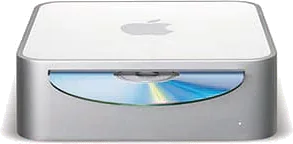
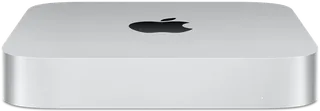
Apple Mac mini (2005) vs Apple Mac mini (M2 or M2 Pro)
Better figure, where one is clearly better
| AppleMac mini (2005) | AppleMac mini (M2 or M2 Pro) | |
|---|---|---|
| Overview | ||
| Released | January 2005 | January 2023 |
| Performance | ||
| Processor | PowerPC G4 7447A (1.25 GHz) or PowerPC G4 7447A (1.42 GHz) | Apple M2 or Apple M2 Pro |
| CPU cores | 1 | 8, 10 or 12 |
| Graphics | ATI Radeon 9200 | 10-core GPU, 16-core GPU or 19-core GPU |
| Memory | 256 MB, 512 MB or 1 GB | 8 GB, 16 GB, 24 GB or 32 GB (better) |
| Storage | 40 GB to 80 GB | 256 GB to 8 TB (better) |
| CPU | 1.25 or 1.42 GHz PowerPC G4 with Velocity Engine, 512 KB L2 cache and 167 MHz system bus; EveryMac identifies the single-core 7447A processor, cross-checked with the Freescale fact sheet hosted by NXP | M2: 8-core CPU with 4 performance cores and 4 efficiency cores; M2 Pro: 10-core CPU with 6 performance cores and 4 efficiency cores, or 12-core CPU |
| GPU | ATI Radeon 9200 with 32 MB dedicated DDR SDRAM and AGP 4X support | M2: 10-core GPU; M2 Pro: 16-core or 19-core GPU |
| AI engine | – | 16-core Neural Engine |
| Memory bandwidth | – | M2: 100GB/s; M2 Pro: 200GB/s |
| Memory type | One slot for 333 MHz PC2700 DDR SDRAM, up to 1 GB. Original January models had 256 MB standard; Apple raised standard memory to 512 MB on 26 July 2005. Configurations include original and later memory options. | – |
| Storage type | 1.25 GHz model has a 40 GB Ultra ATA hard drive, configurable to 80 GB; 1.42 GHz models have 80 GB. Combo drive reads DVDs and burns CDs; optional 4x SuperDrive writes DVDs. July 2005 added a standard SuperDrive model at 1.42 GHz. | SSD |
| Media engine | – | Hardware-accelerated H.264, HEVC, ProRes and ProRes RAW; video decode engine; video encode engine; ProRes encode and decode engine |
| Display | ||
| Screen | None built in | None built in |
| Connections | ||
| Ports | 2 × USB-A, Ethernet, headphone jack | 2 × Thunderbolt 4, 2 × USB-A, HDMI, Ethernet, headphone jack |
| Ethernet | 0.1 Gb/s | 1 Gb/s (better) |
| External displays | Up to 1 | Up to 2 (better) |
| Wi-Fi | Optional 802.11g | Wi-Fi 6E |
| Bluetooth | Optional internal Bluetooth | 5.3 |
| Back ports | Two USB 2.0 ports, FireWire 400 (8 W), DVI, 10/100BASE-T Ethernet and headphone/audio line output. No audio input. Modem standard on original models; July 2005 lower model retains it, higher models make it optional. | 2 × Thunderbolt 4 (M2) or 4 × Thunderbolt 4 (M2 Pro), with DisplayPort, Thunderbolt 4 and USB 4 (up to 40Gb/s) and USB 3.1 Gen 2 (up to 10Gb/s); 2 × USB-A (up to 5Gb/s); HDMI with multichannel audio output; Gigabit Ethernet, configurable to 10Gb Ethernet; 3.5 mm headphone jack with advanced support for high-impedance headphones |
| External displays | DVI digital output up to 1920 × 1200; included VGA adapter supports up to 1920 × 1080. Optional Apple DVI to Video Adapter provides S-video/composite output. | M2: up to two (one at up to 6K 60Hz over Thunderbolt, plus one at up to 5K 60Hz over Thunderbolt or 4K 60Hz over HDMI); M2 Pro: up to three (two at up to 6K 60Hz over Thunderbolt plus one at up to 4K 60Hz over HDMI), or one at up to 8K 60Hz or 4K 240Hz over HDMI |
| Speakers | Built-in speaker | Built-in speaker |
| Microphones | – | None built in |
| Keyboard and mouse | Display, keyboard and mouse sold separately; DVI-to-VGA adapter included | – |
| Design and power | ||
| Type | Compact | Compact |
| Weight | 1.32 kg | 1.18 kg (better) |
| Width × depth × height | 165.1 × 165.1 × 50.8 mm | 197 × 197 × 35.8 mm |
| Operating system | macOS | macOS |
| Size and weight detail | Maker weight 1.32 kg; Apple notes variation by configuration and manufacturing process | – |
| Power supply | Maximum continuous power 85 W; 100–240 V AC, 50–60 Hz single phase | Built-in; 100–240V AC; 150W (M2) or 185W (M2 Pro) maximum continuous power |
| Power use | – | M2 with 24GB and 2TB: 7W idle, 50W CPU maximum; M2 Pro with 32GB and 8TB: 7W idle, 100W CPU maximum |
| Noise | – | 5 dBA sound pressure at idle (operator position) |
| Colours | – | Silver |
| In the box | Mac mini, power adapter, install DVDs and documentation. January models ship with Mac OS X Panther and iLife '05; July configurations use Tiger. AirPort Extreme and Bluetooth optional at launch, standard on the July 1.42 GHz models. | Mac mini, power lead |
More comparisons
- Apple Mac mini (2005) vs Apple Mac mini (M6 or M5 Pro)
- Apple Mac mini (M2 or M2 Pro) vs Apple Mac mini (M6 or M5 Pro)
- Apple Mac mini (2005) vs Apple Mac mini (M4 or M4 Pro)
- Apple Mac mini (M2 or M2 Pro) vs Apple Mac mini (M4 or M4 Pro)
- Apple iMac 24″ (M4) vs Apple Mac mini (M2 or M2 Pro)
- Apple iMac 24″ (M3) vs Apple Mac mini (M2 or M2 Pro)
- Apple Mac mini (M1) vs Apple Mac mini (M2 or M2 Pro)
- Apple Mac mini (2018) vs Apple Mac mini (M2 or M2 Pro)
- Apple Mac mini (Late 2014) vs Apple Mac mini (M2 or M2 Pro)
- Apple Mac mini (Late 2012) vs Apple Mac mini (M2 or M2 Pro)
- Apple Mac mini (M2 or M2 Pro) vs Apple Mac mini (Mid 2011)
- Apple Mac mini (M2 or M2 Pro) vs Apple Mac mini (Mid 2010)
- Apple Mac mini (Late 2009) vs Apple Mac mini (M2 or M2 Pro)
- Apple Mac mini (Early 2009) vs Apple Mac mini (M2 or M2 Pro)
- Apple Mac mini (M2 or M2 Pro) vs Apple Mac mini (Mid 2007)
- Apple Mac mini (Late 2006) vs Apple Mac mini (M2 or M2 Pro)