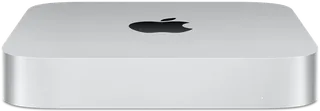
Apple Mac mini (M1) vs Apple Mac mini (M2 or M2 Pro)
Better figure, where one is clearly better
| AppleMac mini (M1) | AppleMac mini (M2 or M2 Pro) | |
|---|---|---|
| Overview | ||
| Released | November 2020 | January 2023 |
| Performance | ||
| Processor | Apple M1 | Apple M2 or Apple M2 Pro |
| CPU cores | 8 | 8, 10 or 12 |
| Graphics | 8-core GPU | 10-core GPU, 16-core GPU or 19-core GPU |
| Memory | 8 GB or 16 GB | 8 GB, 16 GB, 24 GB or 32 GB (better) |
| Storage | 256 GB to 2 TB | 256 GB to 8 TB (better) |
| CPU | 8-core CPU with 4 performance cores and 4 efficiency cores | M2: 8-core CPU with 4 performance cores and 4 efficiency cores; M2 Pro: 10-core CPU with 6 performance cores and 4 efficiency cores, or 12-core CPU |
| GPU | 8-core GPU | M2: 10-core GPU; M2 Pro: 16-core or 19-core GPU |
| AI engine | 16-core Neural Engine | 16-core Neural Engine |
| Memory bandwidth | – | M2: 100GB/s; M2 Pro: 200GB/s |
| Storage type | SSD, configurable to 512 GB, 1 TB or 2 TB | SSD |
| Media engine | – | Hardware-accelerated H.264, HEVC, ProRes and ProRes RAW; video decode engine; video encode engine; ProRes encode and decode engine |
| Display | ||
| Screen | None built in | None built in |
| Connections | ||
| Ports | 2 × Thunderbolt 3, 2 × USB-A, HDMI, Ethernet, headphone jack | 2 × Thunderbolt 4, 2 × USB-A, HDMI, Ethernet, headphone jack |
| Ethernet | 1 Gb/s | 1 Gb/s |
| External displays | Up to 2 | Up to 2 |
| Wi-Fi | Wi-Fi 6 | Wi-Fi 6E |
| Bluetooth | 5.0 | 5.3 |
| Back ports | Two Thunderbolt / USB 4 ports with DisplayPort, Thunderbolt 3 and USB 4 up to 40 Gb/s, and USB 3.1 Gen 2 up to 10 Gb/s; two USB-A ports up to 5 Gb/s; HDMI; Gigabit Ethernet, configurable to 10 Gb Ethernet; 3.5 mm headphone jack | 2 × Thunderbolt 4 (M2) or 4 × Thunderbolt 4 (M2 Pro), with DisplayPort, Thunderbolt 4 and USB 4 (up to 40Gb/s) and USB 3.1 Gen 2 (up to 10Gb/s); 2 × USB-A (up to 5Gb/s); HDMI with multichannel audio output; Gigabit Ethernet, configurable to 10Gb Ethernet; 3.5 mm headphone jack with advanced support for high-impedance headphones |
| External displays | One display up to 6K 60 Hz over Thunderbolt and one up to 4K 60 Hz over HDMI, simultaneously | M2: up to two (one at up to 6K 60Hz over Thunderbolt, plus one at up to 5K 60Hz over Thunderbolt or 4K 60Hz over HDMI); M2 Pro: up to three (two at up to 6K 60Hz over Thunderbolt plus one at up to 4K 60Hz over HDMI), or one at up to 8K 60Hz or 4K 240Hz over HDMI |
| Speakers | Built-in speaker; HDMI multichannel audio output | Built-in speaker |
| Microphones | – | None built in |
| Design and power | ||
| Type | Compact | Compact |
| Weight | 1.2 kg | 1.18 kg (better) |
| Width × depth × height | 197 × 197 × 36 mm | 197 × 197 × 35.8 mm |
| Operating system | macOS | macOS |
| Power supply | Built-in; 100–240 V AC, 50–60 Hz; maximum continuous power 150 W | Built-in; 100–240V AC; 150W (M2) or 185W (M2 Pro) maximum continuous power |
| Power use | – | M2 with 24GB and 2TB: 7W idle, 50W CPU maximum; M2 Pro with 32GB and 8TB: 7W idle, 100W CPU maximum |
| Noise | 5 dBA sound pressure at idle and during Apple's wireless web test (operator position) | 5 dBA sound pressure at idle (operator position) |
| Materials | 100% recycled aluminium enclosure | – |
| Colours | Silver | Silver |
| In the box | Mac mini, power cord | Mac mini, power lead |

More comparisons
- Apple Mac mini (M1) vs Apple Mac mini (M6 or M5 Pro)
- Apple Mac mini (M2 or M2 Pro) vs Apple Mac mini (M6 or M5 Pro)
- Apple Mac mini (M2 or M2 Pro) vs Apple Mac mini (M4 or M4 Pro)
- Apple Mac mini (M1) vs Apple Mac mini (M4 or M4 Pro)
- Apple iMac 24″ (M4) vs Apple Mac mini (M2 or M2 Pro)
- Apple iMac 24″ (M3) vs Apple Mac mini (M2 or M2 Pro)
- Apple Mac mini (2018) vs Apple Mac mini (M2 or M2 Pro)
- Apple Mac mini (Late 2014) vs Apple Mac mini (M2 or M2 Pro)
- Apple Mac mini (Late 2012) vs Apple Mac mini (M2 or M2 Pro)
- Apple Mac mini (M2 or M2 Pro) vs Apple Mac mini (Mid 2011)
- Apple Mac mini (M2 or M2 Pro) vs Apple Mac mini (Mid 2010)
- Apple Mac mini (Late 2009) vs Apple Mac mini (M2 or M2 Pro)
- Apple Mac mini (Early 2009) vs Apple Mac mini (M2 or M2 Pro)
- Apple Mac mini (M2 or M2 Pro) vs Apple Mac mini (Mid 2007)
- Apple Mac mini (Late 2006) vs Apple Mac mini (M2 or M2 Pro)
- Apple Mac mini (Early 2006) vs Apple Mac mini (M2 or M2 Pro)