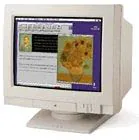
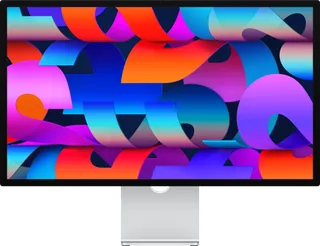
Apple Multiple Scan 1705 Display vs Apple Studio Display (2026)
Better figure, where one is clearly better
| AppleMultiple Scan 1705 Display | AppleStudio Display (2026) | |
|---|---|---|
| Overview | ||
| Released | 1995 | March 2026 |
| Display | ||
| Screen size | 15.8″ | 27″ |
| Resolution | – | 5120 × 2880 (5K) |
| Sharpness | – | 218 pixels per inch |
| Panel | CRT (Nominal 17-inch flat-square shadow-mask colour CRT, 15.8-inch viewable diagonal, P22 phosphor and 0.28 mm dot pitch. Analogue CRT has no fixed native pixel matrix.) | IPS (5K Retina) |
| Refresh rate | – | 60 Hz |
| Brightness (typical) | – | 600 nits |
| Colour range | – | Wide colour (P3) |
| Screen finish | – | Glossy |
| Shape | – | Flat |
| Colour depth | – | 1 billion colours |
| Colour modes | – | Apple Display (P3-600 nits), HDTV Video (BT.709–BT.1886), NTSC Video (BT.601 SMPTE-C), PAL and SECAM Video (BT.601 EBU), Digital Cinema (P3-DCI), Digital Cinema (P3-D65), Design and Print (P3-D50), Photography (P3-D65), Internet and Web (sRGB) |
| Pixel pitch | Maker 0.28 mm dot pitch | – |
| Supported signal modes | Current maker support and owner's guide list 640 × 480 at 60, 67 or 75 Hz, 800 × 600 at 60 or 75 Hz, 832 × 624 at 75 Hz and 1024 × 768 at 75 Hz. Apple Facts additionally publishes 1280 × 1024 at 60 Hz for Windows; the owner's guide confirms a 640 × 480 to 1280 × 1024 range. Service Source's separate 1280 × 1024 at 84 Hz entry conflicts with its scan range and other maker tables, so it is not treated as a confirmed operating mode. These are supported analogue signals, not a native matrix or native refresh rate. | – |
| Screen coating | Owner's guide specifies antistatic and antiglare surface treatment | – |
| Connections | ||
| Video inputs | VGA | Thunderbolt 5 |
| USB-C charging | None | Up to 96 W (better) |
| USB ports | – | Thunderbolt 5, 2 × USB-C |
| Ethernet | – | No |
| Speakers | No | Yes |
| Webcam | – | 12MP Center Stage with Desk View |
| USB-C detail | – | Upstream Thunderbolt 5 (up to 120 Gb/s) with 96 W host charging |
| Daisy chaining | – | Downstream Thunderbolt 5 port daisy-chains more displays; up to four Studio Display models with a MacBook Pro with M5 Max |
| USB hub detail | – | 1 × Thunderbolt 5 downstream (up to 120 Gb/s), 2 × USB-C (up to 10 Gb/s) for peripherals, storage and networking |
| Speaker detail | – | Six speakers with force-cancelling woofers; wide stereo; Spatial Audio with Dolby Atmos |
| Webcam detail | – | Three-mic array with directional beamforming; camera features and firmware updates need a Mac |
| Other connections | Physical monitor video socket is VGA DE-15; original detachable Apple cable connects it to the Macintosh DA-15 computer connector. Owner's guide describes a supplied PC adapter at the computer end, or a DDC display cable without that adapter; exact-model cable inspection by Siber-Sonic corroborates the DE-15 monitor connection. The cable's Macintosh end is not a second monitor input. | – |
| Design | ||
| Stand adjusts | Tilt, swivel (better) | Tilt |
| VESA mount | – | Yes |
| Weight with stand | 20.5 kg | 6.3 kg |
| Height adjustment | – | 105 mm with the optional tilt- and height-adjustable stand |
| Tilt | Built-in tilt-and-swivel stand; numerical range unpublished | −5° to +25° |
| Pivot | – | Landscape only on either stand; portrait with the VESA mount adapter |
| VESA pattern | – | 100 × 100 mm (VESA mount adapter option) |
| Swivel | Built-in tilt-and-swivel stand; numerical range unpublished | – |
| Size with stand | Owner's guide publishes 437 × 420 × 477 mm ±5 mm (height × width × depth), paired with 17.2 × 16.5 × 18.8 inches ±0.2 inch. Service Source instead gives 437 × 420 × 479 mm with differing inch values; Apple Facts gives 43.7 × 41.9 × 47.8 cm. Maker differences retained rather than converted or combined. | Tilt stand 62.3 × 16.8 × 47.8 cm; tilt- and height-adjustable stand 62.3 × 20.7 × 47.9–58.3 cm and 7.6 kg (W × D × H) |
| Size without stand | – | 62.3 × 3.1 × 36.2 cm with VESA mount adapter (W × D × H) |
| Weight without stand | – | 5.4 kg with VESA mount adapter |
| Weight detail | Owner's guide and Service Source publish 20.5 kg; owner's guide also gives approximately 45.2 lb, matching current maker support. Apple Facts instead pairs 45.2 lb with 20.3 kg; maker difference retained. | – |
| Controls | Front power, brightness, contrast, degauss, select, up and down controls; additional controls adjust horizontal/vertical shift and size, curvature and side alignment. Pressing up and down together recalls factory settings. | – |
| Power and support | ||
| Power use | Current maker support gives 165 W maximum; owner's guide and Service Source instead publish 100 W maximum. Energy Star and VESA DPMS power-saving support confirmed; exact idle wattage unpublished. | – |
| Power supply | Current maker support lists regional 90–132 or 198–264 V AC, 47–63 Hz; owner's guide gives 100–240 V, 50/60 Hz and Service Source describes a universal 90–264 V supply. Mains frequency is not display refresh. | 100–240 V AC, 50–60 Hz, single phase |
| Software | Owner's guide supplies display software and ColorSync support for Macintosh; compatible video hardware and suitable cable or adapter determine usable modes. Current Apple support dates introduction 23 September 1995 and the exact model is present in October 1995 Apple Facts; actual first on-sale day/month remains unverified, so year 1995 retained. No direct successor inferred. Low-resolution photograph is the exact Apple Computer image credited by EveryMac. | Needs an Apple silicon Mac with macOS Tahoe 26.3.1 or later, or an iPad with iPadOS 26.3.1 or later |
| Certifications | – | ENERGY STAR |
| Warranty | – | 1-year limited warranty and 90 days of complimentary technical support from Apple |
| In the box | – | Studio Display, Thunderbolt 5 Pro cable (1 m) |
More comparisons
- Apple Studio Display (2026) vs Samsung ViewFinity S8 (S80HF)
- Apple AppleVision 750 Display vs Apple Studio Display (2026)
- Apple AppleColor High-Resolution RGB Monitor vs Apple Studio Display (2026)
- Apple Macintosh Portrait Display vs Apple Studio Display (2026)
- Apple Apple Color Plus 14-inch Display vs Apple Studio Display (2026)
- Apple AppleVision 850 vs Apple Studio Display (2026)
- Apple AppleVision 850AV vs Apple Studio Display (2026)
- Apple Multiple Scan 15 Display vs Apple Studio Display (2026)
- Apple Multiple Scan 17 Display vs Apple Studio Display (2026)
- Apple Multiple Scan 20 Display vs Apple Studio Display (2026)
- Apple Multiple Scan 720 Display vs Apple Studio Display (2026)
- Apple AppleVision 1710AV vs Apple Studio Display (2026)
- Apple Studio Display (17-inch LCD, 2001) vs Apple Studio Display (2026)
- Apple Studio Display (17-inch CRT, 1999) vs Apple Studio Display (2026)
- Apple Studio Display (2026) vs Apple Studio Display (21-inch CRT, 1999)
- Apple Studio Display (17-inch CRT ADC, 2000) vs Apple Studio Display (2026)