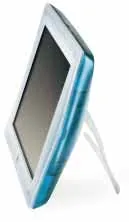
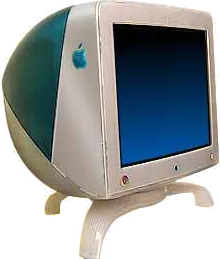
Apple Studio Display (15-inch LCD, 1999) vs Apple Studio Display (21-inch CRT, 1999)
Better figure, where one is clearly better
| AppleStudio Display (15-inch LCD, 1999) | AppleStudio Display (21-inch CRT, 1999) | |
|---|---|---|
| Overview | ||
| Released | January 1999 | January 1999 |
| Display | ||
| Screen size | 15.1″ | 19.8″ |
| Resolution | 1024 × 768 | – |
| Sharpness | 85 pixels per inch | – |
| Panel | LCD (TFT active-matrix LCD; Apple does not identify the panel subtype) | CRT (Nominal 21-inch Sony Trinitron aperture-grille CRT with a 19.8-inch viewable image; 0.25–0.27 mm variable aperture grille pitch. Vertically flat screen, without a fixed native pixel matrix.) |
| Pixel pitch | – | Variable 0.25–0.27 mm aperture grille pitch |
| Supported signal modes | – | Supports 1600 × 1200, 1280 × 1024 and 1024 × 768 at up to 85 Hz; 1152 × 870 and 832 × 624 at up to 75 Hz. Horizontal scan 31–107 kHz; vertical scan 48–120 Hz. These are selectable CRT signal modes, not a fixed native matrix or one native refresh rate. |
| Screen coating | – | Antireflective and antistatic screen coating |
| Calibration | – | Internal measurement system adjusts the electron beam to maintain factory calibration; stores ColorSync profiles. Includes an ambient-light tool, variable 4100–9300 K white-point selection and gamma-curve adjustment. |
| Refresh rate | 75 Hz | – |
| Brightness (typical) | 200 nits | – |
| Contrast ratio | 200:1 | – |
| Shape | Flat | – |
| Colour depth | Up to 16 million colours | – |
| Viewing angles | Typical 120° horizontal and 90° vertical | – |
| Connections | ||
| Video inputs | VGA | VGA |
| USB-C charging | None | None |
| USB ports | – | 4 × USB-A |
| Other connections | VGA computer video input, separate RCA composite and 4-pin DIN S-video inputs, left/right RCA audio inputs and mini-stereo audio output. Two downstream ADB sockets on desktop stand; no USB hub. Unlike the original Rev. A, computer video uses a VGA connector rather than Apple's 15-pin D-sub connector. | 15-pin mini D-Sub VGA video connector with supplied VGA-to-Macintosh adaptor |
| Design | ||
| Stand adjusts | Height, tilt, swivel | – |
| Weight with stand | 5.5 kg | 35 kg |
| Height adjustment | 110 mm with desktop stand; inherited from Rev. A in Apple's revision-specific technical note | – |
| Tilt | −10° to +45° with desktop stand; +15° fixed picture-frame stand | – |
| Swivel | ±45° with desktop stand | – |
| Size with stand | Desktop stand, 39.9 × 38.1–49.0 × 24.9 cm (width × height × depth). Picture-frame stand, 15.7 × 11.6 × 6.9 inches, weighing 3.5 kg. Apple technical note's metric picture-frame height is inconsistent with its inch figure, so the published imperial dimensions are retained. | 51.1 × 56.6 × 55 cm (width × height × depth), January 1999 Blueberry datasheet; later Graphite enclosure dimensions differ |
| Controls | Power, brightness, graphics/video source toggle, reset and on-screen display navigation | Power, brightness and contrast; compatible Mac software supplies geometry, convergence, degauss, white-point and calibration adjustments |
| Colours | Translucent Blueberry and ice-white enclosure; distinct from original Azul and later Graphite/DVI revisions | Translucent Blueberry and white enclosure |
| Power and support | ||
| Power use | Display operating consumption below 35 W | Maximum 180 W operating; less than 30 W standby; less than 5 W when the computer is in energy-saving mode |
| Power supply | External power adaptor; mains frequency does not describe display refresh rate | 90–264 V AC, single-phase 47–63 Hz; mains frequency is separate from display refresh |
| Software | Apple support dates introduction to 5 January 1999 and the revision-specific technical note identifies the 1999 San Francisco Macworld launch. January precision is retained because a separate exact first-sale day has not been established. Native 1024 × 768 accepts 60, 70 or 75 Hz. Apple Technical Information Library article 30460 explicitly distinguishes this 200 cd/m², 5.5 kg revision from original Rev. A (180 cd/m² and 4.5 kg). PowerPC Mac with Mac OS 8.0 or later, or Windows 95/NT. | Maker announced the new Studio Display family on 5 January 1999; January retail precision is used because a distinct first-sale day is unconfirmed. January M6204LL/A datasheet requires the new Power Macintosh G3 with built-in USB and Mac OS 8.0 or later. Brightness and contrast ratio are unpublished and omitted; no pixel density is assigned to this CRT. |
| In the box | Display, desktop stand, picture-frame stand, VGA-to-Macintosh adaptor, power cord and adaptor, Apple Displays software and user manual | Display, Apple Displays software, VGA-to-Macintosh adaptor, power cord, ambient-light tool and setup guide |
More comparisons
- Apple Studio Display (2026) vs Apple Studio Display (21-inch CRT, 1999)
- Apple Studio Display (21-inch CRT, 1999) vs Apple Studio Display XDR
- Apple Studio Display (15-inch LCD, 1999) vs Apple Studio Display (2026)
- Apple Studio Display (15-inch LCD, 1999) vs Apple Studio Display XDR
- Apple Studio Display (15-inch LCD, 1999) vs Apple Studio Display (2022)
- Apple Studio Display (2022) vs Apple Studio Display (21-inch CRT, 1999)
- Apple Studio Display (15-inch LCD, 1999) vs Apple Studio Display (17-inch LCD, 2001)
- Apple Studio Display (17-inch LCD, 2001) vs Apple Studio Display (21-inch CRT, 1999)
- Apple Studio Display (21-inch CRT, 1999) vs Sony GDM-F520
- Apple Studio Display (15-inch LCD, 1999) vs Apple Studio Display (15-inch ADC, 2000)
- Apple Studio Display (15-inch ADC, 2000) vs Apple Studio Display (21-inch CRT, 1999)
- Apple Studio Display (15-inch LCD, 1999) vs Apple Studio Display (17-inch CRT ADC, 2000)
- Apple Studio Display (17-inch CRT ADC, 2000) vs Apple Studio Display (21-inch CRT, 1999)
- Apple Studio Display (21-inch CRT, 1999) vs Sony GDM-FW900
- Apple Studio Display (15-inch LCD, 1999) vs Apple Studio Display (15-inch DVI, 1999)
- Apple Studio Display (15-inch DVI, 1999) vs Apple Studio Display (21-inch CRT, 1999)