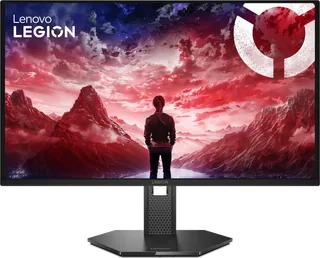
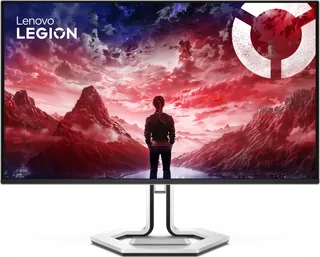
Lenovo Legion 27Q-10 vs Lenovo Legion Pro 32UD-10
Better figure, where one is clearly better
| LenovoLegion 27Q-10 | LenovoLegion Pro 32UD-10 | |
|---|---|---|
| Overview | ||
| Released | November 2025 | November 2025 |
| Display | ||
| Screen size | 26.5″ | 31.5″ |
| Resolution | 2560 × 1440 (QHD) | 3840 × 2160 (4K) (better) |
| Sharpness | 111 pixels per inch | 140 pixels per inch (better) |
| Panel | QD-OLED | QD-OLED |
| Refresh rate | 240 Hz | 240 Hz |
| Response time (grey to grey) | 0.03 ms | 0.03 ms |
| Brightness (typical) | 200 nits | 250 nits (better) |
| HDR peak brightness | 400 nits | 1,000 nits (better) |
| HDR certification | – | DisplayHDR True Black 400 |
| HDR formats | HDR10 | Dolby Vision |
| Contrast ratio | 1,500,000:1 | 1,500,000:1 |
| Colour range | 99% DCI-P3, 99% sRGB | 99% DCI-P3, 99% sRGB |
| DCI-P3 coverage | 99% | 99% |
| Colour accuracy (Delta E) | Below 2 | – |
| Shape | Flat | Flat |
| Adaptive sync | FreeSync Premium, VESA AdaptiveSync | FreeSync Premium Pro, VESA AdaptiveSync |
| Colour depth | True 10-bit, 1.07 billion colours | True 10-bit, 1.07 billion colours |
| sRGB coverage | 99% (CIE 1931) | 99% (CIE 1931) |
| Colour accuracy | Average Delta E < 2 at sRGB | Average Delta E < 2 at sRGB |
| Colour modes | – | Warm, Neutral, Cool, sRGB, DCI-P3, User; game modes Standard, FPS1, FPS2, Racing, RTS, Game1, Game2 |
| HDR detail | – | Peak 1,000 nits at 3% APL, 400 nits at 10% APL, 250 nits at 100% APL; HDR modes Auto, HDR Photo, HDR Movie, HDR Game and TB 400 |
| Motion blur reduction | VESA ClearMR 13000 | VESA ClearMR 13000 |
| Viewing angles | 178° / 178° | 178° / 178° |
| Pixel pitch | 0.2292 × 0.2292 mm (110 ppi) | 0.1814 × 0.1814 mm |
| Eye care | TÜV Rheinland Low Blue Light (hardware), Eyesafe Display 2.0, Natural Low Blue Light | TÜV Rheinland Low Blue Light (hardware), Eyesafe Display 2.0, Natural Low Blue Light |
| Burn-in protection | – | OLED Care screen-protection reminders after 6, 12 and 18 hours of use, enforced at 24 hours; image sticking isn't covered by the warranty |
| Calibration | Factory calibrated | Factory calibrated; calibration report in the box |
| Connections | ||
| Video inputs | 2 × HDMI 2.1, DisplayPort 1.4 | 2 × HDMI 2.1, DisplayPort 1.4, USB-C |
| USB-C charging | None | Up to 15 W (better) |
| USB ports | – | 3 × USB-A |
| Ethernet | – | No |
| Speakers | No | No |
| HDMI detail | 2 × HDMI 2.1 (TMDS) | 2 × HDMI 2.1 FRL (supports FRL 6 Gbps), up to 3840 × 2160 at 240 Hz |
| DisplayPort detail | DisplayPort 1.4 (HBR3) | DisplayPort 1.4 (HBR3), 3840 × 2160 at 240 Hz with 32.4 Gbps bandwidth; DSC can be switched on in the menu |
| USB-C detail | – | USB-C upstream (USB 10 Gbps) with DisplayPort 1.4 Alt Mode (HBR3) and up to 15 W PD 3.1 |
| USB hub detail | – | 3 × USB-A (USB 5 Gbps) downstream |
| Picture by picture | – | PIP and PBP |
| Audio out | 3.5 mm audio out | – |
| Design | ||
| Stand adjusts | Height, tilt, swivel, pivot (better) | Height, tilt, swivel |
| VESA mount | Yes | Yes |
| Weight with stand | 6 kg | 8.5 kg |
| Height adjustment | – | 135 mm |
| Tilt | – | −5° to 22° |
| Swivel | – | −45° to 45° |
| VESA pattern | 100 × 100 mm | 100 × 100 mm |
| Size with stand | 609.3 × 214.0 × 389.2–524.2 mm (W × D × H) | 718.9 × 245.4 × 463.1–598.1 mm (W × D × H) |
| Size without stand | 609.3 × 40.5 × 354.3 mm (W × D × H) | 718.9 × 51.2 × 415.3 mm (W × D × H) |
| Weight without stand | 3.8 kg | 6.1 kg |
| Controls | – | Up, down, left, right and menu/OK controls, plus game-mode, input and power buttons |
| Colours | Black | Raven Black |
| Power and support | ||
| Power use | 41 W typical, 67 W max | 130 W typical, 175 W max, < 0.5 W sleep, < 0.3 W off |
| Energy class | E | F |
| Power supply | Built-in | Built-in, 100–240 V AC, 50–60 Hz |
| Software | Lenovo Artery (Lenovo Accessories and Display Manager), Legion Space | Lenovo Artery (Lenovo Accessories and Display Manager), Legion Space |
| Certifications | Windows 10 and 11; RoHS | Windows 10 and 11; RoHS; volatile organic compound certification |
| Warranty | 3-year limited | 3-year limited |
| In the box | Monitor with stand, DisplayPort cable (1.8 m), power cable (1.8 m), 4 screws, quick setup guide, warranty booklet | Monitor with stand, power cable (1.8 m), DP 1.4 cable (1.8 m), HDMI 2.1 cable (1.8 m), USB-C Gen 2 HBR3 cable (1.5 m), screwdriver and 8 screws, factory calibration report, quick setup guide, warranty booklet |
More comparisons
- AOC AGON PRO AG326UZD2 vs Lenovo Legion Pro 32UD-10
- Dell Alienware 27 240Hz QD-OLED (AW2726DM) vs Lenovo Legion 27Q-10
- BenQ MOBIUZ EX321UZ vs Lenovo Legion Pro 32UD-10
- Dell Alienware 32 4K QD-OLED Gaming Monitor (AW3225QF) vs Lenovo Legion Pro 32UD-10
- Lenovo Legion 27Q-10 vs MSI MAG 274QP QD-OLED X24
- Lenovo Legion 27Q-10 vs LG UltraGear OLED 27GX700A
- ASUS ROG Swift OLED PG32UCDM vs Lenovo Legion Pro 32UD-10
- Dell Alienware 27 280Hz QD-OLED (AW2725D) vs Lenovo Legion 27Q-10