Logitech Anywhere Mouse MX vs Logitech VX Nano Cordless Laser Mouse for Notebooks
Better figure, where one is clearly better
| LogitechAnywhere Mouse MX | LogitechVX Nano Cordless Laser Mouse for Notebooks | |
|---|---|---|
| Overview | ||
| Released | August 2009 | August 2007 |
| Tracking | ||
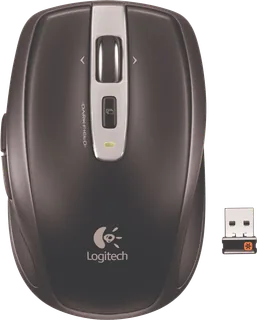
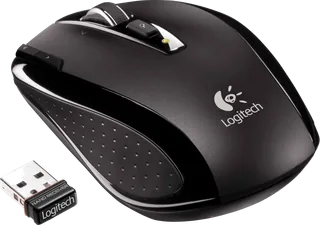
| Shape | Compact | Compact |
| Hand | Right hand | Either hand |
| Sensitivity | – | Up to 800 DPI |
| Sensor | Darkfield laser | Invisible laser |
| Buttons | 7 (better) | 5 |
| Free-spinning wheel | Yes | Yes |
| Thumb wheel | No | – |
| Sensor | Darkfield laser tracking on many surfaces, including clear glass at least 4 mm thick. Logitech's launch sources do not give a DPI figure. | Invisible laser at 800 DPI; Logitech says it does not track on mirrors or clear glass. |
| Scroll wheel | Press the wheel to switch between stepped and free-spinning vertical scrolling; tilt it for horizontal scrolling. | MicroGear Precision Scroll Wheel; press to switch between click-to-click and free-spinning modes, and tilt for horizontal scrolling. |
| Thumb wheel | No separate thumb wheel; the two left-side buttons navigate back and forward. | – |
| Connections and battery | ||
| Connects by | USB receiver | USB receiver |
| Power | AA battery | AAA battery |
| Battery life (maker's claim) | Up to 7 months | Up to 6 months |
| Receiver | Logitech Unifying nano receiver over 2.4 GHz, with a compartment inside the battery cover for storage; one receiver can pair with up to six compatible devices. | Stowable 2.4 GHz nano USB receiver protrudes 8 mm from a notebook; Logitech lists QUAD for the 2007 version and eQUAD for 2008 and later versions. |
| Charging | Two replaceable AA alkaline batteries, rated by Logitech support for up to seven months; the mouse can also run on one AA battery. | – |
| Works with | At launch, Windows XP, Vista or 7 and Mac OS X 10.4 or later with a USB port. | Windows XP or Vista and Mac OS X 10.3.9 or later with USB, per Logitech support and its Japan launch specification; an older English datasheet prints 10.2.9 for Mac. |
| Software | Logitech SetPoint on Windows and Logitech Control Center on Mac supported button configuration at launch. | SetPoint on Windows or downloadable Logitech Control Center on Mac for button customisation. |
| Design | ||
| Weight | 125 g | 95 g (better) |
| Size | 90.5 × 63 × 34.5 mm (length × width × height); 125 g with two AA batteries according to Logitech's 2009 fact sheet. | 97.9 × 61.2 × 33.9 mm (length × width × height) per Logitech support. The 2007 Japan launch lists 95 g with batteries and 73 g without; current support lists a conflicting 96.39 g without batteries. |
| In the box | Mouse, Unifying receiver, travel pouch, two AA batteries and documentation. | Mouse, nano receiver, desktop USB extension stand, two AAA batteries, SetPoint CD, protective pouch and user guide. |
| Warranty | Three-year limited warranty in Logitech's launch fact sheet. | Three-year limited hardware warranty. |
More comparisons
- Logitech MX Master 4 vs Logitech VX Nano Cordless Laser Mouse for Notebooks
- Logitech Anywhere Mouse MX vs Logitech MX Master 4
- Logitech Anywhere Mouse MX vs Logitech MX Ergo S
- Logitech MX Anywhere 3S vs Logitech VX Nano Cordless Laser Mouse for Notebooks
- Logitech Anywhere Mouse MX vs Logitech MX Anywhere 3S
- Logitech Anywhere Mouse MX vs Logitech MX Master 3S
- Logitech Anywhere Mouse MX vs Logitech MX Anywhere 3
- Logitech Anywhere Mouse MX vs Logitech MX Master 3
- Logitech Anywhere Mouse MX vs Logitech MX Vertical
- Logitech Anywhere Mouse MX vs Logitech MX Anywhere 2S
- Logitech Anywhere Mouse MX vs Logitech MX Anywhere 2
- Logitech Anywhere Mouse MX vs Logitech Gaming Mouse G500
- Logitech Anywhere Mouse MX vs Logitech Performance Mouse MX
- Apple Wireless Mighty Mouse vs Logitech VX Nano Cordless Laser Mouse for Notebooks
- Logitech G5 Laser Mouse /2007 vs Logitech VX Nano Cordless Laser Mouse for Notebooks