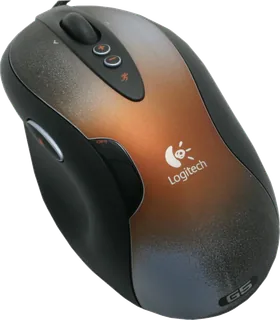
Logitech G5 Laser Mouse (2005) vs Logitech MX518 Gaming-Grade Optical Mouse
Better figure, where one is clearly better
| LogitechG5 Laser Mouse (2005) | LogitechMX518 Gaming-Grade Optical Mouse | |
|---|---|---|
| Overview | ||
| Released | 2005 | April 2005 |
| Tracking | ||
| Shape | Ergonomic | Ergonomic |
| Hand | Right hand | Right hand |
| Sensitivity | Up to 2,000 DPI (better) | Up to 1,600 DPI |
| Sensor | Laser | Optical |
| Buttons | 6 | 8 (better) |
| Sensor | The Logitech guide lists 400, 800 and 2,000 DPI presets, with up to five software-set levels between 400 and 2,000 DPI. Logitech's later G5 /2007 sheet identifies this original as the 500-reports-per-second predecessor. | Logitech lists 400, 800 and 1,600 dpi settings out of the box, with up to five levels configurable in SetPoint. |
| Scroll wheel | Stepped scroll wheel tilts left and right for horizontal scrolling and can be reassigned in SetPoint. | Clickable scroll wheel; no free-spin mode. |
| Connections and battery | ||
| Connects by | Cable | Cable |
| Power | Cable | Cable |
| Works with | – | USB connection; SetPoint is needed to customise button assignments. |
| Software | Logitech SetPoint allows button assignments and separate horizontal and vertical sensitivity settings. | Logitech SetPoint. |
| Design | ||
| Colours | – | Dark grey with a patterned top shell. |
| Weight | 112 g | – |
| Size | ComputerBase lists approximately 130 × 65 × 40 mm and a 112 g unweighted mouse; these are review figures, not maker specifications. | – |
| Materials | Removable weight cartridge takes 1.7 g or 4.5 g weights; up to 36 g of weights may be inserted, according to the original Logitech guide and period reviews. | – |
| In the box | Mouse, weight cartridge, weights and case, SetPoint software CD and documentation, as listed by ComputerBase. | – |
More comparisons
- Logitech G5 Laser Mouse (2005) vs Logitech PRO X3 SUPERSTRIKE
- Logitech G5 Laser Mouse (2005) vs Logitech PRO X2 SUPERSTRIKE
- Logitech G5 Laser Mouse (2005) vs Logitech PRO 2 LIGHTSPEED
- Logitech G5 Laser Mouse (2005) vs Logitech G502 X PLUS
- Logitech G5 Laser Mouse (2005) vs Logitech PRO X SUPERLIGHT
- Logitech G5 Laser Mouse (2005) vs Logitech G703 LIGHTSPEED
- Logitech G MX518 Gaming Mouse vs Logitech MX518 Gaming-Grade Optical Mouse
- Logitech G5 Laser Mouse (2005) vs Logitech G502 HERO
- Logitech G5 Laser Mouse (2005) vs Logitech G502 Proteus Spectrum
- Logitech G5 Laser Mouse (2005) vs Logitech G5 Laser Mouse /2007
- Logitech G5 Laser Mouse /2007 vs Logitech MX518 Gaming-Grade Optical Mouse
- Logitech MX Revolution vs Logitech MX518 Gaming-Grade Optical Mouse
- Logitech G5 Laser Mouse (2005) vs Logitech MX Revolution
- Apple Mighty Mouse (wired) vs Logitech G5 Laser Mouse (2005)
- Logitech MX1000 Laser Cordless Mouse vs Logitech MX518 Gaming-Grade Optical Mouse
- Logitech MX518 Gaming-Grade Optical Mouse vs Logitech MX700 Cordless Optical Mouse