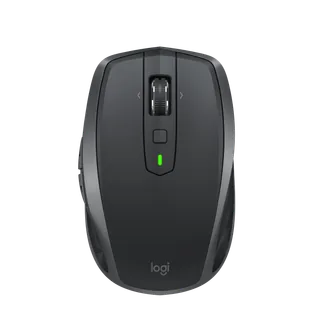
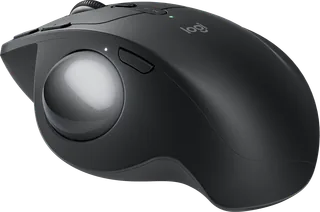
Logitech MX Anywhere 2S vs Logitech MX Ergo S
Better figure, where one is clearly better
| LogitechMX Anywhere 2S | LogitechMX Ergo S | |
|---|---|---|
| Overview | ||
| Released | June 2017 | September 2024 |
| Tracking | ||
| Shape | Compact | Trackball |
| Hand | Right hand | Right hand |
| Sensitivity | Up to 4,000 DPI (better) | Up to 2,048 DPI |
| Sensor | Darkfield high precision | Logitech Advanced Optical Tracking |
| Buttons | 7 | 8 (better) |
| Free-spinning wheel | Yes | No |
| Thumb wheel | No | No |
| Quiet clicks | – | Yes |
| Sensor | Darkfield laser tracking at up to 4,000 DPI; glass tracking requires glass at least 4 mm thick. | 512–2,048 DPI; precision mode button for slower, finer tracking; report rate 125 Hz over Logi Bolt and 88–133 Hz over Bluetooth |
| Scroll wheel | Precision wheel switches mechanically between stepped and free-spinning vertical scrolling and tilts left or right for horizontal scrolling. | Precision scroll wheel with left and right tilt and middle click |
| Thumb wheel | No separate thumb wheel; the main wheel tilts for horizontal scrolling. | – |
| Gestures | The button below the wheel can be customised as a gesture button in Logitech Options. | – |
| Connections and battery | ||
| Connects by | Bluetooth and USB receiver | Bluetooth and USB receiver |
| Devices it switches between | 3 (better) | 2 |
| Power | Rechargeable | Rechargeable |
| Battery life (maker's claim) | Up to 70 days | Up to 120 days |
| Charging port | Micro-USB | USB-C |
| Receiver | Logitech Unifying USB receiver supplied with the original model; Bluetooth Low Energy is also supported. A later Bluetooth Edition omitted the receiver. | Logi Bolt USB-A receiver included |
| Charging | Micro-USB charging of a 500 mAh lithium-polymer battery; Logitech rates it for up to 70 days per charge. | USB-C; a 1-minute charge gives 24 hours of use; full charge in 2 hours; 500 mAh battery; cable not included |
| Works with | At launch, Unifying supported Windows 7 or later and Mac OS X 10.8 or later; Bluetooth Low Energy supported Windows 8 or later and Mac OS X 10.10 or later. | Bluetooth 5.2 with Windows 10, 11 or later, macOS 12 or later, iPadOS 15 or later, Android 12 or later, Linux and ChromeOS; Logi Bolt with Windows 10, 11 or later, macOS 12 or later, Linux and ChromeOS |
| Software | Logitech Options supports button remapping and Flow control between up to three computers. | Logi Options+ on Windows and macOS (Smart Actions, Logitech Flow) |
| Design | ||
| Weight | 106 g (better) | 259 g |
| Size | 100.3 × 61.6 × 34.4 mm (length × width × height); 106 g. | 132.5 × 99.8 × 51.4 mm (length × width × height); 259 g with the metal base plate, 164 g without |
| Materials | – | Plastics with 20% certified post-consumer recycled content; soft rubber grip; metal base plate with hinge; left and right buttons rated for 3 million clicks |
| Colours | Graphite, Midnight Teal and Light Grey. | Graphite |
| In the box | Original model includes mouse, Unifying receiver, Micro-USB charging cable and documentation. | Trackball, Logi Bolt USB receiver, documentation (no cable) |
| Warranty | – | 2-year limited hardware warranty |
More comparisons
- Logitech MX Anywhere 2S vs Logitech MX Master 4
- Logitech MX Ergo S vs Logitech MX Master 4
- Logitech MX Ergo S vs Razer Basilisk V3 Pro 35K
- Logitech MX Ergo S vs Logitech PRO 2 LIGHTSPEED
- Logitech MX Anywhere 3S vs Logitech MX Ergo S
- Logitech MX Ergo S vs Logitech MX Master 3S
- Logitech MX Anywhere 3 vs Logitech MX Ergo S
- Logitech MX Ergo S vs Logitech MX Master 3
- Logitech MX Ergo S vs Logitech MX Vertical
- Logitech MX Ergo S vs Logitech MX Master 2S
- Logitech MX Anywhere 2 vs Logitech MX Ergo S
- Logitech MX Ergo S vs Logitech MX Master
- Logitech Anywhere Mouse MX vs Logitech MX Ergo S
- Logitech MX Ergo S vs Logitech Performance Mouse MX
- Logitech MX Ergo S vs Logitech MX Revolution
- Logitech MX Ergo S vs Logitech MX1000 Laser Cordless Mouse