Logitech MX Anywhere 3S vs Logitech MX Master 4
Better figure, where one is clearly better
| LogitechMX Anywhere 3S | LogitechMX Master 4 | |
|---|---|---|
| Overview | ||
| Released | June 2023 | October 2025 |
| Tracking | ||
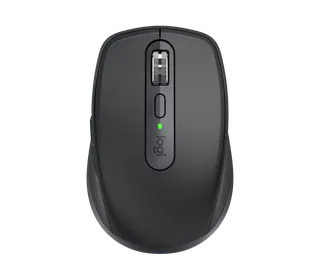
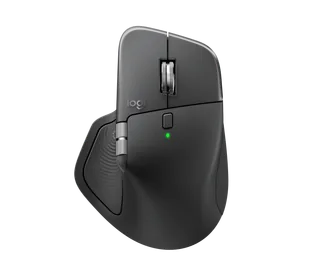
| Shape | Compact | Ergonomic |
| Hand | Right hand | Right hand |
| Sensitivity | Up to 8,000 DPI | Up to 8,000 DPI |
| Sensor | Darkfield high precision | Darkfield high precision |
| Buttons | 6 | 8 (better) |
| Free-spinning wheel | Yes | Yes |
| Thumb wheel | No | Yes |
| Quiet clicks | Yes | Yes |
| Sensor | 200–8,000 DPI, adjustable in 50 DPI steps (1,000 DPI by default); tracks on almost any surface, including glass; Bluetooth report rate 88–133 Hz | 200–8,000 DPI, adjustable in 50 DPI steps (1,000 DPI by default); tracks on almost any surface, including glass; 125 Hz report rate over Logi Bolt and Bluetooth |
| Scroll wheel | MagSpeed electromagnetic wheel with SmartShift, which switches between ratchet and free-spin as you scroll faster; up to 1,000 lines a second; horizontal scrolling by holding a side button while turning the wheel | MagSpeed electromagnetic wheel with SmartShift, which switches between ratchet and free-spin as you scroll faster; up to 1,000 lines a second; adjustable ratchet force |
| Thumb wheel | – | Aluminium thumb wheel for horizontal scrolling; app-specific functions such as zoom or brush size in Logi Options+ |
| Gestures | The top button, below the wheel, can be set as a gesture button in Logi Options+ | Gesture button next to the back and forward buttons (hold it and move the mouse; up to five actions); Actions Ring shortcut overlay opened from the Haptic Sense Panel |
| Haptic feedback | – | Haptic Sense Panel under the thumb; feedback for the Actions Ring, Smart Actions, gestures, moving between screens and app plugins including Adobe Photoshop, Adobe Lightroom Desktop and Zoom; four intensity levels; also works with Windows 11's built-in haptics (Windows 11 update from March 2026 or later) |
| Connections and battery | ||
| Connects by | Bluetooth and USB receiver | Bluetooth and USB receiver |
| Devices it switches between | 3 | 3 |
| Power | Rechargeable | Rechargeable |
| Battery life (maker's claim) | Up to 70 days | Up to 70 days |
| Charging port | USB-C | USB-C |
| Receiver | Works with a Logi Bolt USB receiver, not included (MX Anywhere 3S for Business comes with one); not compatible with other Logitech receivers | Logi Bolt USB-C receiver in the box (USB-A Bolt receivers also work); the Mac version works with Logi Bolt but comes without a receiver |
| Charging | USB-C; a 1-minute charge gives 3 hours of use; full charge in 2 hours; 500 mAh lithium-polymer battery | USB-C; a 1-minute charge gives 3 hours of use; 650 mAh battery; charging cable not included |
| Works with | Bluetooth Low Energy with Windows 10, 11 or later, macOS 10.15 or later, iPadOS 14 or later, Android 8.0 or later, Linux and ChromeOS; the Mac version lists macOS 10.15 or later and iPadOS 14 or later | Bluetooth Low Energy 5.1 with Windows 11 or later, macOS 13 or later, iPadOS 15 or later, Android 12 or later, Linux and ChromeOS; Logi Bolt with Windows 10, 11 or later, macOS 13 or later, Linux and ChromeOS; the Mac version lists macOS 13 or later and iPadOS 15 or later |
| Software | Logi Options+ on Windows and macOS (Smart Actions, Logitech Flow); basic functions work without software on other systems | Logi Options+ on Windows and macOS (Actions Ring, Smart Actions, haptics, Logitech Flow); basic support in Logi Tune; basic functions work without software on other systems |
| Design | ||
| Weight | 99 g (better) | 150 g |
| Size | 100.5 × 65 × 34.4 mm (length × width × height) | 128.15 × 88.35 × 50.8 mm (length × width × height) |
| Materials | Certified post-consumer recycled plastic, 78% in Graphite and 61% in Pale Grey and Rose; silicone side grips; left and right buttons rated for 10 million clicks | Plastics with 54% (Graphite, Space Black) or 48% (Pale Grey, White Silver) certified post-consumer recycled content; thumb wheel of low-carbon aluminium; battery with 100% recycled cobalt |
| Colours | Graphite, Pale Grey, Rose; Mac version in Space Grey, Pale Grey | Graphite, Pale Grey; Mac version in Space Black, White Silver |
| In the box | Mouse, USB-C charging cable (USB-A to USB-C, or USB-C to USB-C with the Mac version), documentation | Mouse, Logi Bolt USB-C receiver, documentation; the Mac version has the mouse and documentation only |
| Warranty | 2-year limited hardware warranty | 2-year limited hardware warranty |
More comparisons
- Logitech MX Master 3S vs Logitech MX Master 4
- Logitech MX Master vs Logitech MX Master 4
- Logitech MX Master 2S vs Logitech MX Master 4
- Logitech MX Master 3 vs Logitech MX Master 4
- Logitech MX Master 4 vs Logitech MX Revolution
- Logitech MX Master 4 vs Logitech Performance Mouse MX
- Logitech MX Master 4 vs Logitech MX1000 Laser Cordless Mouse
- Logitech MX Master 4 vs Logitech MX700 Cordless Optical Mouse
- Logitech MX Master 4 vs Logitech VX Nano Cordless Laser Mouse for Notebooks
- Logitech MX Anywhere 2S vs Logitech MX Master 4
- Apple Wireless Mighty Mouse vs Logitech MX Master 4
- Apple Magic Mouse 2 (Lightning) vs Logitech MX Master 4
- Logitech MX Master 4 vs ZOWIE EC2-DW
- Logitech MX Master 4 vs Razer Basilisk V3 Pro 35K
- Logitech MX Master 4 vs Razer DeathAdder V4 Pro
- Logitech MX Ergo S vs Logitech MX Master 4