Logitech MX Revolution vs Logitech MX700 Cordless Optical Mouse
Better figure, where one is clearly better
| LogitechMX Revolution | LogitechMX700 Cordless Optical Mouse | |
|---|---|---|
| Overview | ||
| Released | August 2006 | 2002 |
| Tracking | ||
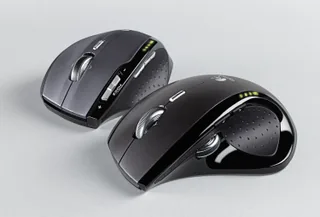
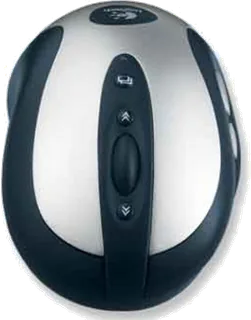
| Shape | Ergonomic | Ergonomic |
| Hand | Right hand | Right hand |
| Sensitivity | Up to 800 DPI | Up to 800 DPI |
| Sensor | Laser | MX Optical Engine |
| Buttons | 7 | 8 (better) |
| Free-spinning wheel | Yes | – |
| Thumb wheel | Yes | – |
| Sensor | Laser sensor; 800 DPI reported by Bare Feats | MX Optical Engine captures 4.7 megapixels per second; ComputerBase lists 800 DPI for the MX700. |
| Scroll wheel | MicroGear Precision Scroll Wheel with SmartShift motorised automatic switching between stepped and free-spinning modes; can also be switched manually | Stepped vertical wheel with separate Cruise Control buttons for sustained scrolling; no wheel tilt or free-spin mode. |
| Thumb wheel | Second wheel can zoom in documents and images or switch between applications | – |
| Connections and battery | ||
| Connects by | USB receiver | USB receiver |
| Power | Rechargeable | Rechargeable |
| Battery life (maker's claim) | – | Up to 10 days |
| Receiver | USB micro receiver using 2.4 GHz radio, reported by Bare Feats | Fast RF cordless receiver integrated into the charging stand, with a maker-stated range of 6 feet (about 1.8 m); the stand connects by USB or PS/2. |
| Charging | Rechargeable lithium-ion battery; mouse charges in an AC-powered desktop station, with battery-level LEDs | Two replaceable NiMH AA cells charge in the supplied stand. Logitech support gives about ten days per full charge for standard office use, or a day of use after 15 minutes of charging; heavy use can shorten this. |
| Works with | Windows and Mac computers with a USB port; platform-specific Logitech software needed for custom functions | Logitech's 2002 datasheet lists Windows 98, NT 4.0, 2000, Me and XP, plus Mac OS 8.6 or later. |
| Software | Logitech SetPoint on Windows or Logitech Control Center on Mac for button actions and scroll settings | MouseWare software supplied on CD for button assignment. |
| Design | ||
| Weight | 148 g (better) | 171 g |
| Size | – | 130.3 × 72.2 × 43.5 mm (length × width × height); Logitech lists 171 g with batteries and 115 g without. |
| In the box | Mouse, recharging station, AC power cord, USB micro receiver, SetPoint CD and guide | Mouse, receiver and charging stand, two NiMH AA cells, USB-to-PS/2 adaptor, mains supply, MouseWare CD and user guide. |
| Warranty | – | Five-year manufacturer warranty in Logitech's 2002 datasheet. |
More comparisons
- Logitech MX Master 4 vs Logitech MX Revolution
- Logitech MX Master 4 vs Logitech MX700 Cordless Optical Mouse
- Logitech MX Ergo S vs Logitech MX Revolution
- Logitech MX Ergo S vs Logitech MX700 Cordless Optical Mouse
- Logitech MX Anywhere 3S vs Logitech MX Revolution
- Logitech MX Anywhere 3S vs Logitech MX700 Cordless Optical Mouse
- Logitech MX Master 3S vs Logitech MX Revolution
- Logitech MX Master 3S vs Logitech MX700 Cordless Optical Mouse
- Logitech MX Anywhere 3 vs Logitech MX Revolution
- Logitech MX Anywhere 3 vs Logitech MX700 Cordless Optical Mouse
- Logitech MX Master 3 vs Logitech MX Revolution
- Logitech MX Master 3 vs Logitech MX700 Cordless Optical Mouse
- Logitech MX Revolution vs Logitech MX Vertical
- Logitech MX Vertical vs Logitech MX700 Cordless Optical Mouse
- Logitech MX Anywhere 2S vs Logitech MX Revolution
- Logitech MX Anywhere 2S vs Logitech MX700 Cordless Optical Mouse