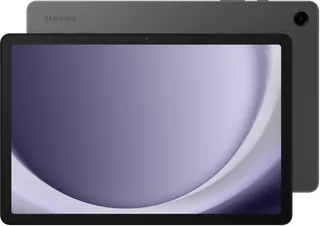
Samsung Galaxy Tab A11 vs Samsung Galaxy Tab A9+
Better figure, where one is clearly better
| SamsungGalaxy Tab A11 | SamsungGalaxy Tab A9+ | |
|---|---|---|
| Overview | ||
| Released | September 2025 | October 2023 |
| Display | ||
| Screen size | 8.7″ | 11″ |
| Resolution | 1340 × 800 | 1920 × 1200 (better) |
| Sharpness | 179 pixels per inch | 206 pixels per inch (better) |
| Panel | LCD | LCD |
| Refresh rate | 90 Hz | 90 Hz |
| Display type | TFT LCD, WXGA+, 16 million colours; 8.7 inches as a full rectangle or 8.6 inches accounting for rounded corners | TFT LCD, WUXGA, 16 million colours; 11 inches as a full rectangle or 10.9 inches accounting for rounded corners |
| Display features | Up to 90 Hz refresh rate | Up to 90 Hz refresh rate |
| Performance | ||
| Chip | MediaTek Helio G99 | Qualcomm SM6375 |
| Memory | 4 GB – 8 GB | 4 GB – 8 GB |
| Storage | 64 GB, 128 GB | 64 GB, 128 GB, 256 GB (better) |
| CPU | Octa-core CPU at 2.2 and 2.0 GHz; Samsung Japan's launch specification identifies MediaTek Helio G99 | Qualcomm SM6375 with Adreno 619 in Samsung’s US business specification sheet; octa-core CPU at 2.2 and 1.8 GHz in UK specifications. TechAdvisor and Notebookcheck identify it as Snapdragon 695; Original configurations: 4 GB RAM/64 GB storage and 8 GB RAM/128 GB storage. Samsung’s current Irish SM-X210R range lists a memory refresh with 6 GB RAM/128 GB storage and 8 GB RAM/256 GB storage. microSD cards up to 1 TB store media, not applications, in the maker’s current feature footnote |
| Cameras | ||
| Rear camera | 8 MP | 8 MP |
| Ultra wide camera | None | None |
| Front camera | 5 MP | 5 MP |
| Rear camera | 8 MP with autofocus; no flash | 8 MP with autofocus; no flash. Up to Full HD 1920 × 1080 video at 30 fps |
| Front camera | 5 MP | 5 MP; Full HD 30 fps video in TechAdvisor and Notebookcheck tests |
| Video recording | Up to Full HD at 30 fps in Notebookcheck's exact-model test; maker lists Full HD at 60 fps playback, which is not a recording claim | – |
| Battery and connections | ||
| Battery (mAh) | 5,100 mAh | 7,040 mAh (better) |
| Fastest charging | 15 W | 15 W |
| Mobile data option | Yes | Yes |
| Stylus | Not supported | Not supported |
| Keyboard made for it | No | Yes |
| Battery life detail | 5,100 mAh typical, 4,980 mAh rated in exact Wi-Fi and LTE product information sheets. Regulatory endurance per cycle 103 hours for Wi-Fi or 93 hours for LTE; energy class C or D respectively. Both list 1,200 battery endurance cycles at default settings. These regulatory figures are not continuous video-playback claims | 7,040 mAh typical. The later SM-X210R refresh has a separate information sheet specifying 6,820 mAh rated, energy class E, 98 hours per regulatory endurance cycle and 1,200 battery cycles; these figures are not established for the original SM-X210 and are not continuous video playback claims |
| Charging | Up to 15 W, confirmed in Samsung Australia's exact A11 comparison table and independent tests; power adapter sold separately. UK product sheets specify 10 W required charger output rather than maximum charging power. | Up to 15 W wired charging; power adapter sold separately. The current Irish SM-X210R page specifies a 10–15 W USB PD charger. Its information sheet lists 10 W required output, rather than maximum charging power |
| USB-C | USB Type-C, USB 2.0; 3.5 mm stereo headphone socket. User guide supports charging another device through a USB cable | USB Type-C, USB 2.0; 3.5 mm stereo headphone socket; keyboard dock port in the original user manual |
| Wi-Fi | Wi-Fi 5 (802.11a/b/g/n/ac), 2.4 and 5 GHz, VHT80; Wi-Fi Direct | Wi-Fi 5 (802.11a/b/g/n/ac), 2.4 and 5 GHz, VHT80; Wi-Fi Direct |
| Bluetooth | Bluetooth 5.3 | Bluetooth 5.1 in exact maker specifications; TechAdvisor’s specification list says 5.3 |
| Mobile network | Optional LTE SM-X135F model, one physical nano-SIM; 337 g versus 335 g for Wi-Fi SM-X130. LTE adds a proximity sensor. Both network versions offer 4/64 GB and 8/128 GB configurations | Optional 5G SM-X216B variant with nano-SIM; 491 g versus 480 g for Wi-Fi SM-X210 in the maker’s launch specification |
| Stylus support | No active stylus support, as confirmed by Notebookcheck; no S Pen included | No active S Pen support in Notebookcheck’s exact-model test |
| Keyboards | No model-specific keyboard connection shown in the exact guide; external keyboards supported in software settings | Dedicated EF-DX211U Book Cover Keyboard Slim connects through POGO pins, without Bluetooth or its own battery. Samsung’s South Africa page lists exact Galaxy Tab A9+ compatibility; sold separately |
| Design | ||
| Weight | 335 g (better) | 480 g |
| Thickness | 8 mm | 6.9 mm (better) |
| Height × width | 211 × 124.7 mm | 168.7 × 257.1 mm |
| Water and dust resistance | IP52 | – |
| Operating system | Android | Android |
| Biometrics | Face recognition; no fingerprint sensor in the exact control layout and independent tests | Face recognition; no fingerprint reader in the original user-manual controls and independent tests |
| Speakers | Two 1.0 W speakers with Dolby Atmos | Four 1.2 W speakers with Dolby Atmos in UK maker specifications. TechAdvisor’s review incorrectly describes the speakers as lacking Dolby Atmos |
| Microphones | – | Two microphones in the original SM-X210/SM-X216B/SM-X218B user-guide layout |
| Sensors | Accelerometer, geomagnetic sensor and light sensor; LTE also has proximity sensing. GPS, GLONASS, BeiDou, Galileo and QZSS | Accelerometer, gyro, geomagnetic, Hall and light sensors; GPS, GLONASS, BeiDou, Galileo and QZSS |
| Materials | Metal enclosure described by independent reviews. IP52 is from the exact UK SM-X130/SM-X135F product information sheets; Samsung Australia's regional comparison table instead lists IP42 for A11, an unresolved regional/table discrepancy. | The original launch model has no published IP rating in the sources read. The later SM-X210R information sheet specifies IP52; this rating has not been transferred to the original model |
| Colours | Grey and Silver | Graphite, Silver and Navy at launch; current Irish range calls the latter two Mystic Silver and Mystic Navy; US Kids Edition uses the Graphite tablet with Blue, Red or Yellow protective cases |
| Software at launch | Android 15 with One UI 7; current Android 16 shared-family guide available. Vietnam launch promises up to seven OS generations; UK exact page lists security updates until 30 September 2032 | Android 13; TechAdvisor identifies One UI 5.1. Current UK support publishes an Android 16 user guide covering SM-X210, SM-X210R and regional cellular variants. Samsung DeX provides a desktop-style interface on the tablet |
| In the box | Tablet, USB Type-C cable, ejection pin and quick start guide in Samsung Japan's launch list; power adapter sold separately | USB-C cable, ejection tool and printed documentation in Notebookcheck’s European test; power adapter sold separately; US Kids Edition bundles add a Puffy Cover, three capacitive Crayo-Pens, two interchangeable tethers and stickers. US press notes require a separately sold minimum 15 W charger; Samsung’s Philippines bundle photograph includes an adapter, so bundle contents vary by region. These capacitive pens do not add active S Pen hardware |

More comparisons
- Samsung Galaxy Tab A11 vs Samsung Galaxy Tab A11+
- Samsung Galaxy Tab A11+ vs Samsung Galaxy Tab A9+
- Samsung Galaxy Tab A11 vs Samsung Galaxy Tab S10 Lite
- Samsung Galaxy Tab A9+ vs Samsung Galaxy Tab S10 Lite
- Samsung Galaxy Tab A11 vs Samsung Galaxy Tab S11
- Samsung Galaxy Tab A11 vs Samsung Galaxy Tab S11 Ultra
- Samsung Galaxy Tab A9+ vs Samsung Galaxy Tab S11
- Samsung Galaxy Tab A9+ vs Samsung Galaxy Tab S11 Ultra
- Lenovo Legion Tab Gen 3 vs Samsung Galaxy Tab A11
- Samsung Galaxy Tab A11 vs Samsung Galaxy Tab A9
- Apple iPad mini (A17 Pro) vs Samsung Galaxy Tab A11
- Samsung Galaxy Tab A11 vs Samsung Galaxy Tab S10 FE
- Samsung Galaxy Tab A11 vs Samsung Galaxy Tab S10 FE+
- Samsung Galaxy Tab A11 vs Samsung Galaxy Tab S10 Ultra
- Samsung Galaxy Tab A11 vs Samsung Galaxy Tab S10+
- Samsung Galaxy Tab A11 vs Samsung Galaxy Tab S9 FE