Samsung Odyssey Neo G9 G95NC vs Samsung Odyssey OLED G6 (G60SF)
Better figure, where one is clearly better
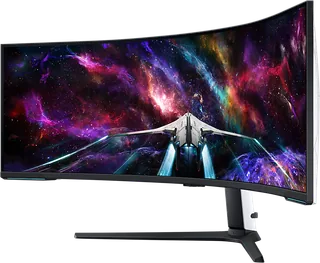
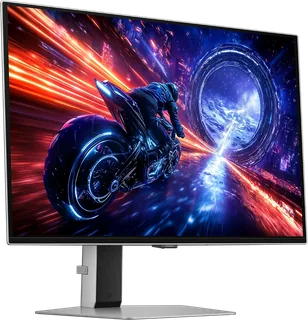
| SamsungOdyssey Neo G9 G95NC | SamsungOdyssey OLED G6 (G60SF) | |
|---|---|---|
| Overview | ||
| Released | 2023 | August 2025 |
| Display | ||
| Screen size | 57″ | 27″ |
| Resolution | 7680 × 2160 (DUHD) (better) | 2560 × 1440 (QHD) |
| Sharpness | 140 pixels per inch (better) | 109 pixels per inch |
| Panel | VA (VA with Quantum Mini LED backlight) | QD-OLED (3rd-gen QD-OLED) |
| Refresh rate | 240 Hz | 500 Hz (better) |
| Response time (grey to grey) | 1 ms | 0.03 ms (better) |
| Brightness (typical) | 420 nits (better) | 300 nits |
| HDR peak brightness | 1,000 nits | 1,000 nits |
| HDR certification | DisplayHDR 1000 | DisplayHDR True Black 500 |
| HDR formats | HDR10+ Gaming | HDR10+, HDR10+ Gaming |
| Contrast ratio | 2,500:1 | 1,000,000:1 |
| Colour range | 95% DCI-P3 | 99% DCI-P3 (CIE 1976) |
| DCI-P3 coverage | 95% | 99% (better) |
| Screen finish | – | Matte |
| Dimming zones | 2,392 | – |
| Shape | Curved (1000R) | Flat |
| Adaptive sync | FreeSync Premium Pro | FreeSync Premium Pro, G-Sync Compatible |
| Colour depth | Up to 1 billion colours | Up to 1 billion colours |
| Colour accuracy | – | Pantone Validated |
| Colour modes | Entertain, Graphic, Eco, Game Standard, FPS, RTS, RPG, Sports, Original and Custom | – |
| HDR detail | Quantum Mini LED local dimming with 2392 zones; 1000-nit peak brightness stated in Samsung's launch release; HDR10+ Gaming | HDR10, HDR10+, HDR10+ Gaming; peak 1,000 nits typical, 800 nits minimum (3% APL, peak brightness set to High) |
| Viewing angles | 178° horizontal and vertical | 178° horizontal, 178° vertical |
| Eye care | Eye Saver Mode, Flicker Free and UL-certified Glare Free | Eye Saver Mode, Flicker Free |
| Burn-in protection | – | Samsung OLED Safeguard+ (pulsating heat pipe cooling, Thermal Modulation System, logo and taskbar detection, screen saver); burn-in at normal use covered by the warranty |
| Calibration | Factory tuning with calibration report | – |
| Connections | ||
| Video inputs | 3 × HDMI 2.1, DisplayPort 2.1 | 2 × HDMI 2.1, DisplayPort 1.4 |
| USB-C charging | None | None |
| USB ports | 2 × USB-A | 2 × USB-A |
| Ethernet | – | No |
| KVM switch | Yes | – |
| Speakers | No | No |
| HDMI detail | 3 x HDMI 2.1; HDMI 1 is limited to 7680 x 2160 at 120Hz in Samsung's manual; full DUHD 240Hz requires HDMI 2.1 FRL 6 support on the graphics card | – |
| DisplayPort detail | 1 x DisplayPort 2.1; full DUHD 240Hz requires UHBR 13.5 support on the graphics card | – |
| USB hub detail | Two USB-A downstream ports and two USB-B upstream ports; Samsung lists USB 3.0 and its manual states compatibility with USB 2.0 upstream cables | 2 x USB-A 3.2 Gen 1 downstream, 1 x USB-B upstream |
| Picture by picture | Picture in picture and picture by picture | PiP and PbP |
| Audio out | Headphone output | Headphone out |
| Design | ||
| Stand adjusts | Height, tilt, swivel | Height, tilt, swivel, pivot (better) |
| VESA mount | Yes | Yes |
| Weight with stand | 19 kg | 6.9 kg |
| Height adjustment | 120 mm, ± 5 mm tolerance | 120 mm |
| Tilt | -3° to +10° | -2° to 25° |
| Swivel | -15° to +15° | -30° to 30° |
| Pivot | – | -92° to 92° |
| VESA pattern | 100 x 100 mm | 100 x 100 mm |
| Size with stand | 1327.5 x 499.6 x 601 mm (W x D x H) | 611.7 x 554.2 x 263.5 mm (W x H x D) |
| Size without stand | 1327.5 x 338.4 x 429.5 mm (W x D x H) | 611.7 x 353.8 x 49.2 mm (W x H x D) |
| Weight without stand | 15.4 kg | 3.8 kg |
| Colours | Black front and stand, white rear; Core Lighting+ and CoreSync | Silver |
| Power and support | ||
| Power use | 59 W typical; 300 W maximum; 0.5 W standby; 0.3 W off | 41.4 W typical, 140 W maximum, 0.5 W standby, 0.3 W off |
| Energy class | G | G |
| Power supply | Internal; AC 100–240V, 50/60Hz | External adapter, AC 100–240 V |
| Certifications | – | VESA DisplayHDR True Black 500, UL Glare Free, Pantone Validated |
| In the box | HDMI cable, DisplayPort cable, USB 3.0 cable and 1.5 m power cable | Power cable (1.5 m), HDMI cable, DisplayPort cable, USB 3.0 cable |
More comparisons
- Samsung Odyssey OLED G6 (G60SF) vs Sony INZONE M10S II
- Samsung Odyssey OLED G6 (G60SF) vs Samsung Odyssey OLED G8 32″ (G80SH)
- Samsung Odyssey Neo G9 G95NC vs Samsung Odyssey OLED G8 32″ (G80SH)
- Dell UltraSharp 52 Thunderbolt Hub (U5226KW) vs Samsung Odyssey Neo G9 G95NC
- Samsung Odyssey G7 G75F (37″) vs Samsung Odyssey OLED G6 (G60SF)
- Samsung Odyssey G7 G75F (37″) vs Samsung Odyssey Neo G9 G95NC
- Gigabyte AORUS FO27Q5P vs Samsung Odyssey OLED G6 (G60SF)
- Samsung Odyssey OLED G6 (G60SF) vs Sony INZONE M10S
- Samsung Odyssey G9 (G91F) vs Samsung Odyssey OLED G6 (G60SF)
- Samsung Odyssey OLED G6 (G60SF) vs Samsung Odyssey OLED G8 G81SF 27-inch
- Samsung Odyssey OLED G6 (G60SF) vs Samsung Odyssey OLED G8 (G80SD)
- Samsung Odyssey OLED G6 (G60SF) vs Samsung Odyssey OLED G9 G95SC
- Samsung Odyssey G9 (G91F) vs Samsung Odyssey Neo G9 G95NC
- Samsung Odyssey Neo G9 G95NC vs Samsung Odyssey OLED G8 G81SF 27-inch
- LG UltraGear OLED 45GX950A vs Samsung Odyssey Neo G9 G95NC
- Samsung Odyssey Neo G9 G95NC vs Samsung Odyssey OLED G8 (G80SD)