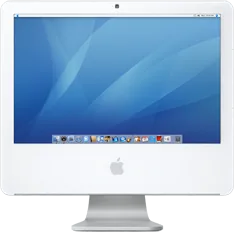
Apple iMac (17-inch, Late 2006) vs Apple iMac (Retina 4K, 21.5-inch, 2019)
Better figure, where one is clearly better
| AppleiMac (17-inch, Late 2006) | AppleiMac (Retina 4K, 21.5-inch, 2019) | |
|---|---|---|
| Overview | ||
| Released | September 2006 | March 2019 |
| Performance | ||
| Processor | Intel Core 2 Duo T5600, Intel Core 2 Duo T7200 or Intel Core 2 Duo T7400 | Intel Core i3-8100, Intel Core i7-8700 or Intel Core i5-8500 |
| CPU cores | 2 | 4 or 6 |
| CPU threads | – | 4, 6 or 12 |
| Graphics | Intel GMA 950 (64 MB shared DDR2) or ATI Radeon X1600 (128 MB GDDR3) | Radeon Pro 555X (2 GB GDDR5), Radeon Pro 560X (4 GB GDDR5) or Radeon Pro Vega 20 (4 GB HBM2) |
| Memory | 512 MB, 1 GB, 2 GB or 3 GB | 8 GB, 16 GB or 32 GB (better) |
| Storage | 160 GB to 500 GB | 256 GB to 1 TB (better) |
| CPU | 1.83 GHz Core 2 Duo T5600 with 2 MB shared L2 cache; higher configuration has 2.0 GHz T7200 or optional 2.16 GHz T7400 with 4 MB shared L2 cache. All use a 667 MHz system bus; exact identities cross-checked with EveryMac. | 3.6 GHz quad-core Core i3 without Turbo Boost, or 3.0 GHz six-core Core i5 with Turbo Boost up to 4.1 GHz; both configurable to 3.2 GHz six-core Core i7 with Turbo Boost up to 4.6 GHz |
| GPU | Intel GMA 950 with 64 MB DDR2 shared system memory on the 1.83 GHz configuration; ATI Radeon X1600 with 128 MB GDDR3 on the 2.0 and 2.16 GHz configurations | Radeon Pro 555X with 2 GB GDDR5 in the lower base; Radeon Pro 560X with 4 GB GDDR5 in the upper base, configurable to Radeon Pro Vega 20 with 4 GB HBM2 |
| Memory type | Two SO-DIMM slots for PC2-5300 (667 MHz) DDR2 SDRAM. Entry configuration has two 256 MB modules, configurable to 1 or 2 GB; higher configurations have two 512 MB modules, configurable to 2 or 3 GB. | 8 GB standard, configurable to 16/32 GB; lower base uses 2400 MHz DDR4 and upper base 2666 MHz DDR4. Memory is not readily user-accessible. |
| Storage type | 160 GB 7200 rpm Serial ATA hard drive; higher configurations can have 250 or 500 GB. Entry configuration has a 24x Combo drive for DVD reading and CD writing; higher configurations have an 8x SuperDrive with 2.4x double-layer DVD burning. | The current Apple sheet lists 256 GB SSD or 1 TB Fusion Drive for both bases, and these are the configurations shown. Apple made SSD storage standard in August 2020. Launch reviews describe a 1 TB hard drive in the lower base and 1 TB Fusion Drive in the upper base, with larger SSD options (Macworld and TechRadar); these historical options are not flattened into the current matrix. |
| Display | ||
| Screen size | 17″ | 21.5″ |
| Resolution | 1440 × 900 | 4096 × 2304 (better) |
| Panel | – | IPS LCD |
| Brightness | 250 nits | 500 nits (better) |
| Display type | Widescreen TFT active-matrix LCD, millions of colours; typical contrast 500:1, viewing angles 140° horizontal and 120° vertical. Panel technology and refresh rate unpublished. | LED-backlit Retina 4K display; IPS panel confirmed by EveryMac; Apple does not publish native refresh rate in this model’s specification sheet |
| Display features | – | Wide colour (P3); supports one billion colours |
| Connections | ||
| Ports | 3 × USB-A, Ethernet, headphone jack | 2 × Thunderbolt 3, 4 × USB-A, SD card slot, Ethernet, headphone jack |
| Ethernet | 1 Gb/s | 1 Gb/s |
| External displays | Up to 1 | Up to 2 (better) |
| Wi-Fi | 802.11g; 54 Mbps AirPort Extreme | 802.11ac |
| Bluetooth | – | 4.2 |
| Camera | iSight camera | FaceTime HD |
| Back ports | Three USB 2.0 ports on the computer and two USB 1.1 ports on its keyboard; two FireWire 400 ports sharing 8 W, mini-DVI, Gigabit Ethernet, headphone/optical digital output and line-in/optical digital input. Bluetooth 2.0 + EDR is standard on higher configurations; not standard on the entry configuration, but listed as an order option in Apple's UK announcement. | Four USB-A ports; two Thunderbolt 3 USB-C ports with DisplayPort, Thunderbolt up to 40 Gb/s and USB 3.1 Gen 2 up to 10 Gb/s; SDXC, Gigabit Ethernet and 3.5 mm headphone jack; Kensington lock slot. Thunderbolt 2, HDMI, DVI and VGA require separately sold adapters. |
| External displays | One external display in extended desktop or mirroring mode; digital resolutions up to 1920 × 1200 and analogue up to 2048 × 1536. DVI, VGA, S-video and composite adapters sold separately. | Built-in display at full native resolution alongside one 5120 × 2880 display at 60 Hz with one billion colours, two 3840 × 2160 displays at 60 Hz with one billion colours, or two 4096 × 2304 displays at 60 Hz with millions of colours |
| Speakers | Built-in stereo speakers with internal 12 W digital amplifier and built-in microphone | Stereo speakers |
| Microphones | – | Built-in microphone |
| Keyboard and mouse | Apple Keyboard and Mighty Mouse; Apple Remote included with higher configurations and optional on the entry model; optional wireless keyboard and mouse for higher configurations | Rechargeable Magic Keyboard and Magic Mouse 2; optional Magic Keyboard with Numeric Keypad and Magic Trackpad 2 |
| Design and power | ||
| Type | All-in-one | All-in-one |
| Weight | – | 5.48 kg |
| Width × depth × height | 426 × 173 × 430 mm | 528 × 175 × 450 mm |
| Operating system | macOS | macOS |
| Size and weight detail | Maker weight 15.5 pounds (7 kg), varying by configuration and manufacturing process; shared scalar weight omitted | Dimensions include the stand; current Apple sheet lists 5.48 kg and warns that weight varies by configuration. Launch reviews tested heavier hard-drive/Fusion configurations. A built-in VESA mount version was also available. |
| Power supply | Maximum continuous power 180 W; 100–240 V AC, 50–60 Hz single phase | 100–240 V AC, 50–60 Hz, single phase |
| Materials | – | Recyclable aluminium enclosure; arsenic-free glass and mercury-free LED backlight |
| In the box | iMac, Apple Keyboard, Mighty Mouse, power cord, install/restore DVDs and documentation; Apple Remote except on the entry configuration. Mac OS X 10.4 Tiger, iLife '06, Front Row, Photo Booth, Microsoft Office 2004 Test Drive and iWork trial. | iMac, Magic Keyboard, Magic Mouse 2, power lead and Lightning to USB cable |

More comparisons
- Apple iMac 24″ (M4) vs Apple iMac (Retina 4K, 21.5-inch, 2019)
- Apple iMac (Retina 4K, 21.5-inch, 2019) vs Apple Mac mini (M4 or M4 Pro)
- Apple iMac (17-inch, Late 2006) vs Apple iMac 24″ (M4)
- Apple iMac 24″ (M3) vs Apple iMac (Retina 4K, 21.5-inch, 2019)
- Apple iMac (17-inch, Late 2006) vs Apple iMac 24″ (M3)
- Apple iMac 24″ (M1) vs Apple iMac (Retina 4K, 21.5-inch, 2019)
- Apple iMac (17-inch, Late 2006) vs Apple iMac 24″ (M1)
- Apple iMac (Retina 4K, 21.5-inch, 2019) vs Apple iMac (Retina 5K, 27-inch, 2020)
- Apple iMac (17-inch, Late 2006) vs Apple iMac (Retina 5K, 27-inch, 2020)
- Apple iMac (Retina 4K, 21.5-inch, 2017) vs Apple iMac (Retina 4K, 21.5-inch, 2019)
- Apple iMac (Retina 4K, 21.5-inch, 2019) vs Apple iMac (Retina 5K, 27-inch, 2019)
- Apple iMac (21.5-inch, 2017) vs Apple iMac (Retina 4K, 21.5-inch, 2019)
- Apple iMac (21.5-inch, Mid 2011) vs Apple iMac (Retina 4K, 21.5-inch, 2019)
- Apple iMac (21.5-inch, Mid 2010) vs Apple iMac (Retina 4K, 21.5-inch, 2019)
- Apple iMac (20-inch, Early 2008) vs Apple iMac (Retina 4K, 21.5-inch, 2019)
- Apple iMac Pro (2017) vs Apple iMac (Retina 4K, 21.5-inch, 2019)