Apple Mac mini (M1) vs Apple Mac mini (M6 or M5 Pro)
Better figure, where one is clearly better
| AppleMac mini (M1) | AppleMac mini (M6 or M5 Pro) | |
|---|---|---|
| Overview | ||
| Released | November 2020 | September 2026 |
| Performance | ||
| Processor | Apple M1 | Apple M6 or Apple M5 Pro |
| CPU cores | 8 | 12, 15 or 18 |
| Graphics | 8-core GPU | 12-core GPU, 16-core GPU or 20-core GPU |
| Memory | 8 GB or 16 GB | 16 GB, 24 GB, 32 GB, 48 GB or 64 GB (better) |
| Storage | 256 GB to 2 TB | 256 GB to 8 TB (better) |
| CPU | 8-core CPU with 4 performance cores and 4 efficiency cores | M6: 12-core CPU with 2 super cores, 4 performance cores and 6 efficiency cores; M5 Pro: 15-core CPU with 5 super cores and 10 performance cores, or 18-core CPU with 6 super cores and 12 performance cores |
| GPU | 8-core GPU | Neural Accelerators; hardware-accelerated ray tracing |
| AI engine | 16-core Neural Engine | Dual 16-core Neural Engine (M6); 16-core Neural Engine (M5 Pro) |
| Memory bandwidth | – | M6: 153GB/s with 16GB, 170GB/s with 24GB or 32GB; M5 Pro: 307GB/s |
| Storage type | SSD, configurable to 512 GB, 1 TB or 2 TB | SSD |
| Media engine | – | Hardware-accelerated H.264, HEVC, ProRes and ProRes RAW; video decode engine; video encode engine; ProRes encode and decode engine; AV1 decode |
| Display | ||
| Screen | None built in | None built in |
| Connections | ||
| Ports | 2 × Thunderbolt 3, 2 × USB-A, HDMI, Ethernet, headphone jack | 3 × Thunderbolt 4, 2 × USB-C, HDMI, Ethernet, headphone jack |
| Ethernet | 1 Gb/s | 2.5 Gb/s (better) |
| External displays | Up to 2 | Up to 3 (better) |
| Wi-Fi | Wi-Fi 6 | Wi-Fi 7 |
| Bluetooth | 5.0 | 6 |
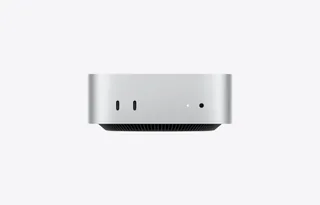
| Front ports | – | 2 × USB-C with USB 3 (up to 10Gb/s); 3.5 mm headphone jack with advanced support for high-impedance headphones |
| Back ports | Two Thunderbolt / USB 4 ports with DisplayPort, Thunderbolt 3 and USB 4 up to 40 Gb/s, and USB 3.1 Gen 2 up to 10 Gb/s; two USB-A ports up to 5 Gb/s; HDMI; Gigabit Ethernet, configurable to 10 Gb Ethernet; 3.5 mm headphone jack | M6: 3 × Thunderbolt 4 (USB-C) with Thunderbolt 4 and USB 4 (up to 40Gb/s) and DisplayPort; M5 Pro: 3 × Thunderbolt 5 (USB-C) with Thunderbolt 5 (up to 120Gb/s), USB 4 (up to 40Gb/s) and DisplayPort; HDMI with multichannel audio output; 2.5Gb Ethernet (RJ-45), configurable to 10Gb Ethernet |
| External displays | One display up to 6K 60 Hz over Thunderbolt and one up to 4K 60 Hz over HDMI, simultaneously | M6: up to three (two at up to 6K 60Hz or 4K 165Hz, plus a third at up to 5K 60Hz over Thunderbolt or 4K 60Hz over HDMI), or two (one at up to 8K 60Hz, 5K 120Hz or 4K 240Hz, plus one at up to 5K 60Hz over Thunderbolt or 4K 60Hz over HDMI); M5 Pro: up to three at up to 6K 60Hz or 4K 165Hz, or two (one at up to 8K 60Hz, 5K 120Hz or 4K 240Hz, plus one at up to 5K 120Hz or 4K 200Hz); VRR and HDR supported |
| Speakers | Built-in speaker; HDMI multichannel audio output | Built-in speaker |
| Microphones | – | None built in; Apple says an external microphone or headset is needed for calls |
| Design and power | ||
| Type | Compact | Compact |
| Weight | 1.2 kg | 0.67 kg (better) |
| Width × depth × height | 197 × 197 × 36 mm | 127 × 127 × 50 mm |
| Operating system | macOS | macOS |
| Power supply | Built-in; 100–240 V AC, 50–60 Hz; maximum continuous power 150 W | Built-in; 100–240V AC; 155W maximum continuous power |
| Power use | – | M6 with 16GB and 256GB: 4W idle, 70W maximum; M5 Pro with 64GB and 8TB: 6W idle, 145W maximum |
| Noise | 5 dBA sound pressure at idle and during Apple's wireless web test (operator position) | 5 dBA sound pressure at idle (operator position); declared to ECMA-109 as 1.3 B sound power and 4 dB sound pressure at idle and wireless web (M5 Pro, 18-core CPU, 20-core GPU) |
| Materials | 100% recycled aluminium enclosure | 100% recycled aluminium enclosure; 50% recycled content overall |
| Colours | Silver | Silver |
| In the box | Mac mini, power cord | Mac mini, power lead (1.8 m) |

More comparisons
- Apple Mac mini (2018) vs Apple Mac mini (M6 or M5 Pro)
- Apple Mac mini (Early 2009) vs Apple Mac mini (M6 or M5 Pro)
- Apple Mac mini (M6 or M5 Pro) vs Apple Mac mini (Mid 2010)
- Apple Mac mini (Early 2006) vs Apple Mac mini (M6 or M5 Pro)
- Apple Mac mini (2005) vs Apple Mac mini (M6 or M5 Pro)
- Apple Mac mini (M6 or M5 Pro) vs Apple Mac mini (Mid 2007)
- Apple Mac mini (M4 or M4 Pro) vs Apple Mac mini (M6 or M5 Pro)
- Apple Mac mini (M6 or M5 Pro) vs Framework Desktop (AMD Ryzen AI Max 300 Series)
- Apple Mac mini (M2 or M2 Pro) vs Apple Mac mini (M6 or M5 Pro)
- Apple Mac mini (Late 2014) vs Apple Mac mini (M6 or M5 Pro)
- Apple Mac mini (Late 2012) vs Apple Mac mini (M6 or M5 Pro)
- Apple Mac mini (M6 or M5 Pro) vs Apple Mac mini (Mid 2011)
- Apple Mac mini (M6 or M5 Pro) vs Apple Mac Studio (M5 Max or M5 Ultra)
- Apple Mac mini (Late 2009) vs Apple Mac mini (M6 or M5 Pro)
- Apple Mac mini (Late 2006) vs Apple Mac mini (M6 or M5 Pro)
- Apple Mac mini (M1) vs Apple Mac mini (M4 or M4 Pro)