Apple MacBook (13-inch, Early 2006) vs Apple MacBook Air 13″ (M1)
Better figure, where one is clearly better
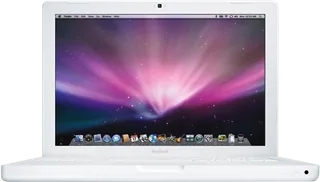
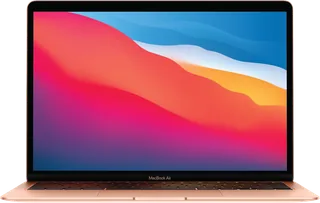
| AppleMacBook (13-inch, Early 2006) | AppleMacBook Air 13″ (M1) | |
|---|---|---|
| Overview | ||
| Released | May 2006 | November 2020 |
| Display | ||
| Screen size | 13.3″ | 13.3″ |
| Resolution | 1280 × 800 | 2560 × 1600 (better) |
| Panel | – | IPS LCD |
| Refresh rate | – | 60 Hz |
| Brightness | 250 nits | 400 nits (better) |
| Touchscreen | No | No |
| Display type | Glossy TFT widescreen display with millions of colours; panel technology and refresh rate unpublished by Apple. The launch announcement specifies 250 cd/m² brightness. | Retina display; LED-backlit with IPS technology |
| Pixel density | – | 227 ppi |
| Colour range | – | Wide colour (P3); millions of colours |
| Screen finish | – | Glossy (Notebookcheck) |
| Display features | – | True Tone; 60 Hz refresh rate (Notebookcheck) |
| Performance | ||
| Processor | Intel Core Duo T2400 or Intel Core Duo T2500 | Apple M1 |
| CPU cores | 2 | 8 |
| Graphics | Intel GMA 950 (64 MB shared DDR2) | 7-core GPU or 8-core GPU |
| Memory | 512 MB, 1 GB or 2 GB | 8 GB or 16 GB (better) |
| Storage | 60 GB to 120 GB | 128 GB to 2 TB (better) |
| CPU | 1.83 GHz Intel Core Duo T2400 or 2.0 GHz Core Duo T2500; exact processor identities confirmed by Ars Technica. 2 MB shared L2 cache and 667 MHz front-side bus. | 8-core CPU with 4 performance cores and 4 efficiency cores |
| GPU | Intel GMA 950 with 64 MB DDR2 shared with main memory; Apple notes a minimum 80 MB allocation including graphics and system use. | 7-core or 8-core GPU |
| AI engine | – | 16-core Neural Engine |
| Memory type | Two SO-DIMM slots for 667 MHz DDR2 SDRAM (PC2-5300); 512 MB standard, configurable to 1 GB or 2 GB. | Unified memory, configurable to 16 GB |
| Storage type | 5400 rpm Serial ATA hard drive. White models start at 60 GB and black at 80 GB; 80 GB, 100 GB and 120 GB build-to-order drives. The 1.83 GHz model has a DVD-ROM/CD-RW Combo drive; 2.0 GHz models have a DVD-writing SuperDrive. | SSD; consumer models started at 256 GB, configurable to 512 GB, 1 TB or 2 TB. Apple's US education price list also lists an 8 GB / 128 GB model with a 7-core GPU. |
| Cooling | – | Fanless |
| Battery and size | ||
| Battery life (maker's claim) | – | Up to 18 hours |
| Battery capacity | 55 Wh (better) | 49.9 Wh |
| Weight | 2.36 kg | 1.29 kg (better) |
| Thickness | 27.5 mm | 16.1 mm (better) |
| Width × depth | 325 × 227 mm | 304.1 × 212.4 mm |
| Battery life detail | Removable 55 Wh lithium-polymer battery. Maker reference weight varies with configuration and manufacturing process; battery-life hours are not published in the archived specification. | Up to 15 hours wireless web; lithium-polymer battery |
| Charger | 60 W MagSafe Power Adapter | 30 W USB-C Power Adapter |
| Materials | Polycarbonate enclosure | 100% recycled aluminium enclosure |
| Colours | White at 1.83 GHz or 2.0 GHz; black at 2.0 GHz. The configurations table combines colour variants with matching processor, memory and storage. | Gold, Silver, Space Grey |
| Connections | ||
| Ports | 2 × USB-A, Ethernet, headphone jack, MagSafe | 2 × Thunderbolt 3, headphone jack |
| Wi-Fi | AirPort Extreme 802.11g | Wi-Fi 6 |
| Bluetooth | 2.0 + EDR | 5.0 |
| Webcam | iSight camera, 640 × 480 resolution | 720p FaceTime HD |
| Operating system | macOS | macOS |
| Port detail | Two USB 2.0 ports, one FireWire 400 port (8 W), Gigabit Ethernet, MagSafe and Mini-DVI; separate combined optical digital audio input/line input and combined optical digital audio output/headphone output. Display adapters sold separately. | Two Thunderbolt / USB 4 ports with charging, DisplayPort, Thunderbolt 3 and USB 4 up to 40 Gb/s, and USB 3.1 Gen 2 up to 10 Gb/s; 3.5 mm headphone jack |
| External displays | One external display up to 1920 × 1200 alongside the built-in screen; Mini-DVI adapters support DVI, VGA, S-video and composite video. | One external display at up to 6K 60 Hz alongside the built-in display |
| Keyboard | Full-size keyboard with 78 US or 79 ISO keys, 12 function keys, four arrow keys and an embedded numeric keypad | Backlit Magic Keyboard; 78 (US) or 79 (ISO) keys with 12 function keys and inverted-T arrow keys; ambient light sensor |
| Trackpad | Trackpad with two-finger scrolling and a separate button | Force Touch trackpad |
| Speakers | Built-in stereo speakers | Stereo speakers; wide stereo sound; Dolby Atmos playback |
| Microphones | Built-in omnidirectional microphone | Three-mic array with directional beamforming |
| Biometrics | – | Touch ID |
| In the box | MacBook, Apple Remote, removable battery, 60 W MagSafe Power Adapter with AC wall plug and power cord, install/restore DVDs and documentation; Mac OS X 10.4.6 Tiger and iLife ’06. | MacBook Air, 30 W USB-C Power Adapter, USB-C Charge Cable (2 m) |
More comparisons
- Apple MacBook Air 13″ (M1) vs Apple MacBook Air 13″ (M5)
- Apple MacBook (13-inch, Early 2006) vs Apple MacBook Air 13″ (M5)
- Apple MacBook Air 13″ (M1) vs Apple MacBook Air 15″ (M5)
- Apple MacBook Air 13″ (M1) vs Apple MacBook Neo
- Apple MacBook Air 13″ (M1) vs Apple MacBook Air 13″ (M4)
- Apple MacBook Air 13″ (M1) vs Apple MacBook Air 15″ (M4)
- Apple MacBook Air 13″ (M1) vs Apple MacBook Air 13″ (M3)
- Apple MacBook Air 13″ (M1) vs Apple MacBook Air 15″ (M3)
- Apple MacBook Air 13″ (M1) vs Apple MacBook Air 15″ (M2)
- Apple MacBook Air 13″ (M1) vs Apple MacBook Air 13″ (M2)
- Apple MacBook Air 13″ (M1) vs Apple MacBook Pro 13″ (M1)
- Apple MacBook Air 13″ (M1) vs Apple MacBook Air (Retina, 13-inch, 2018)
- Apple MacBook Air 13″ (M1) vs Apple MacBook Air (Retina, 13-inch, 2020)
- Apple MacBook (Retina, 12-inch, Early 2015) vs Apple MacBook Air 13″ (M1)
- Apple MacBook (Retina, 12-inch, 2017) vs Apple MacBook Air 13″ (M1)
- Apple MacBook Air (13-inch, 2017) vs Apple MacBook Air 13″ (M1)