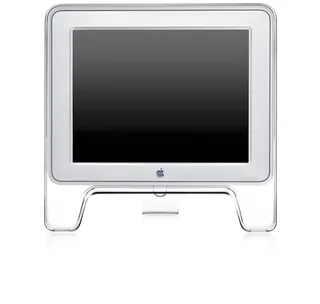
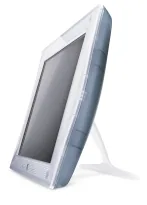
Apple Studio Display (15-inch ADC, 2000) vs Apple Studio Display (15-inch DVI, 1999)
Better figure, where one is clearly better
| AppleStudio Display (15-inch ADC, 2000) | AppleStudio Display (15-inch DVI, 1999) | |
|---|---|---|
| Overview | ||
| Released | July 2000 | December 1999 |
| Display | ||
| Screen size | 15″ | 15.1″ |
| Resolution | 1024 × 768 | 1024 × 768 |
| Sharpness | 85 pixels per inch | 85 pixels per inch |
| Panel | LCD (TFT active-matrix LCD; Apple does not identify the panel subtype) | LCD (TFT active-matrix LCD; Apple does not identify the panel subtype) |
| Refresh rate | – | 75 Hz |
| Brightness (typical) | 230 nits (better) | 200 nits |
| Contrast ratio | 300:1 | 200:1 |
| Shape | Flat | Flat |
| Colour depth | 24-bit colour; up to 16.7 million colours | 24-bit colour, 8 bits per colour channel; up to 16.7 million colours |
| Viewing angles | Typical 120° horizontal and 90° vertical | Typical 120° horizontal and 90° vertical |
| Connections | ||
| Video inputs | Apple Display Connector | DVI |
| USB-C charging | None | None |
| USB ports | 2 × USB-A | 2 × USB-A |
| Other connections | Integrated ADC cable supplies digital video, USB data and power; two downstream powered USB ports. No separate analogue computer, composite, S-video or audio input. | 24-pin digital DVI connector using TMDS; two downstream USB 1.1 ports and an upstream USB lead. Display cable branches to DVI, USB and external power adaptor. No analogue computer, composite, S-video or audio input. |
| Design | ||
| Stand adjusts | Tilt | Height, tilt, swivel (better) |
| Weight with stand | 5.2 kg | 5.5 kg |
| Size with stand | 41 × 40.3 × 17.2–25.9 cm (width × height × depth), from Apple's May 2001 French datasheet; archived support page rounds to 15.8 × 16.1 × 6.7 inches (height × width × depth) | Desktop stand, 39.9 × 38.1–49.0 × 24.9 cm (width × height × depth). Picture-frame stand, 15.7 × 11.6 × 6.9 inches, weighing 3.5 kg. Apple datasheet's metric picture-frame height is inconsistent with its inch figure, so the published imperial dimensions are retained. |
| Controls | Touch-sensitive system power, sleep and wake control, plus brightness adjustment | Power/system startup and sleep, plus two brightness buttons on underside of display; software colour calibration through USB |
| Colours | Crystal-clear acrylic enclosure with silver-coloured frame | Translucent Graphite and white; distinct digital DVI hardware rather than a colour-only revision |
| Power and support | ||
| Power use | Maximum 50 W operating; 35 W or less in sleep mode, from Apple datasheet | Below 35 W operating, from December 1999 Apple datasheet. Archived support page labels 35 W as Energy Saver consumption and leaves maximum unknown; datasheet's operating specification retained. |
| Power supply | Powered through ADC; datasheet specifies 28 V DC ±1.5 V, with no separate monitor mains cord | External power adaptor, 100–240 V AC at 50–60 Hz; mains frequency is not a published display refresh rate |
| Software | Apple's 19 July 2000 US announcement says available immediately; Japanese first retail was 5 August, so the earlier US sale date is used. Brightness, contrast, weight and metric dimensions follow Apple's surviving May 2001 datasheet for M7928ZM/A. Neither this datasheet nor the archived support page specifies native refresh, so it is omitted. Requires Power Mac G4 or Power Mac G4 Cube with ADC in maker launch documentation; other digital sources require a compatible powered ADC adaptor. | Apple service manual and revision-specific support note place this DVI model in December 1999; the August date repeated by some secondary histories is not used. Apple Canada's 6 December announcement says it could be ordered and was expected to ship before year-end; first retail month is retained without inventing a day. Native resolution is 1024 × 768; Apple's Japanese support sheet explicitly specifies 70 or 75 Hz at native resolution; the English archived support sheet and December datasheet omit the refresh rates. Maker compatibility is Power Mac G4 with ATI RAGE 128 Pro graphics and built-in USB, running Mac OS 9.0 or later. Maker support lists 15.1-inch viewable size while the datasheet rounds to 15 inches. |
| In the box | Display with integrated stand and ADC cable | Display, desktop stand, picture-frame stand, power cord and adaptor, Apple Displays software and user manual |
More comparisons
- Apple Studio Display (15-inch DVI, 1999) vs Apple Studio Display (2026)
- Apple Studio Display (15-inch DVI, 1999) vs Apple Studio Display XDR
- Apple Studio Display (15-inch ADC, 2000) vs Apple Studio Display (2026)
- Apple Studio Display (15-inch ADC, 2000) vs Apple Studio Display XDR
- Apple Studio Display (15-inch ADC, 2000) vs Apple Studio Display (2022)
- Apple Studio Display (15-inch DVI, 1999) vs Apple Studio Display (2022)
- Apple Studio Display (15-inch DVI, 1999) vs Apple Studio Display (17-inch LCD, 2001)
- Apple Studio Display (15-inch ADC, 2000) vs Apple Studio Display (17-inch LCD, 2001)
- Apple Studio Display (15-inch LCD, 1998) vs Apple Studio Display (15-inch ADC, 2000)
- Apple Studio Display (15-inch LCD, 1999) vs Apple Studio Display (15-inch ADC, 2000)
- Apple Studio Display (15-inch ADC, 2000) vs Apple Studio Display (17-inch CRT ADC, 2000)
- Apple Studio Display (15-inch ADC, 2000) vs Apple Studio Display (17-inch CRT, 1999)
- Apple Studio Display (15-inch ADC, 2000) vs Apple Studio Display (21-inch CRT, 1999)
- Apple Studio Display (15-inch DVI, 1999) vs Apple Studio Display (17-inch CRT ADC, 2000)
- Apple Studio Display (15-inch LCD, 1999) vs Apple Studio Display (15-inch DVI, 1999)
- Apple Studio Display (15-inch LCD, 1998) vs Apple Studio Display (15-inch DVI, 1999)