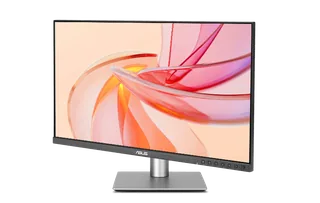
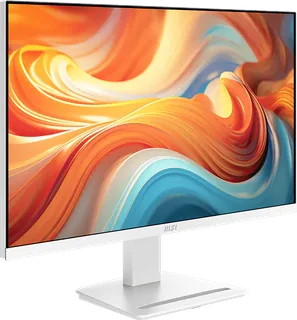
ASUS ProArt Display PA278CGRV vs MSI PRO MP273QW E14
Better figure, where one is clearly better
| ASUSProArt Display PA278CGRV | MSIPRO MP273QW E14 | |
|---|---|---|
| Overview | ||
| Released | December 2025 | November 2025 |
| Display | ||
| Screen size | 27″ | 27″ |
| Resolution | 2560 × 1440 (QHD) | 2560 × 1440 (QHD) |
| Sharpness | 109 pixels per inch | 109 pixels per inch |
| Panel | IPS | IPS |
| Refresh rate | 144 Hz | 144 Hz |
| Response time (grey to grey) | 5 ms | 4 ms (better) |
| Brightness (typical) | 350 nits (better) | 300 nits |
| HDR peak brightness | 400 nits | – |
| HDR certification | DisplayHDR 400 | – |
| HDR formats | HDR10 | – |
| Contrast ratio | 1,500:1 | 1,500:1 |
| Colour range | 97% DCI-P3, 100% sRGB | 91% DCI-P3, 97% sRGB (CIE 1976) |
| DCI-P3 coverage | 97% (better) | 91% |
| Screen finish | Matte | – |
| Shape | Flat | Flat |
| Adaptive sync | FreeSync, VESA AdaptiveSync | FreeSync |
| Colour depth | 10-bit (1.07 billion colours) | 8-bit (6-bit + FRC), 16.7 million colours |
| sRGB coverage | 100% | 97% (CIE 1976) |
| Adobe RGB coverage | – | 85% (CIE 1976) |
| Colour accuracy | ΔE < 2, factory calibrated, Calman Verified; colour pre-calibration report included | – |
| Colour modes | sRGB, BT.709, Adobe RGB, P3, BT.2020, DICOM, HDR PQ, Native, two user modes; colour temperatures 9300K, 6500K, 5500K, 5000K, DCI-P3, M Model | – |
| HDR detail | HDR10; 400 cd/m² peak | HDR Ready (MSI) |
| Response time detail | Trace Free Technology | 4 ms grey-to-grey, 1 ms MPRT |
| Variable refresh range | – | 48–144 Hz (AMD FreeSync) |
| Viewing angles | 178° / 178° (CR ≥ 10) | 178° / 178° |
| Pixel pitch | 0.233 mm | 0.2331 × 0.2331 mm |
| Eye care | Flicker-free, TÜV Low Blue Light, Light Sync (ambient light sensor adjusts brightness and colour temperature) | – |
| Calibration | ProArt Palette, ProArt Chroma Tune, RGB gain and offset, gamma 1.8–2.6 | – |
| Connections | ||
| Video inputs | HDMI 2.1, DisplayPort 1.4, USB-C | 2 × HDMI 2.0b, DisplayPort 1.2a |
| USB-C charging | Up to 96 W (better) | None |
| USB ports | 3 × USB-A, USB-C | – |
| KVM switch | Yes | – |
| Ethernet | No | – |
| Speakers | Yes | Yes |
| HDMI detail | 1 x HDMI 2.1 (TMDS) | 2 × HDMI 2.0b, 2560 × 1440 up to 144 Hz; HDMI CEC (MSI Power Link) |
| DisplayPort detail | 1 x DisplayPort 1.4 in (DSC), 1 x DisplayPort out for daisy chaining | DisplayPort 1.2a, 2560 × 1440 up to 144 Hz |
| USB-C detail | 1 x USB-C with DisplayPort Alt Mode and 96 W Power Delivery; 1 x USB-C upstream (USB 3.2) for the KVM switch | – |
| Daisy chaining | DisplayPort out | – |
| USB hub detail | 3 x USB-A and 1 x USB-C, USB 3.2 Gen 1 | – |
| Picture by picture | PiP and PbP | – |
| Audio out | Earphone jack | Headphone out |
| Speaker detail | 2 x 2 W | 2 × 2 W |
| Design | ||
| Stand adjusts | Height, tilt, swivel, pivot (better) | Tilt |
| VESA mount | Yes | Yes |
| Weight with stand | 6.6 kg | 4.5 kg |
| Height adjustment | 0–130 mm | – |
| Tilt | -5° to 23° | −5° to 20° |
| Swivel | -30° to 30° | – |
| Pivot | -90° to 90° | – |
| VESA pattern | 100 x 100 mm | 100 × 100 mm |
| Size with stand | 612.2 x 536.1 x 190.4 mm (W x H x D) | 613.49 × 201.01 × 470.61 mm (W × D × H) |
| Size without stand | 612.2 x 362.9 x 46.9 mm (W x H x D) | 613.49 × 59.56 × 364.46 mm (W × D × H) |
| Colours | – | White |
| Weight without stand | 4.7 kg | – |
| Power and support | ||
| Power use | Less than 20 W on, less than 0.5 W power saving, 0 W off (hard switch) | – |
| Power supply | 100–240 V, 50/60 Hz | Internal, 100–240 V |
| Software | DisplayWidget Center (auto rotation), ASUS Power Sync | – |
| Certifications | VESA DisplayHDR 400, Calman Verified, Mac Compliance, AMD FreeSync, TÜV Low Blue Light, TÜV Flicker-free, TCO Certified, EPEAT Gold, ENERGY STAR | CB/CE; Energy Star |
| Warranty | 3 years, zero bright dot | – |
| In the box | Quick release stand, power cord, USB-C cable, HDMI cable, DisplayPort cable, colour pre-calibration report | HDMI cable, power cord, quick guide |
More comparisons
- ASUS ProArt Display PA278CGRV vs Dell 27 QHD Monitor (SE2726D)
- Dell 27 QHD Monitor (SE2726D) vs MSI PRO MP273QW E14
- ASUS ProArt Display PA278CGRV vs Dell Pro 27 QHD Monitor (E2726DS)
- ASUS ProArt Display PA278CGRV vs Dell 27 Plus QHD USB-C (S2725DC)
- ASUS ProArt Display PA278CGRV vs Dell 27 Plus QHD Monitor (S2725DSM)
- ASUS ProArt Display 6K PA32QCV vs ASUS ProArt Display PA278CGRV
- ASUS ProArt Display PA278CGRV vs MSI MAG 274QRFW E20
- ASUS ProArt Display PA278CGRV vs Dell Pro 27 Plus QHD USB-C Hub (P2725DE)
- ASUS ProArt Display PA278CGRV vs MSI MAG 274QF
- ASUS ProArt Display PA278CGRV vs Dell UltraSharp 27 Monitor (U2724D)
- ASUS ProArt Display PA278CGRV vs Dell UltraSharp 27 Thunderbolt Hub (U2724DE)
- ASUS ProArt Display PA278CGRV vs LG UltraGear 27GL850-B
- Dell 27 Plus QHD USB-C (S2725DC) vs MSI PRO MP273QW E14
- Dell 27 Plus QHD Monitor (S2725DSM) vs MSI PRO MP273QW E14
- Dell UltraSharp 27 Monitor (U2724D) vs MSI PRO MP273QW E14
- Dell UltraSharp 27 Thunderbolt Hub (U2724DE) vs MSI PRO MP273QW E14