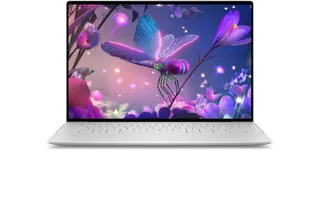
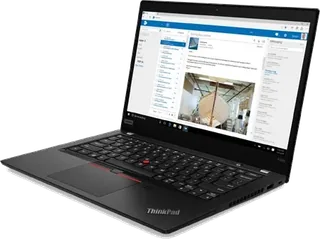
Dell XPS 13 Plus 9320 (2022) vs Lenovo ThinkPad X390
Better figure, where one is clearly better
| DellXPS 13 Plus 9320 (2022) | LenovoThinkPad X390 | |
|---|---|---|
| Overview | ||
| Released | 2022 | March 2019 |
| Display | ||
| Screen size | 13.4″ | 13.3″ |
| Resolution | 1920 × 1200 or 3456 × 2160 (better) | 1920 × 1080 |
| Panel | OLED | IPS LCD |
| Refresh rate | 60 Hz | – |
| Brightness | 500 nits or 400 nits (better) | 300 nits |
| Touchscreen | No or Yes | Yes |
| Display type | 13.4-inch display; FHD+ 1920 × 1200 LCD with or without touch, UHD+ 3840 × 2400 LCD touch, or 3.5K 3456 × 2160 OLED touch. All four options are 60 Hz; Dell describes the LCD panels as WVA without identifying IPS explicitly | Listed FHD ten-point-touch IPS panel, 72% NTSC; optional FHD non-touch IPS, HD 1366 × 768 TN at 250 nits or Privacy Guard FHD IPS at 400 nits |
| Pixel density | Dell publishes 169.3 ppi FHD+, 338.67 ppi UHD+ and 304 ppi OLED | – |
| Colour range | FHD+ 100% sRGB; UHD+ 90% DCI-P3; OLED 100% DCI-P3, as specified by Dell | – |
| Screen finish | Non-touch FHD+ is anti-glare; touch FHD+, UHD+ and OLED are anti-reflective | Anti-glare |
| Display features | LCD typical brightness 500 nits; OLED 400 nits. Typical contrast 2000:1 FHD+, 1650:1 UHD+, 1,000,000:1 OLED. Eyesafe low-blue-light technology | – |
| Performance | ||
| Processor | Intel Core i5-1240P or Intel Core i7-1280P | Intel Core i7-8565U |
| CPU cores | 12 or 14 | 4 |
| CPU threads | 16 or 20 | 8 |
| Graphics | Intel Iris Xe Graphics | Intel UHD Graphics |
| Memory | 8 GB or 16 GB | 16 GB |
| Storage | 512 GB | 512 GB |
| CPU | This record covers the original 2022 12th-generation 28 W P-series version. Dell lists i5-1240P, i7-1260P, i5-1250P vPro, i7-1270P vPro and i7-1280P vPro; the later 2023 13th-generation refresh reused the 9320 identifier and is excluded here | 8th-generation Core i3/i5/i7; later 10th-generation Core i5/i7 outside EMEA; listed combination verified by Windows Central; available by March 2019 according to contemporaneous Notebookcheck coverage, ahead of maker's planned May launch |
| GPU | Integrated Intel Iris Xe Graphics; no discrete GPU option | Integrated Intel UHD Graphics; no separate graphics option |
| Memory type | Original 12th-generation models use soldered dual-channel LPDDR5-5200, in 8, 16 or 32 GB. The current manual separately lists LPDDR5-6000 for the later 13th-generation revision | DDR4-2400 soldered to system board; no sockets; 4, 8, 16 or 32 GB; 32 GB unavailable on later 10th-generation models |
| Storage type | One replaceable M.2 2230 or 2280 NVMe SSD; current manual lists 256 GB Gen 3/Gen 4, 512 GB self-encrypting Gen 3/Gen 4 and ordinary Gen 4 2280 SSDs up to 2 TB. Configurations shown are the exact original base and tested combinations documented by Tom’s Hardware | One replaceable M.2 SATA or PCIe NVMe drive; PCIe 3.0 ×4 for 2280 or ×2 for 2242; listed 512 GB PCIe NVMe drive (Windows Central) |
| Battery and size | ||
| Battery life (maker's claim) | – | Up to 17.6 hours |
| Battery capacity | 55 Wh (better) | 48 Wh |
| Weight | 1.23 kg (better) | 1.28 kg |
| Thickness | 15.28 mm (better) | 16.9 mm |
| Width × depth | 295.3 × 199.04 mm | 311.9 × 217.2 mm |
| Battery life detail | 55 Wh three-cell lithium-ion; Dell does not publish a fixed runtime in the setup guide | Integrated 48 Wh; up to 17.6 hours MobileMark 2014 or 19 hours JEITA 2.0; Rapid Charge up to 80% in one hour with 65 W adapter; weight and dimensions shown for PPS touch configuration, non-touch carbon-fibre FHD starts at 1.22 kg and 16.5 mm thickness |
| Charger | 60 W USB-C adapter | 45 W or 65 W USB-C adapter |
| Fast charging | Maker launch announcement claims about 80% charge in less than one hour with Express Charge 2.0; current setup guide lists approximately three hours charging with the computer switched off | – |
| Materials | Aluminium body with glass palm rest; stated weight 1.23 kg for FHD+/UHD+ and 1.26 kg for OLED, subject to configuration and manufacturing variation | PPS or carbon-fibre display cover; magnesium-aluminium bottom; carbon-fibre cover offered only with non-touch FHD |
| Colours | Platinum or Graphite | Black |
| Connections | ||
| Ports | 2 × Thunderbolt 4 | 2 × USB-A, 2 × USB-C, Thunderbolt, HDMI, microSD slot, headphone jack |
| Wi-Fi | Wi-Fi 6E | Intel Wireless-AC 9560, 2×2 802.11ac; optional Wi-Fi 6 AX200 |
| Bluetooth | 5.3 | Bluetooth 5.1 in current PSREF; earlier Windows configurations reported as 5.0 |
| Webcam | 720p at 30 fps, with separate IR camera | Optional 720p or IR plus 720p hybrid, with ThinkShutter |
| Operating system | Windows | Windows |
| Port detail | Two Thunderbolt 4 USB-C ports with Power Delivery and display output; charging occupies one. No integrated analogue audio jack or media-card reader. Current manual lists Intel AX211 Wi-Fi 6E and Bluetooth 5.3; the original Tom’s Hardware test specifies Bluetooth 5.2 | Two USB-A 3.1 Gen 1, USB-C Gen 1 and USB-C Gen 2/Thunderbolt 3 with PD/DisplayPort, HDMI 1.4b, Ethernet extension connector, combo audio and side dock; optional microSD or microSD/nano-SIM combo slot, smart card reader; RJ-45 requires ThinkPad Ethernet Extension Adapter Gen 2 |
| External displays | – | Up to three independent displays; HDMI up to 4096 × 2160 at 24 Hz, Thunderbolt up to 4096 × 2304 at 60 Hz |
| Keyboard | Backlit zero-lattice keyboard; UK layout has 65 keys. Capacitive top row switches between media controls and function keys | Six-row spill-resistant keyboard with optional LED backlight; removable without taking apart the main chassis (Notebookcheck) |
| Trackpad | Haptic touchpad concealed beneath glass, 112.30 × 64.15 mm; no visible boundary | Mylar multi-touch touchpad and TrackPoint |
| Speakers | Two tweeters and two woofers, 2 W average and 2.5 W peak each | Stereo speakers, 1 W × 2, Dolby Audio Premium |
| Microphones | Dual digital-array microphones | Dual-array far-field microphones; no-microphone option for special bids |
| Biometrics | Fingerprint reader in the power button; separate infrared camera for Windows Hello | Optional match-on-chip fingerprint reader or IR camera; discrete TPM 2.0 |
| In the box | Original review units included USB-C to USB-A and USB-C to 3.5 mm audio adapters; the current manual describes the audio adapter as sold separately, so bundles vary | – |
More comparisons
- Dell XPS 13 DX13260 vs Dell XPS 13 Plus 9320 (2022)
- Dell XPS 13 DX13260 vs Lenovo ThinkPad X390
- Dell XPS 13 Plus 9320 (2022) vs Dell XPS 14 DA14260
- Dell XPS 13 Plus 9320 (2022) vs Dell XPS 16 DA16260
- Lenovo ThinkPad X13 Gen 6 (AMD) vs Lenovo ThinkPad X390
- Lenovo ThinkPad X13 Gen 6 (Intel) vs Lenovo ThinkPad X390
- Lenovo ThinkPad T14 Gen 6 (AMD) vs Lenovo ThinkPad X390
- Dell XPS 13 9350 vs Lenovo ThinkPad X390
- Dell XPS 13 9350 vs Dell XPS 13 Plus 9320 (2022)
- Dell XPS 13 Plus 9320 (2022) vs Dell XPS 14 9440
- Dell XPS 13 Plus 9320 (2022) vs Dell XPS 16 9640
- Dell XPS 13 Plus 9320 (2022) vs Sony VAIO Z (VGN-Z11WN/B)
- Dell XPS 13 Plus 9320 (2022) vs Sony VAIO Z (VPCZ21M9E)
- Dell XPS 13 9310 vs Dell XPS 13 Plus 9320 (2022)
- Dell XPS 13 Plus 9320 (2022) vs Dell XPS 17 9700
- Dell XPS 13 Plus 9320 (2022) vs Dell XPS 15 9500