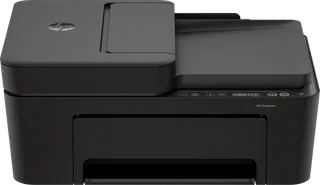
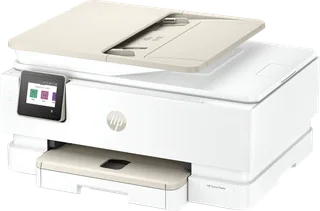
HP DeskJet 4310 vs HP Envy Photo 7930
Better figure, where one is clearly better
| HPDeskJet 4310 | HPEnvy Photo 7930 | |
|---|---|---|
| Overview | ||
| Released | September 2025 | October 2025 |
| Printing | ||
| Type | Inkjet | Inkjet |
| Colour | Yes | Yes |
| Speed, black | 8.5 pages a minute | 15 pages a minute (better) |
| Speed, colour | 5.5 pages a minute | 10 pages a minute (better) |
| Resolution | 4800 × 1200 dpi | 4800 × 1200 dpi |
| Prints both sides | No | Yes |
| Printing detail | Manual two-sided printing (driver support); no borderless printing; draft speeds up to 20 ppm black, 16 ppm colour; print languages HP PCL 3 GUI, PCLm, URF; 1.0 GHz processor, 64 MB memory | Automatic two-sided printing; borderless up to 216 x 297 mm; draft speeds up to 22 ppm black, 20 ppm colour; print language HP PCL 3 GUI; 256 MB memory |
| First page out | As fast as 15 sec black, 20 sec colour (A4, ready) | As fast as 18 sec black, 20 sec colour (A4, ready) |
| Resolution detail | Up to 1200 x 1200 rendered dpi black; up to 4800 x 1200 optimised dpi colour on selected HP photo papers (1200 input dpi) | Up to 1200 x 1200 rendered dpi black; up to 4800 x 1200 optimised dpi colour (1200 input dpi) |
| Ink or toner | Two cartridges (black and tri-colour), HP 308 or HP 308e EvoMore black; HP Instant Ink subscription available | Two cartridges (black and tri-colour), HP 303 or HP 303XL; HP Instant Ink subscription available |
| Page yield | HP 308 black: ~160 pages; HP 308 tri-colour: ~120 pages; HP 308e EvoMore black: ~320 pages | HP 303: ~200 pages black, ~165 pages tri-colour; HP 303XL: ~600 pages black, ~415 pages tri-colour |
| Duty cycle | Up to 1,000 pages a month (A4); 100 to 300 pages recommended | Up to 1,000 pages a month (A4); 300 to 400 pages recommended |
| Scanning and copying | ||
| Does | Print, Scan and Copy | Print, Scan and Copy |
| Document feeder | Yes | Yes |
| Scanner | Flatbed (up to 216 x 297 mm) and 35-sheet automatic document feeder (up to 215.9 x 355.6 mm), one-sided; up to 1200 dpi optical; up to 2.5 ipm black and colour (A4, 200 ppi); JPEG, PDF, TIFF, PNG | Flatbed (up to 215.9 x 297 mm) and 35-sheet automatic document feeder (up to 215.9 x 355.6 mm); up to 1200 dpi optical; JPG, BMP, TIFF, PDF, PNG |
| Copying | Up to 6 cpm black, 3 cpm colour (ISO, A4) | Up to 13 cpm black, 6 cpm colour (ISO, A4); up to 50 copies; 25 to 400% |
| Fax | Mobile fax from the HP app (send only); no fax modem | – |
| Paper | ||
| Largest paper | A4 | A4 |
| Paper tray | 60 sheets | 125 sheets (better) |
| Paper sizes | A4, B5, A6, DL envelope; custom 76 x 127 to 215 x 355 mm | Main tray: A4, A5, A6, B5, 10 x 15 cm, 10 x 30 cm, envelopes (C5, C6, DL); photo tray: 10 x 15, 13 x 13, 13 x 18 cm |
| Paper types | Plain, photo and brochure papers, envelopes, cards, labels; plain paper 60 to 90 g/m², 10 x 15 cm photo paper up to 300 g/m² | Plain, photo, matte and glossy brochure papers, cards, labels, envelopes; plain paper 75 to 90 g/m², photo paper up to 300 g/m² |
| Output tray | 25 sheets | 60 sheets |
| Connections | ||
| Connects by | Wi-Fi and USB | Wi-Fi and USB |
| Connection detail | Hi-Speed USB 2.0; dual-band Wi-Fi (802.11a/b/g/n, 2.4 and 5 GHz) | USB 2.0; dual-band Wi-Fi (802.11a/b/g/n/ac) with self-healing |
| Printing from phones | HP app, Apple AirPrint, Mopria, HP Print Service Plugin (Android) | HP app, Apple AirPrint, Mopria, HP Print Service Plugin (Android), Chrome OS |
| App | HP app | HP app |
| Control panel | Icon LCD with 7 buttons and 5 status lights | 2.7-inch colour touchscreen that tilts, with 3 buttons (back, home, help) |
| Design | ||
| Weight | 4.81 kg | 8 kg |
| Power use | 2.61 W ready, 1.35 W sleep, 0.10 W off | Up to 14 W printing, 4.9 W ready, 1.02 W sleep, 0.06 W off |
| Noise | 6.4 B(A) sound power, 57 dB(A) sound pressure | 6.2 B(A) sound power, 52 dB(A) sound pressure |
| Size | 428 x 332 x 200 mm (W x D x H); up to 428 x 579 x 261 mm with the output extension out | 460 x 383 x 233 mm (W x D x H) |
| In the box | Printer, HP 308 setup black and tri-colour cartridges, setup guide, reference guide, power cord | Printer, HP 303 setup black and tri-colour cartridges, setup guide, reference guide, power cord |