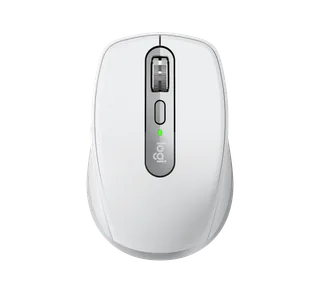
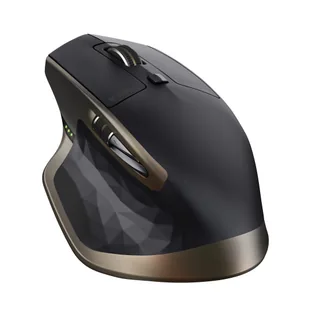
Logitech MX Anywhere 3 vs Logitech MX Master
Better figure, where one is clearly better
| LogitechMX Anywhere 3 | LogitechMX Master | |
|---|---|---|
| Overview | ||
| Released | September 2020 | April 2015 |
| Tracking | ||
| Shape | Compact | Ergonomic |
| Hand | Right hand | Right hand |
| Sensitivity | Up to 4,000 DPI (better) | Up to 1,600 DPI |
| Sensor | Darkfield high precision | Darkfield laser |
| Buttons | 6 (better) | 5 |
| Free-spinning wheel | Yes | Yes |
| Thumb wheel | No | Yes |
| Sensor | Darkfield tracking on almost any surface including glass; adjustable from 200 to 4,000 DPI. | Darkfield laser tracking on glass at least 4 mm thick; 400–1,600 DPI in 200 DPI steps, 1,000 DPI nominal |
| Scroll wheel | MagSpeed electromagnetic wheel with SmartShift, switching between stepped and free-spinning modes; Logitech claims up to 1,000 lines per second. | Speed-adaptive wheel automatically switches between click-to-click and free-spinning scrolling |
| Thumb wheel | No separate thumb wheel; horizontal scrolling uses a side button held while turning the main wheel. | Side-to-side scrolling and page switching; functions can be customised in Logitech Options |
| Gestures | – | Customisable button in the thumb rest for gesture controls |
| Connections and battery | ||
| Connects by | Bluetooth and USB receiver | Bluetooth and USB receiver |
| Devices it switches between | 3 | 3 |
| Power | Rechargeable | Rechargeable |
| Battery life (maker's claim) | Up to 70 days | Up to 40 days |
| Charging port | USB-C | Micro-USB |
| Receiver | The standard model includes a Logitech Unifying USB receiver; the Mac variant connects over Bluetooth and has no receiver in the box. | Included Logitech Unifying USB receiver; 2.4 GHz wireless connection with a stated range of 10 m |
| Charging | USB-C, 500 mAh rechargeable lithium-polymer battery; Logitech claims three hours of use from a one-minute charge and up to 70 days from a full charge. | Micro-USB; rechargeable 500 mAh lithium-polymer battery; Logitech states a 1-minute charge gives around 2 hours of use, and the mouse works while charging |
| Works with | Standard edition uses Unifying or Bluetooth Low Energy with Windows, macOS, ChromeOS and Linux; Bluetooth also supports iPadOS 13.4 or later. The Mac variant uses Bluetooth. | Unifying on Windows 7 or later and Mac OS X 10.8 or later; Bluetooth Smart on Windows 8 or later and Mac OS X 10.10 or later |
| Software | Logitech Options at launch, with button customisation, application profiles and Flow between computers. | Logitech Options for button and action customisation at launch |
| Design | ||
| Weight | 99 g (better) | 145 g |
| Size | 100.5 × 65 × 34.4 mm (length × width × height); Logitech's consumer support sheet gives 99 g with battery. | 126 × 85.7 × 48.4 mm (length × width × height) |
| Colours | Graphite, Pale Grey and Rose for the standard edition; Pale Grey for the Mac edition at launch. | – |
| In the box | Standard edition includes the mouse, Unifying receiver, USB-A-to-USB-C charging cable and documentation; Mac edition substitutes a USB-C-to-USB-C cable and omits the receiver. | Mouse, Logitech Unifying receiver, Micro-USB charging cable and documentation |
| Warranty | – | 1-year limited hardware warranty |
More comparisons
- Logitech MX Master vs Logitech MX Master 4
- Logitech MX Anywhere 3 vs Logitech MX Master 4
- Logitech MX Anywhere 3 vs Logitech MX Ergo S
- Logitech MX Ergo S vs Logitech MX Master
- Logitech MX Anywhere 3 vs Logitech MX Anywhere 3S
- Logitech MX Anywhere 3S vs Logitech MX Master
- Logitech MX Anywhere 3 vs Logitech MX Master 3S
- Logitech MX Master vs Logitech MX Master 3S
- Logitech MX Anywhere 3 vs Logitech POP Mouse
- Logitech MX Anywhere 3 vs Razer Orochi V2
- Logitech MX Anywhere 2S vs Logitech MX Anywhere 3
- Logitech MX Anywhere 3 vs Logitech MX Master 3
- Logitech MX Anywhere 3 vs Logitech MX Vertical
- Logitech MX Anywhere 3 vs Logitech MX Master 2S
- Logitech MX Anywhere 2 vs Logitech MX Anywhere 3
- Logitech Anywhere Mouse MX vs Logitech MX Anywhere 3