Samsung LCD A656 vs Sony BRAVIA W4500
Better figure, where one is clearly better
| SamsungLCD A656 | SonyBRAVIA W4500 | |
|---|---|---|
| Overview | ||
| Released | 2008 | 2008 |
| Display | ||
| Panel | LCD | LCD |
| Panel detail | Full HD fluorescent-backlit LCD. The maker manual lists 100 Hz Motion Plus on 37, 40, 46 and 52 inches; it lists Movie Plus instead on 32 inches. These are processing modes, not verified native panel refresh figures. | WCG-CCFL fluorescent backlight and 10-bit panel in Sony's exact model support sheets. Motionflow 100Hz is a processing feature; native panel refresh is not separately published in the sheets read. |
| Resolution | 1920 × 1080 (Full HD) | 1920 × 1080 (Full HD) |
| HDR formats | None | None |
| Picture processing | Digital Natural Image engine, digital noise reduction and 100 Hz Motion Plus on 37–52-inch models; the 32-inch manual lists Movie Plus instead. | BRAVIA ENGINE 2, Motionflow 100Hz, 24p True Cinema, Live Colour Creation, x.v.Colour and Advanced Contrast Enhancer. |
| Picture modes | Dynamic, Standard and Movie presets, with separate Sports, Cinema and Game Entertainment modes in the maker manual. | Vivid, Standard, Custom and Cinema. |
| Motion handling | 100 Hz Motion Plus is adjustable or can be switched off on 37–52-inch models. TechRadar praised smooth sports and Blu-ray motion on its 40-inch set; What Hi-Fi? noticed minor skin-tone smearing in fast Freeview scenes. | Sony lists Motionflow 100Hz but does not separately specify native panel refresh. HDTVTest found higher motion resolution with Motionflow enabled; it also records judder-free 1080p/24 input on its 40-inch sample. |
| Sizes | ||
| Sizes | 32, 37, 40, 46, 52″ | 40, 46, 52″ |
| Largest size | 52″ | 52″ |
| Gaming | ||
| HDMI ports | 4 (0 HDMI 2.1 at 4K 120 Hz+) | 3 (0 HDMI 2.1 at 4K 120 Hz+) |
| Variable refresh rate | None | None |
| Auto low latency mode | No | – |
| HDMI detail | Four HDMI 1.3 inputs, with HDMI 2 used for DVI plus separate audio. Component accepts up to 1080p. The manual also lists PC VGA, two SCART sockets, composite video and S-Video. | Three HDMI inputs accept 1080p and 24p. Also two RGB SCART inputs, component, composite and VGA PC input. COMPUTER BILD says four HDMI on its reviewed set, conflicting with exact Sony and HDTVTest's three, which is used here. |
| Input lag | – | 0–10 ms in Game/Text mode on HDTVTest's KDL40W4500U sample; 30–50 ms in other modes. |
| Game features | Manual Game Entertainment mode; no automatic low-latency switching or VRR. | Game/Text mode bypasses extra processing. No VRR or high-bandwidth HDMI 2.1 input. |
| Smart TV and sound | ||
| Smart TV platform | None (no smart platform) | None (no smart platform) |
| Processor | DNIe picture processing | BRAVIA ENGINE 2 |
| Speakers | 20 W, 2.0 channels | 20 W |
| eARC | No | – |
| Speaker detail | Two 10 W speakers on each of the five sizes in Samsung's manual. | Two 10 W speakers, 20 W total. |
| Audio features | SRS TruSurround XT, headphone jack, analogue stereo output and optical digital output. The manual says HDMI input audio is output as two channels over optical. | S-Force Front Surround, Voice Zoom, Dolby Digital Plus and automatic volume adjustment. |
| Casting | – | DLNA over Ethernet shares photos and music from compatible local devices, without video playback. |
| TV tuners | Analogue and DVB-T MPEG-2 digital terrestrial reception with CI slot and electronic programme guide; the maker manual does not claim DVB-T2 or Freeview HD. | Analogue PAL/SECAM and DVB-T terrestrial tuner; exact European support sheets also list DVB-C and MPEG-4 HD with compatible operators. UK tuner services may vary by region. |
| USB | One USB port supports JPEG photo viewing and MP3 playback through WISELINK. | One USB 2.0 port for photo and music playback. |
| Ethernet | – | Ethernet LAN port for DLNA photo and music sharing. |
| Optical audio out | One optical digital audio output. | Optical digital audio output. |
| Design and power | ||
| Size | Without stand, width × height × depth from Samsung's manual: 32-inch 806 × 528 × 81 mm; 37-inch 923 × 597 × 84 mm; 40-inch 998 × 638 × 83 mm; 46-inch 1131 × 714 × 95 mm; 52-inch 1276 × 806 × 105 mm. The manual publishes weights only with stands, so configuration weights are omitted. | Without stand (W × H × D), exact Sony sheets: 40″ 986 × 646 × 110 mm; 46″ 1120 × 742 × 115 mm; 52″ 1262 × 829 × 119 mm. Configuration weights exclude stands. |
| Stand | Swivels ±20°. With-stand weights from Samsung's manual: 32-inch 14 kg; 37-inch 18 kg; 40-inch 20 kg; 46-inch 27 kg; 52-inch 35 kg. | Swivel table stand supplied; Sony lists 300 × 300 mm VESA mounts and optional SU-WL500 wall bracket. |
| VESA pattern | – | 300 × 300 mm. |
| Power use | – | Sony lists operating/standby respectively: 40″ 234/0.2 W, 46″ 282/0.2 W and 52″ 293/0.2 W. HDTVTest measured higher standby use on its 40-inch sample with Quick Start enabled. |
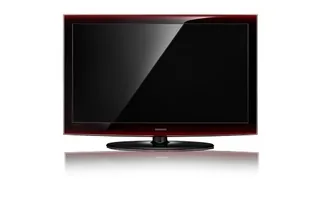
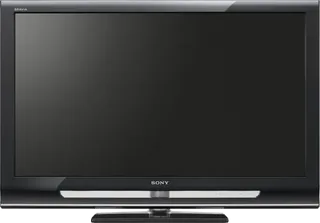
| Colours | Gloss black bezel with a translucent dark red edge, called rose black in contemporary reviews. | Black bezel with clear lower insert and silver trim. |
| In the box | – | RM-ED011 remote, supplied table stand, AC cable and operating instructions. Planned autumn 2008 availability appears in launch coverage; the actual first-sale month is unverified, so release uses year precision. |
More comparisons
- Sony BRAVIA 7 II vs Sony BRAVIA W4500
- Sony BRAVIA 9 II vs Sony BRAVIA W4500
- LG OLED evo C6 vs Samsung LCD A656
- Sony BRAVIA 3 II vs Sony BRAVIA W4500
- Sony BRAVIA 8 II vs Sony BRAVIA W4500
- Samsung LCD A656 vs Samsung Neo QLED QN90F
- Sony BRAVIA 5 vs Sony BRAVIA W4500
- Sony BRAVIA 3 vs Sony BRAVIA W4500
- Sony BRAVIA 9 vs Sony BRAVIA W4500
- Sony BRAVIA 8 vs Sony BRAVIA W4500
- LG LM660T vs Sony BRAVIA W4500
- LG LE8900 vs Sony BRAVIA W4500
- Sony BRAVIA EX500 vs Sony BRAVIA W4500
- Sony BRAVIA W4500 vs Sony BRAVIA W5500
- Samsung LCD A656 vs Samsung LED B8000
- Samsung LCD A656 vs Sony BRAVIA W5500