Lenovo ThinkPad X1 Carbon Gen 14 · Photo source
Lenovo · ThinkPad X1
ThinkPad X1 Carbon Gen 14
Lenovo's 2026 flagship 14-inch business ultralight, built on Intel Core Ultra Series 3 (Panther Lake) processors with a starting weight under 1 kg, suited to professionals who travel and want a full set of ports and easily replaceable parts.
Model history · 2 models, 2024–2026
- 2024ThinkPad X1 Carbon Gen 13Compare
- 2026ThinkPad X1 Carbon Gen 14
- Size
- 14″
- Display
- IPS LCD, 60 Hz
- Processor
- Intel Core Ultra 5 or 7
- Memory
- 32 GB
- Weight
- 0.977 kg
- Battery
- 32.8 h
What reviewers say
Reviewers praise the light, sturdy build, excellent keyboard and ports, easier repairs and faster Panther Lake processors, with much better battery life than the previous generation. Engadget and Ultrabook Review found it expensive; Notebookcheck and Ultrabook Review were unimpressed by the IPS screen option, which Notebookcheck found poorly calibrated, and Notebookcheck disliked the large webcam bump.
From notebookcheck.net, engadget.com and ultrabookreview.com
Specifications
Report a wrong or missing specDisplay
- Screen size
- 14″
- Resolution
- 1920 × 1200
- Panel
- IPS LCD
- Refresh rate
- 60 Hz
- Brightness
- 500 nits
- Touchscreen
- Yes
- Display type
- WUXGA IPS, 16:10; in-cell touch (low power) or on-cell touch with ThinkPad Privacy Guard
- Colour range
- 100% sRGB
- Screen finish
- Anti-glare
- Display features
- 1,500:1 contrast; 85° viewing angles; Eyesafe Certified 2.0; 88.8% screen-to-body ratio; Privacy Guard with Privacy Alert on Privacy Guard models
Performance
- Processor
- Intel Core Ultra 5 325 or Intel Core Ultra 7 356H
- CPU cores
- 8 or 16
- CPU threads
- 8 or 16
- Graphics
- Intel Graphics
- AI engine (NPU)
- 47 TOPS or 50 TOPS
- Memory
- 32 GB
- Storage
- 256 GB to 1 TB
- CPU
- Core Ultra 5 325 with 4 P-cores and 4 LP E-cores (12 MB cache); Core Ultra 7 356H with 4 P-cores, 8 E-cores and 4 LP E-cores (18 MB cache)
- GPU
- Integrated Intel Graphics (up to 40 TOPS), shared memory, DirectX 12 Ultimate
- AI engine
- Copilot+ PC
- Memory type
- LPDDR5X-8533, soldered (not upgradable), dual-channel; may run at a lower speed due to platform limits
- Storage type
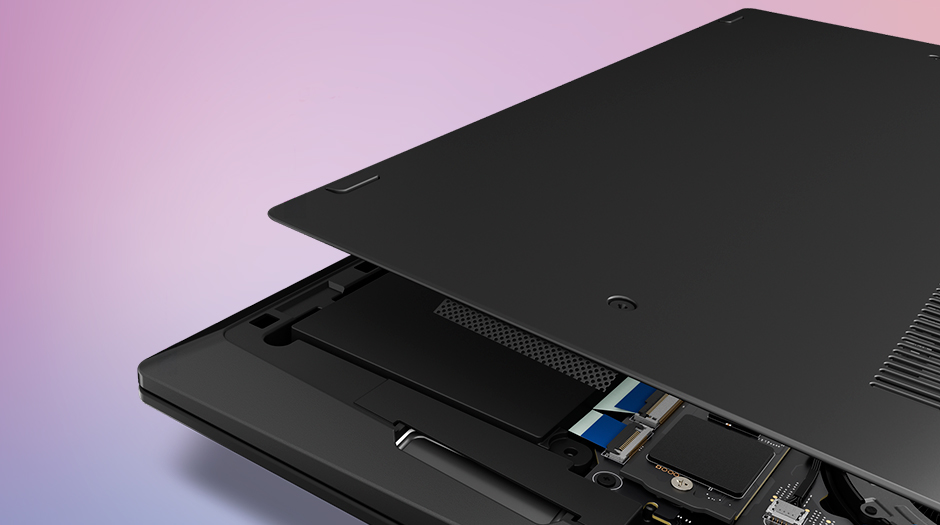
- One M.2 2280 PCIe 5.0 x4 slot; PCIe 4.0 x4 or PCIe 5.0 x4 NVMe SSD up to 2 TB, Opal 2.0
- Cooling
- Fans; Lenovo quotes up to 20% better heat dissipation and 30 W sustained power
Battery and size
- Battery life (maker's claim)
- Up to 32.8 hours
- Battery capacity
- 58 Wh
- Weight
- 0.977 kg
- Thickness
- 14.3 mm
- Width × depth
- 312.5 × 215.75 mm
- Battery life detail
- 58 Wh Li-ion; MobileMark 30 up to 19.2 hr, JEITA 3.0 up to 18.9 hr video and 38.0 hr idle (Lenovo test with Core Ultra 5 325, 16 GB and WUXGA Privacy Guard touch screen)
- Charger
- 65 W USB-C (PD 3.0) adapter, including nano and slim GaN versions; offerings vary by country
- Fast charging
- Rapid Charge to 80% in 1 hour with the 65 W adapter (when off, in standby or hibernating)
- Materials
- Carbon fibre top cover and aluminium bottom cover (WUXGA models); MIL-STD-810H tested
- Colours
- Black; Black FIFA Edition
Connections
- Ports
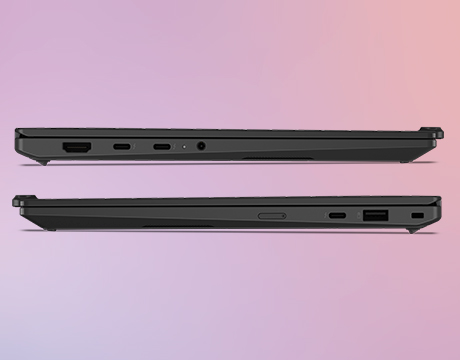
- 3 × Thunderbolt 4, USB-A, HDMI, headphone jack
- Wi-Fi
- Wi-Fi 7
- Bluetooth
- 5.4
- Webcam
- 5MP with IR
- Operating system
- Windows
- Port detail
- 3 × Thunderbolt 4 with USB PD 15–65 W and DisplayPort 2.1; USB-A 5 Gbps (Always On); HDMI 2.1 up to 4K 60 Hz; 3.5 mm headphone/mic combo jack; nano-SIM slot on WWAN models
- External displays
- Up to three external displays (four including the built-in); Thunderbolt up to 8K 60 Hz, HDMI up to 4K 60 Hz
- Keyboard
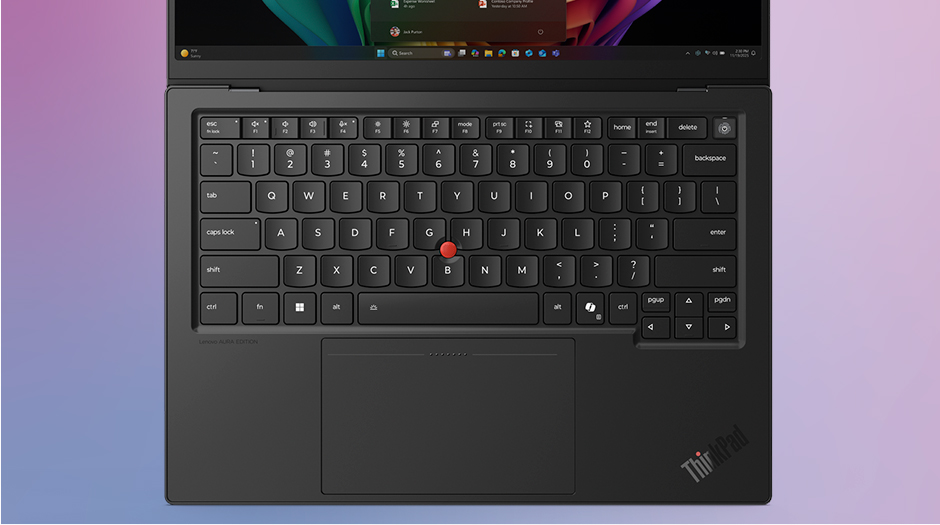
- 6-row, spill-resistant, backlit; 1.5 mm key travel (1.35 mm on Fn row and G/H/B); Copilot key; TrackPoint
- Trackpad
- Glass haptic touchpad (80 × 130 mm) or Mylar 3-button trackpad (80 × 120 mm)
- Speakers
- Stereo 2 W × 2, Dolby Atmos
- Microphones
- Dual-microphone array, 360° far-field
- Biometrics
- Fingerprint reader in the power button (match-on-chip); IR camera for Windows Hello
Configurations
| Processor | Memory | Storage |
|---|---|---|
| Intel Core Ultra 5 325 | 32 GB | 256 GB |
| Intel Core Ultra 7 356H | 32 GB | 512 GB |
| Intel Core Ultra 7 356H | 32 GB | 1 TB |
Pros and cons
Pros
- Starting weight under 1 kg (0.977 kg)
- Three Thunderbolt 4 ports plus USB-A and HDMI 2.1
- Customer-replaceable battery, keyboard, SSD and USB-C ports
Cons
- RAM is soldered and cannot be upgraded
- Base 1920x1200 IPS screen is limited to 60Hz
- No SD card reader
- The UK models' touch screen adds weight; a reviewer weighed one at 1.14 kg
Closest rivals
Model | Size | Display | Processor | Memory | Weight | Battery | Released |
|---|---|---|---|---|---|---|---|
| 14″ | OLED, 60 Hz | Qualcomm Snapdragon X or Snapdragon X Elite | 16 GB – 32 GB | 0.98 kg | 32 h | Jan 2025 | |
| 14″ | OLED, 60 Hz | Qualcomm Snapdragon X2 Elite | 16 GB | 0.99 kg | 33 h | Jan 2026 | |
| 14″ | OLED, 60 Hz | Intel Core Ultra 5, 7 or 9 | 16 GB – 32 GB | 1.12 kg | 22 h | Mar 2026 |
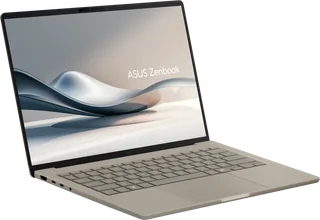
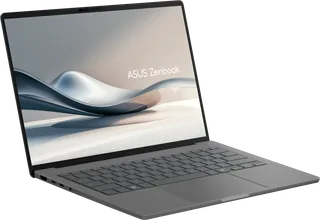


Previous model: ThinkPad X1 Carbon Gen 13.
Sources
- psref.lenovo.com/Product/ThinkPad/ThinkPad_X1_Carbon_Gen_14_Aura_Edition
- psref.lenovo.com/syspool/Sys/PDF/ThinkPad/ThinkPad_X1_Carbon_Gen_14_Aura_Editio…
- lenovo.com/gb/en/p/laptops/thinkpad/thinkpadx1/lenovo-thinkpad-x1-carbon-gen-14…
- techtoday.lenovo.com/sites/default/files/2026-02/thinkpad-x1-carbon-gen-14-aura…
- news.lenovo.com/pressroom/press-releases/lenovo-at-ces-2026-smarter-ai-meets-pu…
- notebookcheck.net/Flagship-business-laptop-with-almost-24-hours-of-battery-life…
Photo: media.lenovonews.fiestic.com
- Lenovo ThinkPad X1 Carbon Gen 14 — 02 ThinkPad X1 Carbon FPR Backlit Front facing JD; maker Aura keyboard-lit studio configuration: Lenovo official press archive — ThinkPad X1/X1CarbonG14-AuraProduct/png/02_ThinkPad_X1_Carbon_FPR_Backlit_Front_facing_JD.png
- Lenovo ThinkPad X1 Carbon Gen 14 — 04 ThinkPad X1 Carbon FPR Backlit Front facing left; maker Aura keyboard-lit studio configuration: Lenovo official press archive — ThinkPad X1/X1CarbonG14-AuraProduct/png/04_ThinkPad_X1_Carbon_FPR_Backlit_Front_facing_left.png
- Lenovo ThinkPad X1 Carbon Gen 14 — 05 ThinkPad X1 Carbon FPR Backlit Front facing right; maker Aura keyboard-lit studio configuration: Lenovo official press archive — ThinkPad X1/X1CarbonG14-AuraProduct/png/05_ThinkPad_X1_Carbon_FPR_Backlit_Front_facing_right.png
- Lenovo ThinkPad X1 Carbon Gen 14 — 01 ThinkPad X1 Carbon FPR Backlit Front facing: Lenovo official press archive — ThinkPad X1/X1CarbonG14-Product/png/01_ThinkPad_X1_Carbon_FPR_Backlit_Front_facing.png
- Lenovo ThinkPad X1 Carbon Gen 14 — 02 ThinkPad X1 Carbon FPR Backlit Front facing JD: Lenovo official press archive — ThinkPad X1/X1CarbonG14-Product/png/02_ThinkPad_X1_Carbon_FPR_Backlit_Front_facing_JD.png
- Lenovo ThinkPad X1 Carbon Gen 14 — 03 ThinkPad X1 Carbon FPR Backlit Left 180 degrees: Lenovo official press archive — ThinkPad X1/X1CarbonG14-Product/png/03_ThinkPad_X1_Carbon_FPR_Backlit_Left_180_degrees.png
- Lenovo ThinkPad X1 Carbon Gen 14 — 04 ThinkPad X1 Carbon FPR Backlit Front facing left: Lenovo official press archive — ThinkPad X1/X1CarbonG14-Product/png/04_ThinkPad_X1_Carbon_FPR_Backlit_Front_facing_left.png
- Lenovo ThinkPad X1 Carbon Gen 14 — 06 ThinkPad X1 Carbon FPR Backlit Right side with screen 1 4 open: Lenovo official press archive — ThinkPad X1/X1CarbonG14-Product/png/06_ThinkPad_X1_Carbon_FPR_Backlit_Right_side_with_screen_1_4_open.png
- Lenovo ThinkPad X1 Carbon Gen 14 — 07 ThinkPad X1 Carbon FPR Backlit Rear facing left: Lenovo official press archive — ThinkPad X1/X1CarbonG14-Product/png/07_ThinkPad_X1_Carbon_FPR_Backlit_Rear_facing_left.png
- Lenovo ThinkPad X1 Carbon Gen 14 — 08 ThinkPad X1 Carbon FPR Backlit Right profile 180 degrees: Lenovo official press archive — ThinkPad X1/X1CarbonG14-Product/png/08_ThinkPad_X1_Carbon_FPR_Backlit_Right_profile_180_degrees.png
- Lenovo ThinkPad X1 Carbon Gen 14 — 09 ThinkPad X1 Carbon FPR Backlit Left profile closed: Lenovo official press archive — ThinkPad X1/X1CarbonG14-Product/png/09_ThinkPad_X1_Carbon_FPR_Backlit_Left_profile_closed.png
- Lenovo ThinkPad X1 Carbon Gen 14 — 10 ThinkPad X1 Carbon FPR Backlit Right profile closed: Lenovo official press archive — ThinkPad X1/X1CarbonG14-Product/png/10_ThinkPad_X1_Carbon_FPR_Backlit_Right_profile_closed.png
- Lenovo ThinkPad X1 Carbon Gen 14 — 11 ThinkPad X1 Carbon FPR Backlit Left profile open: Lenovo official press archive — ThinkPad X1/X1CarbonG14-Product/png/11_ThinkPad_X1_Carbon_FPR_Backlit_Left_profile_open.png
- Lenovo ThinkPad X1 Carbon Gen 14 — 12 ThinkPad X1 Carbon FPR Backlit Right profile open: Lenovo official press archive — ThinkPad X1/X1CarbonG14-Product/png/12_ThinkPad_X1_Carbon_FPR_Backlit_Right_profile_open.png
- Lenovo ThinkPad X1 Carbon Gen 14 — 13 ThinkPad X1 Carbon FPR Backlit Rear facing closed: Lenovo official press archive — ThinkPad X1/X1CarbonG14-Product/png/13_ThinkPad_X1_Carbon_FPR_Backlit_Rear_facing_closed.png
- Lenovo ThinkPad X1 Carbon Gen 14 — 14 ThinkPad X1 Carbon FPR Backlit Front facing closed: Lenovo official press archive — ThinkPad X1/X1CarbonG14-Product/png/14_ThinkPad_X1_Carbon_FPR_Backlit_Front_facing_closed.png
- Lenovo ThinkPad X1 Carbon Gen 14 — 15 ThinkPad X1 Carbon FPR Backlit Rear facing A D Cover: Lenovo official press archive — ThinkPad X1/X1CarbonG14-Product/png/15_ThinkPad_X1_Carbon_FPR_Backlit_Rear_facing_A_D_Cover.png
- Lenovo ThinkPad X1 Carbon Gen 14 — 16 ThinkPad X1 Carbon FPR Backlit Front facing B C Cover: Lenovo official press archive — ThinkPad X1/X1CarbonG14-Product/png/16_ThinkPad_X1_Carbon_FPR_Backlit_Front_facing_B_C_Cover.png
- Lenovo ThinkPad X1 Carbon Gen 14 (left), with ThinkPad X1 2-in-1 Gen 11 and its pen (right); labelled maker family line-up: Lenovo official press archive — ThinkPad X1/X1CarbonG14-specialty/png/08_ThinkPad_X1_Carbon_FPR_Backlit_Family_Shot.png
- Lenovo ThinkPad X1 Carbon Gen 14 Aura Edition, keyboard and trackpad close-up: Lenovo exact product gallery
- Lenovo ThinkPad X1 Carbon Gen 14 Aura Edition, underside with bottom cover lifted: Lenovo exact product gallery
- Lenovo ThinkPad X1 Carbon Gen 14 Aura Edition, left and right closed side profiles: Lenovo exact product gallery