Photo 1 of 4
Dell UltraSharp U2713H · Dell brochure, archived at Dustin; page 1, embedded member Im1.jp2
Dell · UltraSharp
UltraSharp U2713H
A 27-inch QHD wide-gamut IPS monitor with factory-calibrated Adobe RGB, DisplayPort daisy chaining and hardware calibration support.
Model history · 2 models, 2010–2012
- 2010UltraSharp U2711Compare
- 2012UltraSharp U2713H
- Size
- 27″
- Resolution
- 2560 × 1440
- PPI
- 109
- Panel
- IPS
- Refresh
- 60 Hz
- Brightness
- 350 nits
- HDR
- –
- USB-C power
- –
What reviewers say
TFTCentral and PC Monitors praised the U2713H's wide colour gamut, accurate sRGB and Adobe RGB presets and cleaner coating than the U2711. Both found it a strong monitor for colour work but observed some overdrive artefacts in games; TFTCentral found uneven brightness on its sample and little benefit from the uniformity compensation setting.
From tftcentral.co.uk and pcmonitors.info
Specifications
Report a wrong or missing specDisplay
- Screen size
- 27″
- Resolution
- 2560 × 1440 (QHD)
- Sharpness
- 109 pixels per inch
- Panel
- IPS (GB-LED edge-lit AH-IPS wide-gamut panel.)
- Refresh rate
- 60 Hz
- Response time (grey to grey)
- 6 ms
- Brightness (typical)
- 350 nits
- Contrast ratio
- 1,000:1
- Colour range
- 100% sRGB; 99% Adobe RGB
- Colour accuracy (Delta E)
- Below 2
- Screen finish
- Matte
- Shape
- Flat
- Colour depth
- Up to 1.074 billion colours with 12-bit internal processing and 14-bit lookup table, according to Dell.
- sRGB coverage
- 100%, according to Dell.
- Adobe RGB coverage
- 99%, according to Dell.
- Colour accuracy
- Factory-calibrated sRGB and Adobe RGB presets; Dell includes a unit-specific calibration report.
- Colour modes
- sRGB, Adobe RGB, CAL1 and CAL2 user calibration slots, Custom Color and other presets.
- Response time detail
- 6 ms grey-to-grey, typical.
- Viewing angles
- 178° horizontal and vertical, typical.
- Pixel pitch
- 0.231 mm.
- Calibration
- Dell UltraSharp Color Calibration Software supports the X-Rite i1Display Pro at launch.
Connections
- Video inputs
- HDMI, 2 × DisplayPort 1.2
- USB-C charging
- None
- USB ports
- 4 × USB-A
- Speakers
- No
- HDMI detail
- One HDMI input; one dual-link DVI-D input also provided.
- DisplayPort detail
- One DisplayPort input, one Mini DisplayPort input and one DisplayPort 1.2 MST output; MST must be enabled in the menu.
- Daisy chaining
- DisplayPort 1.2 MST output supports a second compatible monitor.
- USB hub detail
- Four USB 3.0 downstream Type-A ports and one upstream Type-B port; one downstream port supports BC 1.2 charging. Integrated card reader.
- Picture by picture
- Picture-in-picture and picture-by-picture modes.
- Audio out
- Audio line out for external speakers; Dell says headphones are unsupported.
Design
- Stand adjusts
- Height, tilt, swivel, pivot
- VESA mount
- Yes
- Weight with stand
- 6.3 kg
- Height adjustment
- 115 mm.
- VESA pattern
- 100 × 100 mm.
- Size with stand
- 639.3 × 200.5 × 423.4–538.4 mm (width × depth × height).
- Size without stand
- 639.3 × 74.1 × 378.2 mm (width × depth × height).
- Weight without stand
- 6.30 kg without cables.
Power and support
- Power use
- 60 W typical and 130 W maximum with USB and soundbar active, according to Dell.
- Power supply
- 100–240 V AC, 50/60 Hz.
- Software
- Dell Display Manager and UltraSharp Color Calibration Software included at launch.
- Certifications
- ENERGY STAR, EPEAT Gold and TCO Certified Displays, according to Dell.
- In the box
- Monitor and stand, power cable, Mini DisplayPort-to-DisplayPort cable, dual-link DVI cable, USB 3.0 upstream cable, factory calibration report and documentation.
Pros and cons
Pros
- 99% Adobe RGB and 100% sRGB coverage
- Factory-calibrated colour modes and user calibration slots
- DisplayPort MST output and four USB 3.0 ports
Cons
- 60 Hz refresh and no adaptive sync
- No USB-C video or laptop charging
- Wide gamut needs a suitable colour mode for standard sRGB content
Closest rivals
Model | Size | Resolution | PPI | Panel | Refresh | Brightness | HDR | USB-C power | Released |
|---|---|---|---|---|---|---|---|---|---|
| 27″ | 2560 × 1440 | 109 | IPS | 60 Hz | 375 nits | – | – | Sept 2010 | |
| 27″ | 2560 × 1440 | 109 | IPS | 60 Hz | 375 nits | – | – | Sept 2011 | |
| 27″ | 2560 × 1440 | 109 | IPS | 60 Hz | 350 nits | – | – | 2010 |
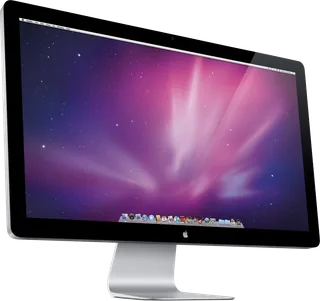
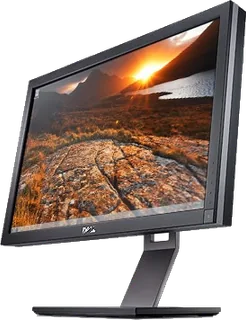
Previous model: UltraSharp U2711.
Sources
- dl.dell.com/manuals/all-products/esuprt_display_projector/esuprt_display/dell-u…
- media.dustin.eu/media/d2000010011002419/ultrasharp-u2713h-product-data-sheet-br…
- dell.com/support/product-details/en-uk/product/dell-u2713h/resources/manuals
Photo: Dell brochure, archived at Dustin; page 1, embedded member Im1.jp2
- UltraSharp U2713H — Side view with its stand.: Dell brochure, archived at Dustin; page 1, embedded member Im0.jpg
- UltraSharp U2713H — Front view with photo applications inside the physical screen.: Dell brochure, archived at Dustin; page 1, embedded member Im0.jpg
- UltraSharp U2713H — Close-up of the physical rear connectors.: Dell brochure, archived at Dustin; page 1, embedded member Im4.jpg