Photo 1 of 9
Dell UltraSharp 27 USB-C Hub Monitor (U2721DE) · Dell official exact-model support page
Dell · UltraSharp
UltraSharp 27 USB-C Hub Monitor (U2721DE)
Dell's 27-inch QHD IPS monitor with 65 W USB-C laptop charging, Ethernet and DisplayPort daisy chaining.
- Size
- 27″
- Resolution
- 2560 × 1440
- PPI
- 109
- Panel
- IPS
- Refresh
- 60 Hz
- Brightness
- 350 nits
- HDR
- –
- USB-C power
- 65 W
What reviewers say
RTINGS and Guide de la Gestion des Couleurs praised the U2721DE's flexible stand and extensive ports for desk work. RTINGS found wide viewing angles but limited contrast and gaming performance; Guide de la Gestion des Couleurs liked its factory colour balance but found only average brightness uniformity and a limited wide-colour gamut.
From rtings.com and guide-gestion-des-couleurs.com
Specifications
Report a wrong or missing specDisplay
- Screen size
- 27″
- Resolution
- 2560 × 1440 (QHD)
- Sharpness
- 109 pixels per inch
- Panel
- IPS
- Refresh rate
- 60 Hz
- Response time (grey to grey)
- 5 ms
- Brightness (typical)
- 350 nits
- Contrast ratio
- 1,000:1
- Colour range
- 99% sRGB, 99% Rec.709, 85% DCI-P3
- DCI-P3 coverage
- 85%
- Colour accuracy (Delta E)
- Below 2
- Screen finish
- Matte
- Shape
- Flat
- Colour depth
- 16.7 million colours
- sRGB coverage
- 99% sRGB and 99% Rec.709 claimed by Dell
- Response time detail
- 5 ms Fast, 8 ms Normal, grey-to-grey
- Viewing angles
- 178° horizontal and vertical
- Pixel pitch
- 0.233 mm
- Eye care
- Flicker-free panel and ComfortView low-blue-light mode
- Calibration
- Factory average Delta E below 2, according to Dell
Connections
- Video inputs
- HDMI, DisplayPort 1.4, USB-C
- USB-C charging
- Up to 65 W
- USB ports
- 4 × USB-A
- KVM switch
- No
- Ethernet
- Yes
- Speakers
- No
- DisplayPort detail
- One DisplayPort 1.4 input and one DisplayPort output with MST support.
- USB-C detail
- USB-C upstream carries DisplayPort 1.4 video and USB 3.1 data, with up to 65 W Power Delivery.
- Daisy chaining
- DisplayPort MST output for a second compatible display.
- USB hub detail
- Two standard USB 3.0 downstream ports and two USB 3.0 downstream ports with BC 1.2 charging at up to 2 A.
- Audio out
- 3.5 mm audio line output
Design
- Stand adjusts
- Height, tilt, swivel, pivot
- VESA mount
- Yes
- Height adjustment
- 130 mm
- Tilt
- -5° to 21°
- Swivel
- -40° to 40°
- VESA pattern
- 100 × 100 mm
- Size with stand
- 612.2 × 180 × 390.2–520.2 mm (W × D × H)
- Size without stand
- 612.2 × 39 × 355 mm (W × D × H)
- Weight without stand
- 4.19 kg
Power and support
- Power use
- 22.6 W on, 0.2 W standby, 0.2 W off, 160 W maximum
- Power supply
- 100–240 V AC, 50–60 Hz
- Software
- Dell Display Manager
- Certifications
- ENERGY STAR and TCO Certified; EPEAT registration varies by country
- In the box
- Stand, DisplayPort cable and USB-C cable
Pros and cons
Pros
- USB-C carries video and data while charging a laptop at up to 65 W
- Ethernet, four USB-A ports and DisplayPort output support a connected desk setup
- Height, tilt, swivel and pivot adjustments
Cons
- 60 Hz panel lacks variable refresh support
- 85% DCI-P3 claim is narrower than wide-gamut UltraSharp successors
- No built-in speakers
Closest rivals
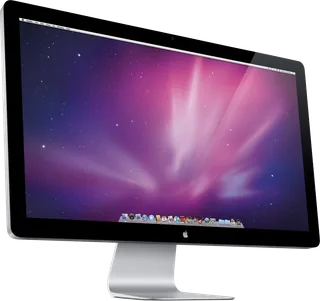
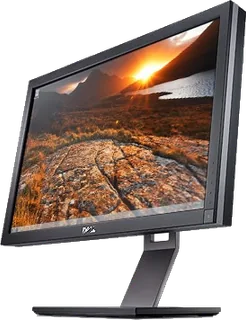
Model | Size | Resolution | PPI | Panel | Refresh | Brightness | HDR | USB-C power | Released |
|---|---|---|---|---|---|---|---|---|---|
| 27″ | 2560 × 1440 | 109 | IPS | 60 Hz | 375 nits | – | – | Sept 2010 | |
| 27″ | 2560 × 1440 | 109 | IPS | 60 Hz | 375 nits | – | – | Sept 2011 | |
| 27″ | 2560 × 1440 | 109 | IPS | 60 Hz | 350 nits | – | – | 2010 |
Sources
- dl.dell.com/manuals/all-products/esuprt_electronics_accessories/esuprt_electron…
- dell.com/support/product-details/en-ie/product/dell-u2721de-monitor/resources/m…
- computerbase.de/news/monitore/dell-u2421he-u2721de-office-monitore.71888
Photo: Dell official exact-model support page
- UltraSharp 27 USB-C Hub Monitor (U2721DE) — Angled front view with applications inside the screen.: Dell official Japanese brochure; page 1, embedded member Im1.jp2
- UltraSharp 27 USB-C Hub Monitor (U2721DE) — Front view with optional AE515M soundbar attached.: Dell official Japanese brochure; page 4, embedded member Im1.jp2
- UltraSharp 27 USB-C Hub Monitor (U2721DE) — Underside view of the physical connector panel.: Dell official Japanese brochure; page 4, embedded member Im3.jp2
- UltraSharp 27 USB-C Hub Monitor (U2721DE) — Side view with its stand.: Dell official Japanese brochure; page 4, embedded member Im4.jp2
- UltraSharp 27 USB-C Hub Monitor (U2721DE) — Close-up of the side USB ports.: Dell official Japanese brochure; page 4, embedded member Im5.jp2
- UltraSharp 27 USB-C Hub Monitor (U2721DE) — Rear view with its stand.: Dell official Japanese brochure; page 4, embedded member Im6.jp2
- UltraSharp 27 USB-C Hub Monitor (U2721DE) — Portrait front view with applications inside the screen.: Dell official Japanese brochure; page 4, embedded member Im7.jp2
- UltraSharp 27 USB-C Hub Monitor (U2721DE) — Front view with applications inside the screen.: Dell official Japanese brochure; page 4, embedded member Im8.jp2