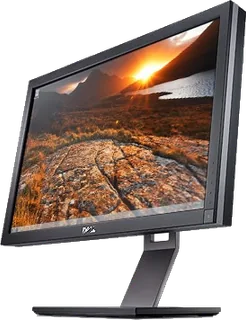
Home Monitors Dell UltraSharp 27 Monitor (U2722D) Dell · UltraSharp
UltraSharp 27 Monitor (U2722D) Released March 2021
Dell's 27-inch QHD 60 Hz IPS monitor with wide colour coverage, a USB data hub and DisplayPort daisy chaining.
Compare with another monitor Compare with… UltraSharp 32 4K QD-OLED (U3226Q) (2026) UltraSharp 52 Thunderbolt Hub (U5226KW) (2026) UltraSharp 27 4K Thunderbolt Hub (U2725QE) (2025) UltraSharp 32 4K Thunderbolt Hub (U3225QE) (2025) UltraSharp 34 Curved Thunderbolt Hub (U3425WE) (2024) UltraSharp 40 Curved Thunderbolt Hub (U4025QW) (2024) UltraSharp 27 Monitor (U2724D) (2023) UltraSharp 27 Thunderbolt Hub (U2724DE) (2023) UltraSharp 24 (U2424H) (2023) UltraSharp 24 USB-C Hub (U2424HE) (2023) UltraSharp 27 4K USB-C Hub Monitor (U2723QE) (2022) UltraSharp 27 USB-C Hub Monitor (U2722DE) (2021) UltraSharp 27 USB-C Hub Monitor (U2721DE) (2020) UltraSharp 27 4K USB-C Monitor (U2720Q) (2020) UltraSharp 27 USB-C Monitor (U2719DC) (2018) UltraSharp U2719D (2018) UltraSharp 27 4K Monitor (U2718Q) (2017) UltraSharp U2717D (2016) UltraSharp 27 Monitor with PremierColor (UP2716D) (2015) UltraSharp U2415 (2014) UltraSharp U2715H (2014) UltraSharp U2414H (2013) UltraSharp U2713H (2012) UltraSharp U2713HM (2012) UltraSharp U2412M (2011) UltraSharp U2711 (2010) UltraSharp U2410 (2009) Apple Thunderbolt Display (2011) Apple LED Cinema Display (27-inch) (2010) Predator X27U F5 (2025) ProCreator PE320QXT (2025) AGON PRO AG326UZD2 (2026) Q27G4SRU (2025) Studio Display (2026) (2026) Studio Display XDR (2026) Studio Display (2022) (2022) LED Cinema Display (24-inch) (2008) Cinema HD Display (30-inch, DVI) (2004) Cinema Display (20-inch, DVI) (2004) Cinema HD Display (23-inch, DVI) (2004) Cinema Display (20-inch, ADC) (2003) Cinema HD Display (23-inch, ADC) (2002) Studio Display (17-inch LCD, 2001) (2001) Cinema Display (22-inch, ADC) (2000) Studio Display (15-inch ADC, 2000) (2000) Studio Display (17-inch CRT ADC, 2000) (2000) Cinema Display (22-inch, DVI) (1999) Studio Display (15-inch DVI, 1999) (1999) Studio Display (15-inch LCD, 1999) (1999) Studio Display (17-inch CRT, 1999) (1999) Studio Display (21-inch CRT, 1999) (1999) Studio Display (15-inch LCD, 1998) (1998) AppleVision 750 Display (1997) AppleVision 850 (1997) AppleVision 850AV (1997) Multiple Scan 720 Display (1997) AppleVision 1710AV (1995) Multiple Scan 14 Display (1995) Multiple Scan 1705 Display (1995) Multiple Scan 15 Display (1994) Multiple Scan 17 Display (1994) Multiple Scan 20 Display (1994) Apple AudioVision 14 Display (1993) Apple Color Plus 14-inch Display (1993) Macintosh Portrait Display (1989) AppleColor High-Resolution RGB Monitor (1987) ROG Swift OLED PG27UCWM (2026) ROG Strix Pulsar XG27AQNGV (2026) ProArt Display PA278CGRV (2025) ProArt Display 6K PA32QCV (2025) ROG Strix OLED XG27UCDMG (2025) ROG Swift OLED PG32UCDM (2024) ZOWIE XQ2566X (2026) MOBIUZ EX321UZ (2026) PD2730S (2025) 24 Low Mount Adjustable Stand Monitor (SE2426HSR) (2026) Alienware 32 240Hz (AW3226DM) (2026) Alienware 34 240Hz (AW3426DWM) (2026) Pro 24 Adjustable Stand Monitor with Speakers (E2426HS) (2026) Pro 24 Monitor (E2426H) (2026) Pro 27 Monitor (E2726H) (2026) 27 Low Mount Adjustable Stand Monitor (SE2726HSR) (2026) Alienware 34 280Hz QD-OLED (AW3426DW) (2026) Alienware 39 5K OLED (AW3926QW) (2026) 27 QHD Monitor (SE2726D) (2026) Alienware 27 240Hz QD-OLED (AW2726DM) (2026) Alienware 27 280Hz (AW2726DL) (2026) Pro 24 Video Conferencing Monitor (E2426HB) (2026) Pro P 24 (P2426H) (2026) Pro P 24 16:10 USB-C Hub (P2426E) (2026) Pro P 24 USB-C Hub (P2426HE) (2026) 24 Monitor (SE2426H) (2026) 27 Monitor (SE2726H) (2026) 24 240Hz Monitor (SE2426HG) (2026) 27 240Hz Monitor (SE2726HG) (2026) Pro 27 Adjustable Stand Monitor (E2726HS) (2026) Pro 27 QHD Monitor (E2726DS) (2026) 24 Plus Monitor (S2425HSM) (2025) 27 Plus Monitor (S2725HSM) (2025) 27 Plus QHD Monitor (S2725DSM) (2025) 27 Plus QHD USB-C (S2725DC) (2025) Alienware 25 320Hz (AW2525HM) (2025) Alienware 27 280Hz QD-OLED (AW2725D) (2025) Alienware 34 240Hz QD-OLED (AW3425DW) (2025) 27 Plus 4K Monitor (S2725QS) (2025) 27 Plus 4K USB-C (S2725QC) (2025) Pro 24 Monitor (E2425HM) (2025) Pro 24 Plus QHD USB-C Hub (P2425DE) (2025) Pro 27 Plus 4K USB-C Hub (P2725QE) (2025) Pro 27 Plus QHD USB-C Hub (P2725DE) (2025) Alienware 27 4K QD-OLED (AW2725Q) (2025) Alienware 27 4K Dual-Resolution (AW2725QF) (2024) Pro 24 Plus (P2425H) (2024) Pro 24 Plus USB-C Hub (P2425HE) (2024) Pro 27 Plus (P2725H) (2024) Pro 27 Plus USB-C Hub (P2725HE) (2024) Alienware 27 360Hz QD-OLED (AW2725DF) (2024) Alienware 32 4K QD-OLED Gaming Monitor (AW3225QF) (2024) Alienware 500Hz (AW2524HF) (2023) Alienware 34 Curved QD-OLED (AW3423DW) (2022) Alienware 34 Curved QD-OLED (AW3423DWF) (2022) G27Q26 (2026) AORUS FO27Q5P (2025) M27UP (2025) MO32U (2024) Series 7 Pro 31.5″ 4K Thunderbolt 4 Docking Monitor (732xk) (2026) HyperX OMEN OLED 27qs (2026) ThinkVision P27UD-40 (2026) Legion 27Q-10 (2025) Legion Pro 32UD-10 (2025) UltraGear evo GX9 (39GX950B) (2026) UltraGear OLED GX7 (27GX790B) (2026) UltraFine evo 6K (32U990A) (2025) UltraGear OLED 34GX900A (2025) UltraGear OLED 27GX700A (2025) UltraGear OLED 45GX950A (2025) UltraGear 27G850A-B (2025) UltraGear OLED GX7 (27GX790A) (2024) UltraFine 27US550 (2024) UltraGear OLED 32GS95UE (2024) UltraGear 27GR83Q-B (2023) UltraGear 27GL850-B (2019) MPG 322UR QD-OLED X24 (2026) MPG 341CQR QD-OLED X36 (2026) PRO MAX 271PHW E14 (2026) PRO MP251 E14L (2025) PRO MP273QW E14 (2025) MAG 274QP QD-OLED X24 (2025) MAG 272QP QD-OLED X50 (2025) MAG 274QRFW E20 (2025) MAG 325QF E18V (2025) MPG 346CQRF X24 (2025) MAG 275UPD E14 (2025) MAG 321CQF E18 (2025) MAG 322URDF E16 (2025) MAG 274F (2025) MAG 275QF X32 (2025) MAG 274QF (2025) MAG 342CQR E2 (2024) MPG 341CQPX QD-OLED (2024) MPG 321URX QD-OLED (2024) Evnia 32M2N8900P (2026) Brilliance 27E3U7903 (2025) Odyssey OLED G8 32″ (G80SH) (2026) ViewFinity S7 (S70H) 27″ (2026) ViewFinity S8 (S80HF) (2026) Odyssey G7 G75F (37″) (2025) Odyssey OLED G6 (G60SF) (2025) Odyssey G9 (G91F) (2025) Odyssey OLED G8 G81SF 27-inch (2025) ViewFinity S8 S80UD (37″) (2025) Odyssey OLED G8 (G80SD) (2024) Odyssey OLED G9 G95SC (2023) Odyssey Neo G9 G95NC (2023) INZONE M10S II (2026) INZONE M10S (2024) INZONE M9 II (2024) INZONE M3 (2022) INZONE M9 (2022) GDM-F520 (2001) GDM-FW900 (2000) ColorPro VP2788-5K (2025)
Size 27″
Resolution 2560 × 1440
PPI 109
Panel IPS
Refresh 60 Hz
Brightness 350 nits
HDR –
USB-C power – What reviewers say TFTCentral and MonitorNerds found the U2722D well suited to office work, praising its QHD workspace, wide colour gamut and adjustable stand. Both found the factory sRGB mode more accurate than the default wide-gamut mode and considered its 60 Hz response less suited to fast games; MonitorNerds also noted the lack of USB-C video input.
From tftcentral.co.uk and monitornerds.com
Display
Screen size 27″
Resolution 2560 × 1440 (QHD)
Sharpness 109 pixels per inch
Panel IPS
Refresh rate 60 Hz
Response time (grey to grey) 5 ms
Brightness (typical) 350 nits
Contrast ratio 1,000:1
Colour range 100% sRGB, 100% Rec.709, 95% DCI-P3
DCI-P3 coverage 95%
Screen finish Matte
Shape Flat
Colour depth 1.07 billion colours
sRGB coverage 100% sRGB and 100% Rec.709 claimed by Dell
Colour modes Factory-calibrated sRGB and Rec.709 presets, plus Standard and wider-gamut modes
Response time detail 5 ms Fast, 8 ms Normal, grey-to-grey
Viewing angles 178° horizontal and vertical
Pixel pitch 0.2331 mm
Eye care ComfortView Plus low-blue-light backlight and flicker-free operation
Calibration Factory-calibrated sRGB and Rec.709 presets with a calibration report in the box Connections
Video inputs HDMI, DisplayPort 1.4
USB-C charging None
USB ports 3 × USB-A, USB-C
KVM switch No
Ethernet No
Speakers No
DisplayPort detail One DisplayPort 1.4 input and one DisplayPort output for MST daisy chaining.
USB-C detail Rear USB-C 3.2 Gen 2 upstream is for data only; the bottom quick-access downstream USB-C port provides up to 15 W.
Daisy chaining DisplayPort MST output for a second compatible display.
USB hub detail Two rear USB-A 3.2 Gen 2 ports, one quick-access USB-A with Battery Charging 1.2, and one quick-access USB-C 3.2 Gen 2 with up to 15 W.
Picture by picture Picture-in-picture and picture-by-picture modes
Audio out 3.5 mm audio line output Design
Stand adjusts Height, tilt, swivel, pivot
VESA mount Yes
Height adjustment 150 mm
Tilt -5° to 21°
Swivel -45° to 45°
Pivot -90° to 90°
VESA pattern 100 × 100 mm
Size with stand 611.3 × 185 × 385.1–535.1 mm (W × D × H)
Size without stand 611.3 × 49.5 × 352 mm (W × D × H)
Weight without stand 4.38 kg Power and support
Power use 20 W on, 0.5 W standby, 0.3 W off, 74 W maximum
Energy class E
Power supply 100–240 V AC, 50–60 Hz
Software Dell Display Manager
Certifications ENERGY STAR, EPEAT Gold and TCO Certified
Warranty Dell three-year Advanced Exchange Service and Premium Panel Exchange
In the box Stand, DisplayPort cable, USB-C to USB-A upstream cable and factory calibration report Pros and cons Pros + 100% sRGB, 100% Rec.709 and 95% DCI-P3 coverage claimed by Dell+ DisplayPort output and four downstream USB hub ports+ Height, tilt, swivel and pivot adjustmentsCons − USB-C port carries data only, without video input or laptop charging− 60 Hz panel has no advertised HDR or adaptive sync support− No built-in speakers