Apple Cinema Display (22-inch, DVI) vs Dell Alienware 500Hz (AW2524HF)
Better figure, where one is clearly better
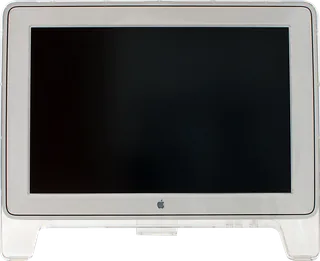
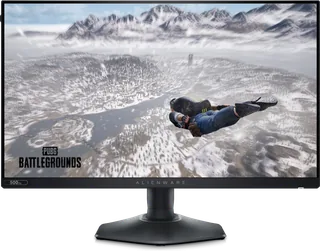
| AppleCinema Display (22-inch, DVI) | DellAlienware 500Hz (AW2524HF) | |
|---|---|---|
| Overview | ||
| Released | December 1999 | September 2023 |
| Display | ||
| Screen size | 22″ | 24.5″ |
| Resolution | 1600 × 1024 | 1920 × 1080 (Full HD) (better) |
| Sharpness | 86 pixels per inch | 90 pixels per inch (better) |
| Panel | LCD (Thin-film transistor active-matrix LCD; Apple does not identify the panel subtype in the original documentation read) | IPS (Fast IPS) |
| Refresh rate | – | 500 Hz |
| Response time (grey to grey) | – | 0.5 ms |
| Brightness (typical) | 180 nits | 400 nits (better) |
| HDR formats | – | HDR10 |
| Contrast ratio | 300:1 | 1,000:1 |
| Colour range | – | 99% sRGB |
| Colour accuracy (Delta E) | – | Below 1.5 |
| Screen finish | Matte | Matte |
| Shape | Flat | Flat |
| Adaptive sync | – | FreeSync Premium, VESA AdaptiveSync, HDMI VRR |
| Colour depth | Up to 16.7 million colours; Apple does not identify the panel bit depth | 1.07 billion colours |
| sRGB coverage | – | 99% |
| Colour accuracy | – | ΔE2000 < 1.5 (average) in the sRGB preset mode |
| Colour modes | – | FPS, MOBA/RTS, RPG, Sports, three custom game modes, sRGB |
| HDR detail | – | HDR10 |
| Response time detail | – | 0.5 ms grey-to-grey minimum, 1 ms most observed (Extreme); 2 ms (Super Fast); 3 ms (Fast) |
| Variable refresh range | – | 48–480 Hz over DisplayPort (500 Hz overclocked); 48–255 Hz over HDMI (vertical scan range) |
| Viewing angles | 160° horizontally and vertically, typical | 178° horizontal, 178° vertical (typical) |
| Pixel pitch | – | 0.2832 mm x 0.2802 mm (90 ppi) |
| Eye care | – | ComfortView Plus hardware low blue light (TÜV Rheinland hardware solution); flicker-free |
| Connections | ||
| Video inputs | DVI | HDMI 2.1, 2 × DisplayPort 1.4 |
| USB-C charging | None | None |
| USB ports | 2 × USB-A | 4 × USB-A |
| Ethernet | – | No |
| Speakers | – | No |
| HDMI detail | – | 1 x HDMI 2.1 (HDCP 1.4), up to 1920 x 1080 at 255 Hz (TMDS) with HDR and VRR |
| DisplayPort detail | – | 2 x DisplayPort 1.4 (HDCP 1.4), up to 1920 x 1080 at 500 Hz with HDR and VRR |
| Other connections | Captive 24-pin DVI connector with TMDS; separate DC power input and USB connection | – |
| USB hub detail | Two-port self-powered USB 1.1 hub; up to 500 mA per port | USB 5Gbps; 1 x USB-B upstream; 2 x USB-A rear; 2 x USB-A bottom (one with BC1.2 charging) |
| Design | ||
| Stand adjusts | Tilt | Height, tilt, swivel, pivot (better) |
| VESA mount | – | Yes |
| Weight with stand | 11.4 kg | 6.01 kg |
| Height adjustment | – | 110 mm |
| Tilt | 10° to 30° | -5° to 21° |
| Swivel | – | -20° to 20° |
| Pivot | – | -90° to 90° |
| VESA pattern | – | 100 x 100 mm |
| Size with stand | 588 × 479 × 210 mm minimum depth; maximum depth 310 mm (width × height × depth) | 555.14 x 243.71 x 390.51–500.51 mm (W x D x H) |
| Size without stand | – | 555.14 x 84 x 328.86 mm (W x D x H) |
| Weight without stand | – | 3.65 kg |
| Controls | System startup and sleep, power on and off, brightness | – |
| Colours | Clear acrylic enclosure with graphite bezel | Dark grey |
| Power and support | ||
| Power use | Apple Support lists maximum 77 W and energy saver 35 W; original AppleCare specifications list operating consumption below 62 W | 18.5 W on mode, 0.5 W standby, 0.3 W off, 74 W maximum |
| Power supply | External power supply, 100–240 V AC; adapter weighs 398 g, separate from the 11.4 kg display | 100–240 VAC, 50/60 Hz, 1.2 A |
| Certifications | – | AMD FreeSync Premium, VESA AdaptiveSync Display, TÜV Rheinland hardware low blue light |
| Warranty | – | 3 years limited with Advanced Exchange Service and Premium Panel Exchange (US) |
| In the box | – | Stand, power cable, DisplayPort 1.4 cable (1.8 m), USB-C to DisplayPort 1.4 cable (1 m), USB-A to USB-B 5Gbps cable (1.8 m), Alienware sticker |
| Software | Requires a Power Mac G4 with AGP 2X slot, DVI graphics card and built-in USB | – |
More comparisons
- Dell Alienware 500Hz (AW2524HF) vs Dell Alienware 32 240Hz (AW3226DM)
- Dell Alienware 500Hz (AW2524HF) vs Dell Alienware 34 240Hz (AW3426DWM)
- Apple Cinema Display (22-inch, DVI) vs Dell Pro 24 Monitor (E2426H)
- Dell Alienware 500Hz (AW2524HF) vs Dell Alienware 34 280Hz QD-OLED (AW3426DW)
- Dell Alienware 500Hz (AW2524HF) vs Dell Alienware 39 5K OLED (AW3926QW)
- Dell Alienware 500Hz (AW2524HF) vs Dell Alienware 27 240Hz QD-OLED (AW2726DM)
- Dell Alienware 500Hz (AW2524HF) vs Dell Alienware 27 280Hz (AW2726DL)
- Apple Cinema Display (22-inch, DVI) vs Apple Studio Display (2026)
- Apple Cinema Display (22-inch, DVI) vs Dell 24 240Hz Monitor (SE2426HG)
- Dell Alienware 500Hz (AW2524HF) vs Dell Alienware 25 320Hz (AW2525HM)
- Dell Alienware 500Hz (AW2524HF) vs Dell Alienware 27 280Hz QD-OLED (AW2725D)
- Apple Cinema Display (22-inch, DVI) vs Dell Pro 24 Monitor (E2425HM)
- Apple Cinema HD Display (23-inch, ADC) vs Dell Alienware 500Hz (AW2524HF)
- Apple Cinema Display (22-inch, DVI) vs Apple Thunderbolt Display
- Apple Cinema Display (22-inch, DVI) vs Apple LED Cinema Display (27-inch)
- Apple Cinema Display (22-inch, DVI) vs Apple LED Cinema Display (24-inch)