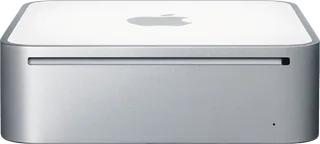
Apple Mac mini (Late 2006) vs Apple Mac mini (Mid 2011)
Better figure, where one is clearly better
| AppleMac mini (Late 2006) | AppleMac mini (Mid 2011) | |
|---|---|---|
| Overview | ||
| Released | September 2006 | July 2011 |
| Performance | ||
| Processor | Intel Core Duo T2300 or Intel Core Duo T2400 | Intel Core i5-2415M, Intel Core i5-2520M, Intel Core i7-2620M or Intel Core i7-2635QM |
| CPU cores | 2 | 2 or 4 |
| CPU threads | – | 4 or 8 |
| Graphics | Intel GMA950 | Intel HD Graphics 3000 or AMD Radeon HD 6630M (256 MB GDDR5) |
| Memory | 512 MB, 1 GB or 2 GB | 2 GB, 4 GB or 8 GB (better) |
| Storage | 60 GB to 160 GB | 256 GB to 1.5 TB (better) |
| CPU | 1.66 GHz Intel Core Duo T2300 or 1.83 GHz Core Duo T2400, both dual-core, with 2 MB L2 cache and 667 MHz frontside bus; exact identities cross-checked with EveryMac | Consumer models have a 2.3 GHz dual-core Core i5-2415M or 2.5 GHz dual-core Core i5-2520M, with a 2.7 GHz dual-core Core i7-2620M option only on the 2.5 GHz model. The server has a 2.0 GHz quad-core Core i7-2635QM. Exact CPU identities are cross-checked with EveryMac; the i5-2415M's four threads come from its exact-model sheet because an individual current Intel sheet was unavailable. |
| GPU | Intel GMA950 shares 64 MB DDR2 with main memory; maker footnote specifies minimum 80 MB graphics/setup usage, leaving 432 MB available from a standard 512 MB configuration | The 2.3 GHz model has Intel HD Graphics 3000 with at least 288 MB shared memory; 2.5/2.7 GHz consumer configurations have AMD Radeon HD 6630M with 256 MB GDDR5. Server configurations have Intel HD Graphics 3000 with at least 384 MB shared memory. |
| Memory type | 512 MB standard as two modules of 667 MHz DDR2 SDRAM (PC2-5300); factory options 1 or 2 GB and maximum 2 GB | 1333 MHz DDR3 memory. The 2.3 GHz model has 2 GB, configurable to 4 or 8 GB; other configurations have 4 GB, configurable to 8 GB. The bottom cover provides access for memory replacement. |
| Storage type | 1.66 GHz model has a 60 GB 5400 rpm SATA hard drive, configurable to 80, 120 or 160 GB; 1.83 GHz model has 80 GB, configurable to 120 or 160 GB. Lower model Combo drive reads DVDs and burns CDs; higher model 8x SuperDrive burns DVDs with 2.4x double-layer support. | The 2.3 GHz consumer model offers a 500 GB 5400 rpm or 750 GB 7200 rpm hard drive. The 2.5/2.7 GHz consumer models additionally offer a 256 GB SSD or a separate 256 GB SSD plus 750 GB hard drive. Server choices are two 500 GB or two 750 GB 7200 rpm hard drives, a single or two 256 GB SSDs, or a separate 256 GB SSD and 750 GB hard drive. Server hard-drive capacities in configurations are the total of two drives (1000/1500 GB), and 512 GB SSD means two 256 GB drives. Mixed SSD/hard-drive combinations are described here rather than assigned one misleading storage type; they are not Fusion Drives. |
| Expansion slots | – | No internal PCI Express expansion slot or optical drive; removable bottom cover for memory access. Optional external MacBook Air SuperDrive or DVD/CD Sharing from another computer. |
| Display | ||
| Screen | None built in | None built in |
| Connections | ||
| Ports | 4 × USB-A, Ethernet, headphone jack | Thunderbolt, 4 × USB-A, HDMI, Ethernet, SD card slot, headphone jack |
| Ethernet | 1 Gb/s | 1 Gb/s |
| External displays | Up to 1 | Up to 2 (better) |
| Wi-Fi | 802.11g | 802.11n |
| Bluetooth | 2.0 + EDR | 4.0 |
| Back ports | Four USB 2.0 ports, one FireWire 400 port at 8 W, DVI output, Gigabit Ethernet, combined optical digital/analogue audio input and combined optical digital/headphone output. DVI, FireWire and audio input described here because the main port list has no fields for them; no HDMI or DisplayPort. | Thunderbolt up to 10 Gb/s, FireWire 800 up to 800 Mb/s, four USB 2.0 up to 480 Mb/s, HDMI, SDXC, Gigabit Ethernet and separate digital/analogue audio input and output minijacks. FireWire and the audio input are described here because the main port list has no fields for them. |
| External displays | DVI digital output up to 1920 × 1200; included VGA adapter supports up to 1920 × 1080. Optional Apple DVI to Video Adapter provides S-video/composite output. | Maker specifies dual display and mirroring; Thunderbolt up to 2560 × 1600 and HDMI up to 1920 × 1200. HDMI to DVI adapter included; Mini DisplayPort adapters optional. |
| Speakers | Built-in speaker | Built-in speaker; digital/analogue headphone output, multichannel HDMI audio and support for an Apple iPhone headset with microphone |
| Keyboard and mouse | Apple Remote and DVI-to-VGA adapter; display, keyboard and mouse sold separately | Display, keyboard and mouse are purchased separately; Apple Remote and external SuperDrive optional |
| Design and power | ||
| Type | Compact | Compact |
| Weight | 1.31 kg | – |
| Width × depth × height | 165.1 × 165.1 × 50.8 mm | 197 × 197 × 36 mm |
| Operating system | macOS | macOS |
| Size and weight detail | – | Consumer models weigh 1.22 kg; the server weighs 1.37 kg. Actual weight varies by configuration and manufacturing process; a shared weight is omitted. |
| Power supply | Maximum continuous power 110 W; 100–240 V AC, 50–60 Hz single phase | Internal supply; AC input 100–240 V, 50–60 Hz single phase; maximum continuous power 85 W |
| Noise | – | The consumer page's headline gives 16 dBA idle, while its model-specific table gives 13 dB for 2.3 GHz and 15 dB for 2.5 GHz at idle, with 16 dB during hard-drive access. The server page gives 17 dBA idle. Figures depend on configuration and measurement position; no single value is selected. |
| Materials | – | Recyclable aluminium enclosure; BFR-free. PVC-free except China mainland, Korea and South Africa, where only internal cables are PVC-free. |
| In the box | Mac mini, Apple Remote, power cord, install/restore DVDs and documentation. Mac OS X Tiger, iLife '06 and Front Row; Rosetta translates compatible PowerPC applications. | Mac mini, HDMI to DVI adapter, power cord and documentation. OS X Lion and iLife included; server adds Lion Server with an unlimited-client licence. Lion Recovery and Internet Recovery support system restoration without a physical install disc. |

More comparisons
- Apple Mac mini (M6 or M5 Pro) vs Apple Mac mini (Mid 2011)
- Apple Mac mini (Late 2006) vs Apple Mac mini (M6 or M5 Pro)
- Apple Mac mini (M4 or M4 Pro) vs Apple Mac mini (Mid 2011)
- Apple Mac mini (Late 2006) vs Apple Mac mini (M4 or M4 Pro)
- Apple Mac mini (M2 or M2 Pro) vs Apple Mac mini (Mid 2011)
- Apple Mac mini (Late 2006) vs Apple Mac mini (M2 or M2 Pro)
- Apple Mac mini (M1) vs Apple Mac mini (Mid 2011)
- Apple Mac mini (Late 2006) vs Apple Mac mini (M1)
- Apple Mac mini (2018) vs Apple Mac mini (Mid 2011)
- Apple Mac mini (2018) vs Apple Mac mini (Late 2006)
- Apple Mac mini (Late 2014) vs Apple Mac mini (Mid 2011)
- Apple Mac mini (Late 2006) vs Apple Mac mini (Late 2014)
- Apple Mac mini (Late 2012) vs Apple Mac mini (Mid 2011)
- Apple Mac mini (Late 2006) vs Apple Mac mini (Late 2012)
- Apple iMac (21.5-inch, Late 2011) vs Apple Mac mini (Mid 2011)
- Apple Mac mini (Late 2009) vs Apple Mac mini (Mid 2011)