Dell XPS 13 Plus 9320 (2022) vs Dell XPS M1330
Better figure, where one is clearly better
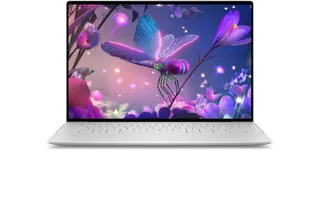
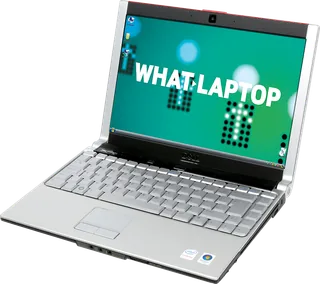
| DellXPS 13 Plus 9320 (2022) | DellXPS M1330 | |
|---|---|---|
| Overview | ||
| Released | 2022 | 2007 |
| Display | ||
| Screen size | 13.4″ | 13.3″ |
| Resolution | 1920 × 1200 or 3456 × 2160 (better) | 1280 × 800 |
| Panel | OLED | – |
| Refresh rate | 60 Hz | 60 Hz |
| Brightness | 500 nits or 400 nits (better) | 300 nits |
| Touchscreen | No or Yes | No |
| Display type | 13.4-inch display; FHD+ 1920 × 1200 LCD with or without touch, UHD+ 3840 × 2400 LCD touch, or 3.5K 3456 × 2160 OLED touch. All four options are 60 Hz; Dell describes the LCD panels as WVA without identifying IPS explicitly | 13.3-inch WXGA TrueLife LCD; LED and CCFL backlight options, both 1280 × 800 at 60 Hz. Dell publishes 300 cd/m² typical for LED and 220 cd/m² typical for CCFL; the main display describes LED |
| Pixel density | Dell publishes 169.3 ppi FHD+, 338.67 ppi UHD+ and 304 ppi OLED | – |
| Colour range | FHD+ 100% sRGB; UHD+ 90% DCI-P3; OLED 100% DCI-P3, as specified by Dell | – |
| Screen finish | Non-touch FHD+ is anti-glare; touch FHD+, UHD+ and OLED are anti-reflective | Glossy TrueLife surface |
| Display features | LCD typical brightness 500 nits; OLED 400 nits. Typical contrast 2000:1 FHD+, 1650:1 UHD+, 1,000,000:1 OLED. Eyesafe low-blue-light technology | Up to 140° opening angle; LED horizontal viewing angles ±50° minimum, vertical +40°/−50° minimum. Dell's manual reverses the screen width and height labels |
| Performance | ||
| Processor | Intel Core i5-1240P or Intel Core i7-1280P | Intel Core 2 Duo T7300 |
| CPU cores | 12 or 14 | 2 |
| CPU threads | 16 or 20 | – |
| Graphics | Intel Iris Xe Graphics | NVIDIA GeForce 8400M GS |
| Memory | 8 GB or 16 GB (better) | 2 GB |
| Storage | 512 GB (better) | 160 GB |
| CPU | This record covers the original 2022 12th-generation 28 W P-series version. Dell lists i5-1240P, i7-1260P, i5-1250P vPro, i7-1270P vPro and i7-1280P vPro; the later 2023 13th-generation refresh reused the 9320 identifier and is excluded here | Core 2 Duo or Celeron options in Dell's revised owner manual; the listed T7300 configuration is the exact 2007 model tested by Notebookcheck and Laptop Mag |
| GPU | Integrated Intel Iris Xe Graphics; no discrete GPU option | Intel 965 GM integrated graphics or optional GeForce 8400M GS with 128 MB dedicated video memory; the listed configuration has GeForce graphics |
| Memory type | Original 12th-generation models use soldered dual-channel LPDDR5-5200, in 8, 16 or 32 GB. The current manual separately lists LPDDR5-6000 for the later 13th-generation revision | Two user-accessible DDR2-667 SO-DIMM slots. Revised October 2008 maker manual supports up to 8 GB; the 2007 reviews state a 4 GB maximum |
| Storage type | One replaceable M.2 2230 or 2280 NVMe SSD; current manual lists 256 GB Gen 3/Gen 4, 512 GB self-encrypting Gen 3/Gen 4 and ordinary Gen 4 2280 SSDs up to 2 TB. Configurations shown are the exact original base and tested combinations documented by Tom’s Hardware | Replaceable internal SATA hard drive; listed 2 GB memory/160 GB 5400 rpm drive pairing is the exact review configuration. Slot-loading DVD±RW drive |
| Battery and size | ||
| Battery capacity | 55 Wh | – |
| Weight | 1.23 kg | – |
| Thickness | 15.28 mm | – |
| Width × depth | 295.3 × 199.04 mm | – |
| Battery life detail | 55 Wh three-cell lithium-ion; Dell does not publish a fixed runtime in the setup guide | Six-cell and nine-cell smart lithium-ion packs in the maker manual; Notebookcheck also documents four-cell 37 Wh, six-cell 56 Wh and nine-cell 85 Wh options. Runtime varies with workload and configuration; no maker hours claim is published |
| Charger | 60 W USB-C adapter | 65 W or 90 W adapter; 100–240 V AC input |
| Fast charging | Maker launch announcement claims about 80% charge in less than one hour with Express Charge 2.0; current setup guide lists approximately three hours charging with the computer switched off | Approximately four hours with the computer switched off |
| Materials | Aluminium body with glass palm rest; stated weight 1.23 kg for FHD+/UHD+ and 1.26 kg for OLED, subject to configuration and manufacturing variation | Magnesium-alloy chassis with brushed aluminium accents, according to Dell's reproduced launch announcement |
| Colours | Platinum or Graphite | Tuxedo Black, Pearl White or Crimson Red at introduction |
| Connections | ||
| Ports | 2 × Thunderbolt 4 | 2 × USB-A, HDMI, Ethernet, SD card slot, 2 × headphone jack |
| Wi-Fi | Wi-Fi 6E | Optional 802.11a/b/g/n |
| Bluetooth | 5.3 | Optional Bluetooth |
| Webcam | 720p at 30 fps, with separate IR camera | 0.3 MP with LED display or 2 MP with CCFL display |
| Operating system | Windows | Windows |
| Port detail | Two Thunderbolt 4 USB-C ports with Power Delivery and display output; charging occupies one. No integrated analogue audio jack or media-card reader. Current manual lists Intel AX211 Wi-Fi 6E and Bluetooth 5.3; the original Tom’s Hardware test specifies Bluetooth 5.2 | Two USB 2.0 Type-A, HDMI, VGA, 10/100 Ethernet, four-pin IEEE 1394, two headphone outputs and separate microphone input; ExpressCard/34 or /54 slot and eight-format card reader. Optional WLAN, WWAN and Bluetooth modules; 802.11a/b/g/n configuration confirmed by Laptop Mag |
| Keyboard | Backlit zero-lattice keyboard; UK layout has 65 keys. Capacitive top row switches between media controls and function keys | QWERTY, AZERTY or Kanji layouts; Europe keyboard 87/104 keys, according to the manual |
| Trackpad | Haptic touchpad concealed beneath glass, 112.30 × 64.15 mm; no visible boundary | 71.7 × 34.0 mm active area; separate buttons |
| Speakers | Two tweeters and two woofers, 2 W average and 2.5 W peak each | Two speakers, 2 W per channel; Sigmatel STAC9228 audio controller |
| Microphones | Dual digital-array microphones | Dual digital microphones |
| Biometrics | Fingerprint reader in the power button; separate infrared camera for Windows Hello | Optional fingerprint reader |
| In the box | Original review units included USB-C to USB-A and USB-C to 3.5 mm audio adapters; the current manual describes the audio adapter as sold separately, so bundles vary | – |
More comparisons
- Dell XPS 13 DX13260 vs Dell XPS 13 Plus 9320 (2022)
- Dell XPS 13 DX13260 vs Dell XPS M1330
- Dell XPS 13 Plus 9320 (2022) vs Dell XPS 14 DA14260
- Dell XPS 13 Plus 9320 (2022) vs Dell XPS 16 DA16260
- Dell XPS 14 DA14260 vs Dell XPS M1330
- Dell XPS 16 DA16260 vs Dell XPS M1330
- Dell XPS M1330 vs Lenovo ThinkPad X13 Gen 6 (AMD)
- Dell XPS M1330 vs Lenovo ThinkPad X13 Gen 6 (Intel)
- Dell XPS M1330 vs Microsoft Surface Laptop 13″ (1st Edition)
- Dell XPS 13 9350 vs Dell XPS 13 Plus 9320 (2022)
- Dell XPS 13 9350 vs Dell XPS M1330
- Dell XPS 13 Plus 9320 (2022) vs Dell XPS 14 9440
- Dell XPS 13 Plus 9320 (2022) vs Dell XPS 16 9640
- Dell XPS 14 9440 vs Dell XPS M1330
- Dell XPS 16 9640 vs Dell XPS M1330
- Dell XPS 13 Plus 9320 (2022) vs Lenovo ThinkPad X390