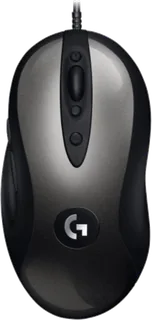
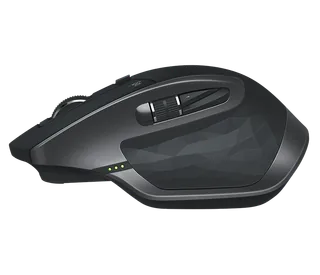
Logitech G MX518 Gaming Mouse vs Logitech MX Master 2S
Better figure, where one is clearly better
| LogitechG MX518 Gaming Mouse | LogitechMX Master 2S | |
|---|---|---|
| Overview | ||
| Released | February 2019 | June 2017 |
| Tracking | ||
| Shape | Ergonomic | Ergonomic |
| Hand | Right hand | Right hand |
| Sensitivity | Up to 16,000 DPI (better) | Up to 4,000 DPI |
| Sensor | HERO 16K optical | Darkfield high precision |
| Buttons | 8 (better) | 7 |
| Free-spinning wheel | – | Yes |
| Thumb wheel | – | Yes |
| Sensor | Logitech states 100–16,000 dpi, more than 400 inches per second tracking and no smoothing, filtering or acceleration. | 200–4,000 DPI in 50 DPI steps; tracks on glass at least 4 mm thick |
| Scroll wheel | Clickable stepped wheel; no free-spin mode. | Speed-adaptive wheel switches automatically between ratcheted and free-spinning modes through SmartShift; a top button also changes modes manually |
| Thumb wheel | – | Side-to-side scrolling by default; Logitech Options can assign other actions |
| Gestures | – | Button beneath the thumb rest supports a press and movement in four directions; up to five actions can be assigned |
| Connections and battery | ||
| Connects by | Cable | Bluetooth and USB receiver |
| Devices it switches between | – | 3 |
| Power | Cable | Rechargeable |
| Battery life (maker's claim) | – | Up to 70 days |
| Charging port | – | Micro-USB |
| Receiver | – | Unifying 2.4 GHz USB-A receiver included; Bluetooth 4.0 Low Energy also supported; Easy-Switch button underneath selects one of three paired computers |
| Charging | – | Micro-USB; 500 mAh lithium-polymer battery; Logitech claims one minute of charge gives about two hours of use |
| Works with | USB computer; Logitech G HUB or Logitech Gaming Software is optional for custom controls. | At launch, Unifying supported Windows 7 or later and Mac OS X 10.8 or later; Bluetooth Low Energy required Windows 8 or later or Mac OS X 10.10 or later |
| Software | Logitech G HUB or Logitech Gaming Software; settings can be kept in onboard memory. | Logitech Options for button mapping and Logitech Flow, which moves the pointer and copies content between computers |
| Design | ||
| Weight | – | 145 g |
| Size | – | 126 × 85.7 × 48.4 mm (length × width × height) |
| Materials | Plastic case with the original MX518 shape. | – |
| Colours | Dark grey and black. | Graphite (EMEA) |
| In the box | – | Mouse, Unifying receiver, Micro-USB charging cable and user documentation |
| Warranty | – | 2-year manufacturer's guarantee |
More comparisons
- Logitech MX Master 2S vs Logitech MX Master 4
- Logitech MX Ergo S vs Logitech MX Master 2S
- Logitech MX Anywhere 3S vs Logitech MX Master 2S
- Logitech MX Master 2S vs Logitech MX Master 3S
- Logitech MX Anywhere 3 vs Logitech MX Master 2S
- Logitech G MX518 Gaming Mouse vs SteelSeries Rival 3
- Logitech MX Master 2S vs Logitech MX Master 3
- Logitech G MX518 Gaming Mouse vs Logitech MX Master 3
- Logitech G MX518 Gaming Mouse vs Logitech G703 LIGHTSPEED
- Logitech G MX518 Gaming Mouse vs Logitech MX518 Gaming-Grade Optical Mouse
- Logitech G MX518 Gaming Mouse vs Logitech G502 HERO
- Logitech G MX518 Gaming Mouse vs Logitech M720 Triathlon
- Logitech MX Master 2S vs Logitech MX Vertical
- Logitech MX Master vs Logitech MX Master 2S
- Logitech MX Anywhere 2S vs Logitech MX Master 2S
- Logitech M720 Triathlon vs Logitech MX Master 2S