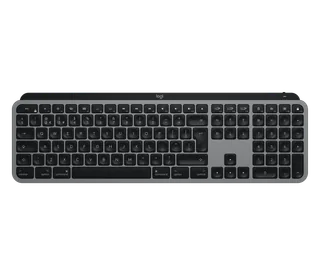
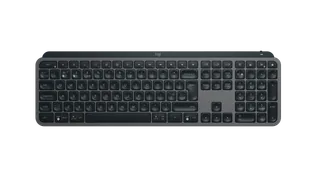
Logitech MX Keys vs Logitech MX Keys S
Better figure, where one is clearly better
| LogitechMX Keys | LogitechMX Keys S | |
|---|---|---|
| Overview | ||
| Released | September 2019 | June 2023 |
| Typing | ||
| Layout | Full size | Full size |
| Switches | Scissor | Scissor |
| Key travel | 1.8 mm | 1.8 mm |
| Backlight | White | White |
| Automatic backlight | Yes | Yes |
| Keys labelled for | Mac, Windows and more | Mac, Windows and more |
| Touch ID | No | No |
| Switches | Scissor switches with 60 g actuation force, rated for 10 million keystrokes (function keys 5 million) | Scissor switches with 60 g actuation force, rated for 10 million keystrokes (function keys 5 million) |
| Keycaps | Spherically dished keys with a matte coating; MX Keys for Mac has Mac-only laser-printed legends | Spherically dished keys shaped for fingertips |
| Layouts | MX Keys for Mac in English UK, Danish/Norwegian/Swedish/Finnish, French, German, Italian, Spanish and Swiss (UK store) | English UK, English International, Belgian, Croatian/Slovenian, Czech/Slovakian, Danish/Norwegian/Swedish/Finnish, French, German, Hebrew, Italian, Portuguese, Spanish, Swiss, Ukrainian (UK store); MX Keys S for Mac in English UK, English International, French, German and Swiss |
| Backlight | A hand proximity sensor turns it on and an ambient light sensor sets the level; eight levels; stays off in bright rooms (over 200 lux) and below 10% battery | A hand proximity sensor turns it on and an ambient light sensor sets the level; seven levels; stays off in bright rooms and below 10% battery; duration and brightness adjustable in Logi Options+ |
| Special keys | Easy-Switch keys; Fn + Esc swaps media keys and F-keys; legends for both Windows and Mac (a Mac layout with an Eject key on MX Keys for Mac) | Dictation, emoji and microphone mute/unmute keys in the F row; Easy-Switch keys; Fn + Esc swaps media keys and F-keys; legends for both Windows and Mac (a Mac layout on MX Keys S for Mac) |
| Connections and battery | ||
| Connects by | Bluetooth and USB receiver | Bluetooth and USB receiver |
| Devices it switches between | 3 | 3 |
| Power | Rechargeable | Rechargeable |
| Battery life (maker's claim) | Up to 5 months | Up to 5 months |
| With the backlight on | Up to 10 days | Up to 10 days |
| Receiver | Logitech Unifying USB receiver included with both versions | Logi Bolt USB receiver included (not compatible with other Logitech receivers); MX Keys S for Mac has none in the box but works with one, which Logitech advises for Macs with FileVault on |
| Battery life detail | Rechargeable 1500 mAh battery; Logitech quotes 10 days with backlighting or 5 months with it off | Rechargeable 1500 mAh Li-Po; Logitech quotes up to 10 days with its default backlight settings or up to 5 months with backlighting off |
| Charging | USB-C port at the top right; usable while charging; USB-A to USB-C cable (USB-C to USB-C with MX Keys for Mac) | USB-C port at the top right; usable while charging; USB-A to USB-C cable (USB-C to USB-C with MX Keys S for Mac) |
| Works with | At launch, Bluetooth with Windows 8 or 10, macOS 10.13 or later, iOS 9 or later, Android 6 or later and Linux, and Unifying with Windows 7, 8 or 10, macOS 10.13 or later, Android 6 or later and Linux; MX Keys for Mac lists macOS 10.15 or later, iOS 13.4 or later and iPadOS 14 or later | Bluetooth with Windows 10, 11 or later, macOS 10.15 or later, iPadOS 14 or later, Android 8.0 or later, Linux and ChromeOS; Logi Bolt with Windows 10, 11 or later, macOS 10.15 or later, Linux and ChromeOS; MX Keys S for Mac lists macOS 10.15 or later, iOS 14 or later and iPadOS 14 or later |
| Software | Logitech Options at launch, now Logi Options+ (Windows and macOS); Logitech Flow with a Flow-enabled Logitech mouse | Logi Options+ (Windows and macOS) for Smart Actions, key customisation and backlight settings; Logitech Flow with a Flow-enabled Logitech mouse |
| Design | ||
| Weight | 810 g | 810 g |
| Width × depth × height | 430.2 × 131.63 × 20.5 mm | 430.2 × 131.63 × 20.5 mm |
| Materials | – | Low-carbon aluminium key-module bracket; plastic parts include 26% (Graphite, Space Gray) or 11% (Pale Gray) certified post-consumer recycled plastic |
| Colours | MX Keys for Mac in Space Gray | Graphite, Pale Gray (UK store; Black also sold in the US); MX Keys S for Mac in Space Gray and Pale Grey |
| In the box | Keyboard, Unifying USB receiver, USB-C charging cable, documentation | Keyboard, Logi Bolt USB receiver, USB-A to USB-C charging cable, documentation (also sold with MX Palm Rest); MX Keys S for Mac comes with a USB-C to USB-C cable and no receiver |
| Warranty | 2-year limited hardware warranty (UK) | 2-year limited hardware warranty (UK) |
More comparisons
- Keychron B6 Pro vs Logitech MX Keys S
- Logitech MX Keys S vs Logitech Signature Slim K950
- Logitech MX Keys S vs Logitech Wave Keys
- Apple Magic Keyboard with Numeric Keypad (Lightning) vs Logitech MX Keys S
- Logitech MX Keys S vs Logitech MX Mechanical
- Logitech MX Keys S vs Logitech MX Mechanical Mini
- Logitech MX Keys Mini vs Logitech MX Keys S
- Logitech MX Keys vs Logitech MX Mechanical
- Logitech MX Keys vs Logitech MX Mechanical Mini
- Logitech MX Keys vs Logitech MX Keys Mini
- Apple Magic Keyboard with Numeric Keypad (Lightning) vs Logitech MX Keys
- Logitech G213 Prodigy vs Logitech MX Keys