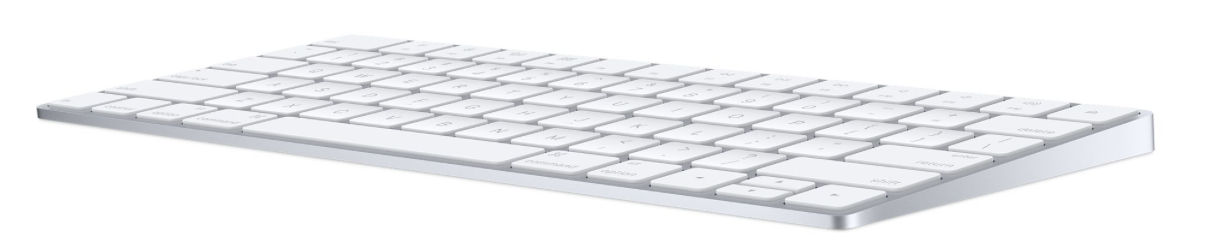
Magic Keyboard (2015, Lightning)
Apple's compact rechargeable keyboard with scissor switches and Lightning charging, for Macs and compatible iOS devices.
- Layout
- Compact
- Switches
- Scissor
- Backlight
- None
- Battery
- –
- Connects by
- Bluetooth
- Weight
- 231 g
What reviewers say
Reviewers liked the stable keys, compact aluminium design and convenient rechargeable battery, but considered the upgrade small for existing Apple keyboard owners. Macworld criticised the price and missing backlight or device switching; AppleInsider found it particularly useful for travel, while questioning the arrow-key layout.
From macworld.com and appleinsider.com
Specifications
Report a wrong or missing specTyping
- Layout
- Compact
- Switches
- Scissor
- Backlight
- None
- Keys labelled for
- Mac
- Touch ID
- No
- Switches
- Revised scissor mechanism; Apple's launch announcement describes a lower profile and increased key stability
- Special keys
- Multimedia function keys; half-height up and down arrows beside full-height left and right arrows, described by AppleInsider
Connections and battery
- Connects by
- Bluetooth
- Devices it switches between
- 1
- Power
- Rechargeable
- Battery life detail
- About a month or more between charges, according to Apple; tested in September 2015 with preproduction keyboards and shipping iMacs. Not an upper-bound battery-life claim.
- Charging
- Built-in rechargeable battery; Lightning-to-USB cable charges and automatically pairs with a Mac. Macworld confirms the keyboard can remain in use while plugged in.
- Works with
- Bluetooth-enabled Mac with OS X 10.11 or later; iOS devices running iOS 9.1 or later, according to the retained original specification
Design
- Weight
- 231 g
- Width × depth × height
- 279 × 114.9 × 10.9 mm
- Size
- Height 0.41–1.09 cm, width 27.9 cm and depth 11.49 cm; Apple's 0.231 kg weight varies by configuration and manufacturing process
- Materials
- Aluminium body, plastic keys and underside, described by AppleInsider
- Colours
- Silver body with white keys
- In the box
- Magic Keyboard and Lightning-to-USB cable. This entry covers the original 2015 model, distinct from later Lock-key, Touch ID and USB-C models.
Pros and cons
Pros
- Compact layout with full-size keys
- Automatically pairs with a Mac when connected by cable
- Apple quotes about a month or more between charges
Cons
- No backlight or numeric keypad
- No Touch ID
- No built-in switch between paired devices
Closest rivals
Model | Layout | Switches | Backlight | Battery | Connects by | Weight | Released |
|---|---|---|---|---|---|---|---|
| Compact | Scissor | None | – | Cable | – | Mar 2009 | |
| Compact | Scissor | None | – | Bluetooth | – | Oct 2009 | |
| Full size | Scissor | None | – | Bluetooth | 390 g | Jun 2017 |


Sources
- support.apple.com/en-gb/112443
- apple.com/uk/newsroom/2015/10/13Apple-Updates-iMac-Family-with-Stunning-New-Ret…
- appleinsider.com/articles/15/10/27/review-apples-magic-keyboard-was-made-to-hit…
- macworld.com/article/667443/apple-magic-keyboard-review.html
Photo: cdsassets.apple.com