Apple Magic Keyboard (2015, Lightning) vs Apple Magic Keyboard with Numeric Keypad (Lightning)
Better figure, where one is clearly better
| AppleMagic Keyboard (2015, Lightning) | AppleMagic Keyboard with Numeric Keypad (Lightning) | |
|---|---|---|
| Overview | ||
| Released | October 2015 | June 2017 |
| Typing | ||
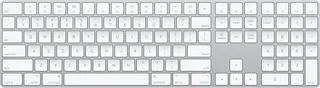
| Layout | Compact | Full size |
| Switches | Scissor | Scissor |
| Backlight | None | None |
| Keys labelled for | Mac | Mac |
| Touch ID | No | No |
| Switches | Revised scissor mechanism; Apple's launch announcement describes a lower profile and increased key stability | Scissor mechanism beneath each key, with a low-profile design |
| Special keys | Multimedia function keys; half-height up and down arrows beside full-height left and right arrows, described by AppleInsider | Numeric keypad, full-size arrow keys, document navigation controls and multimedia keys; F1–F19, Home, End, Page Up, Page Down and forward Delete are described in iMore's exact-model hands-on |
| Connections and battery | ||
| Connects by | Bluetooth | Bluetooth |
| Devices it switches between | 1 | 1 |
| Power | Rechargeable | Rechargeable |
| Battery life detail | About a month or more between charges, according to Apple; tested in September 2015 with preproduction keyboards and shipping iMacs. Not an upper-bound battery-life claim. | About a month or more between charges, according to Apple; tested in April 2017 with preproduction keyboards and shipping iMacs. Not an upper-bound battery-life claim. |
| Charging | Built-in rechargeable battery; Lightning-to-USB cable charges and automatically pairs with a Mac. Macworld confirms the keyboard can remain in use while plugged in. | Built-in rechargeable battery; the included Lightning-to-USB cable charges from a Mac or USB power adapter and automatically pairs with a Mac |
| Works with | Bluetooth-enabled Mac with OS X 10.11 or later; iOS devices running iOS 9.1 or later, according to the retained original specification | Bluetooth-enabled Mac with macOS 10.12.4 or later; iOS devices with iOS 10.3 or later. Apple's guide requires removing the existing pairing before pairing with a different Mac. |
| Software | – | Keyboard preferences configure modifier keys, shortcuts and input sources and show battery level |
| Design | ||
| Weight | 231 g (better) | 390 g |
| Width × depth × height | 279 × 114.9 × 10.9 mm | 418.7 × 114.9 × 10.9 mm |
| Size | Height 0.41–1.09 cm, width 27.9 cm and depth 11.49 cm; Apple's 0.231 kg weight varies by configuration and manufacturing process | Height 0.41–1.09 cm, width 41.87 cm and depth 11.49 cm; Apple's 0.39 kg weight varies by configuration and manufacturing process |
| Materials | Aluminium body, plastic keys and underside, described by AppleInsider | – |
| Colours | Silver body with white keys | Silver with white keys in the retained UK store listing |
| In the box | Magic Keyboard and Lightning-to-USB cable. This entry covers the original 2015 model, distinct from later Lock-key, Touch ID and USB-C models. | Keyboard and Lightning-to-USB-A cable. TechCrunch's 5 June 2017 launch report records immediate shipping; the retained maker sheet does not give a release date. This entry covers the Lightning model without Touch ID. |

More comparisons
- Apple Magic Keyboard (2015, Lightning) vs Apple Magic Keyboard (USB-C)
- Apple Magic Keyboard (2015, Lightning) vs Apple Magic Keyboard with Touch ID (USB-C)
- Apple Magic Keyboard with Numeric Keypad (Lightning) vs Apple Magic Keyboard with Touch ID and Numeric Keypad (USB-C)
- Apple Magic Keyboard with Numeric Keypad (Lightning) vs Logitech MX Keys S
- Apple Magic Keyboard (2015, Lightning) vs Logitech MX Keys Mini
- Apple Magic Keyboard with Numeric Keypad (Lightning) vs Logitech MX Keys
- Apple Magic Keyboard with Numeric Keypad (Lightning) vs Logitech G213 Prodigy
- Apple Magic Keyboard (2015, Lightning) vs Logitech G213 Prodigy
- Apple Apple Wireless Keyboard (2009) vs Apple Magic Keyboard (2015, Lightning)
- Apple Apple Keyboard (compact, 2009) vs Apple Magic Keyboard (2015, Lightning)