Apple MacBook Pro 13″ (M1) vs Apple MacBook Pro (13-inch, Mid 2012)
Better figure, where one is clearly better
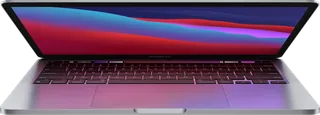
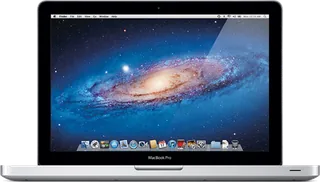
| AppleMacBook Pro 13″ (M1) | AppleMacBook Pro (13-inch, Mid 2012) | |
|---|---|---|
| Overview | ||
| Released | November 2020 | June 2012 |
| Display | ||
| Screen size | 13.3″ | 13.3″ |
| Resolution | 2560 × 1600 (better) | 1280 × 800 |
| Panel | IPS LCD | TN LCD |
| Refresh rate | 60 Hz | – |
| Brightness | 500 nits | – |
| Touchscreen | No | No |
| Display type | Retina display; LED-backlit with IPS technology | 13.3-inch LED-backlit glossy display, 1280 × 800 native resolution and millions of colours. TN panel identified by Notebookcheck’s exact-model review; brightness and refresh rate unpublished by Apple. |
| Pixel density | 227 ppi | – |
| Colour range | Wide colour (P3); millions of colours | – |
| Screen finish | Glossy (Notebookcheck) | – |
| Display features | True Tone; 60 Hz refresh rate (Notebookcheck) | – |
| Performance | ||
| Processor | Apple M1 | Intel Core i5-3210M or Intel Core i7-3520M |
| CPU cores | 8 | 2 |
| CPU threads | – | 4 |
| Graphics | 8-core GPU | Intel HD Graphics 4000 |
| Memory | 8 GB or 16 GB (better) | 4 GB or 8 GB |
| Storage | 256 GB to 2 TB (better) | 128 GB to 1 TB |
| CPU | 8-core CPU with 4 performance cores and 4 efficiency cores | 2.5 GHz dual-core Intel Core i5 with Turbo Boost up to 3.1 GHz and 3 MB L3 cache, or 2.9 GHz dual-core Core i7 with Turbo Boost up to 3.6 GHz and 4 MB L3 cache. i5-3210M identified by Notebookcheck; i7-3520M by EveryMac. |
| GPU | 8-core GPU | Intel HD Graphics 4000 |
| AI engine | 16-core Neural Engine | – |
| Memory type | Unified memory; 8 GB, configurable to 16 GB | 1600 MHz DDR3 in two SO-DIMM slots. Core i5 has 4 GB, configurable to 8 GB; Core i7 has 8 GB. |
| Storage type | SSD, configurable to 512 GB, 1 TB or 2 TB | Core i5 has a 500 GB 5400-rpm hard drive, configurable to 750 GB or 128 GB, 256 GB or 512 GB SSD. Core i7 has a 750 GB 5400-rpm hard drive, configurable to 1 TB or the same SSD capacities. Rows follow the CPU-specific maker storage sections. 8× slot-loading SuperDrive supports DVD±R DL, DVD±RW and CD-RW. |
| Cooling | Active cooling | – |
| Battery and size | ||
| Battery life (maker's claim) | Up to 20 hours | Up to 7 hours |
| Battery capacity | 58.2 Wh | 63.5 Wh (better) |
| Weight | 1.4 kg (better) | 2.06 kg |
| Thickness | 15.6 mm (better) | 24.1 mm |
| Width × depth | 304.1 × 212.4 mm | 325 × 227 mm |
| Battery life detail | Up to 17 hours wireless web; lithium-polymer battery | Built-in 63.5 Wh lithium-polymer battery; up to 7 hours wireless web in Apple’s test. Reference weight varies by configuration and manufacturing process. |
| Charger | 61 W USB-C Power Adapter | 60 W MagSafe Power Adapter with cable management |
| Materials | Recyclable, low-carbon aluminium enclosure | Aluminium unibody enclosure and glass trackpad |
| Colours | Silver, Space Grey | Silver |
| Connections | ||
| Ports | 2 × Thunderbolt 3, headphone jack | 2 × USB-A, MagSafe, headphone jack, SD card slot, Ethernet, Thunderbolt |
| Wi-Fi | Wi-Fi 6 | 802.11n; compatible with 802.11a/b/g |
| Bluetooth | 5.0 | 4.0 |
| Webcam | 720p FaceTime HD | 720p FaceTime HD camera |
| Operating system | macOS | macOS |
| Port detail | Two Thunderbolt / USB 4 ports supporting charging, DisplayPort, Thunderbolt 3 and USB 4 up to 40 Gb/s, and USB 3.1 Gen 2 up to 10 Gb/s; 3.5 mm headphone jack | One Thunderbolt port up to 10 Gb/s, two USB 3 ports up to 5 Gb/s, one FireWire 800 port up to 800 Mb/s, Gigabit Ethernet, SDXC card slot, MagSafe, headphone port with digital/analogue audio line output and iPhone headset support and Kensington lock slot. Thunderbolt provides native Mini DisplayPort output; DVI, VGA, dual-link DVI and HDMI require separate adapters. |
| External displays | One external display up to 6K 60 Hz alongside the built-in display | Built-in display plus one external display up to 2560 × 1600, both at millions of colours; dual display and video mirroring. |
| Keyboard | Backlit Magic Keyboard; 65 (US) or 66 (ISO) keys; Touch Bar; ambient light sensor | Full-size backlit keyboard with ambient light sensor, 78 US or 79 ISO keys, 12 function keys and four arrow keys. |
| Trackpad | Force Touch trackpad | Multi-Touch trackpad supports inertial scrolling, pinch, rotate, swipe, three- and four-finger swipe, tap, double-tap and drag. |
| Speakers | Stereo speakers with high dynamic range; wide stereo sound; Dolby Atmos playback | Stereo speakers with subwoofer |
| Microphones | Studio-quality three-mic array with high signal-to-noise ratio and directional beamforming | Omnidirectional microphone |
| Biometrics | Touch ID | – |
| In the box | 13-inch MacBook Pro, 61 W USB-C Power Adapter, USB-C Charge Cable (2 m) | MacBook Pro, display cleaning cloth, 60 W MagSafe power adapter, AC wall plug, power cord and documentation; OS X Lion and iLife. |
More comparisons
- Apple MacBook Pro 13″ (M1) vs Apple MacBook Pro 14″ (M5 Pro or M5 Max)
- Apple MacBook Pro 13″ (M1) vs Apple MacBook Pro 16″ (M5 Pro or M5 Max)
- Apple MacBook Pro (13-inch, Mid 2012) vs Apple MacBook Pro 14″ (M5 Pro or M5 Max)
- Apple MacBook Pro (13-inch, Mid 2012) vs Apple MacBook Pro 16″ (M5 Pro or M5 Max)
- Apple MacBook Pro (13-inch, Mid 2012) vs Apple MacBook Pro 14″ (M5)
- Apple MacBook Pro 13″ (M1) vs Apple MacBook Pro 14″ (M5)
- Apple MacBook Pro 13″ (M1) vs Apple MacBook Pro 14″ (M4 Pro or M4 Max)
- Apple MacBook Pro 13″ (M1) vs Apple MacBook Pro 14″ (M4)
- Apple MacBook Pro 13″ (M1) vs Apple MacBook Pro 16″ (M4 Pro or M4 Max)
- Apple MacBook Pro (13-inch, Mid 2012) vs Apple MacBook Pro 14″ (M4 Pro or M4 Max)
- Apple MacBook Pro (13-inch, Mid 2012) vs Apple MacBook Pro 14″ (M4)
- Apple MacBook Pro (13-inch, Mid 2012) vs Apple MacBook Pro 16″ (M4 Pro or M4 Max)
- Apple MacBook Pro 13″ (M1) vs Apple MacBook Pro 14″ (M3 Pro / M3 Max)
- Apple MacBook Pro 13″ (M1) vs Apple MacBook Pro 14″ (M3)
- Apple MacBook Pro (13-inch, Mid 2012) vs Apple MacBook Pro 14″ (M3 Pro / M3 Max)
- Apple MacBook Pro (13-inch, Mid 2012) vs Apple MacBook Pro 14″ (M3)