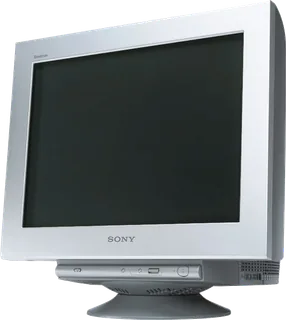
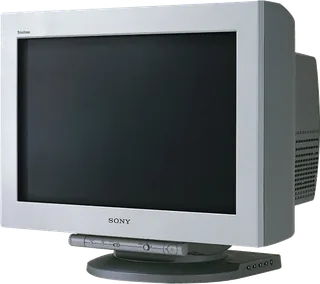
Sony GDM-F520 vs Sony GDM-FW900
Better figure, where one is clearly better
| SonyGDM-F520 | SonyGDM-FW900 | |
|---|---|---|
| Overview | ||
| Released | 2001 | 2000 |
| Display | ||
| Screen size | 19.8″ | 22.5″ |
| Panel | CRT (Flat FD Trinitron aperture-grille CRT; marketed as a 21-inch tube with a 19.8-inch viewable image. No fixed pixel matrix or native refresh rate.) | CRT (Flat FD Trinitron aperture-grille CRT; marketed as a 24-inch tube, with a 22.5-inch active diagonal in Sony's US brochure. No fixed pixel matrix or native refresh rate.) |
| Colour modes | PROFESSIONAL, STANDARD and DYNAMIC Picture Effect modes; EASY, PRESET, EXPERT and sRGB colour settings; 5000 K, 6500 K and 9300 K presets with 5000–11000 K adjustment in EASY | EASY, EXPERT and sRGB; 5000 K, 6500 K and 9300 K presets, adjustable colour temperature, RGB gain and bias |
| Pixel pitch | Uniform 0.22 mm aperture-grille pitch across the screen; not an LCD pixel pitch | Variable aperture-grille pitch, 0.23 mm at the centre to 0.27 mm at the edges; not an LCD pixel pitch |
| Supported signal modes | Sony specifies a maximum 2048 × 1536 at 85 Hz and recommends 1600 × 1200 at 85 Hz. Horizontal scan range 30–137 kHz; vertical scan range 48–170 Hz. These are supported timings, not native resolution or refresh. Maximum viewable area approximately 403.8 × 302.2 mm; standard image area 388 × 291 mm (4:3) or 364 × 291 mm (5:4). | Sony specifies a maximum 2304 × 1440 at 80 Hz and recommends 1920 × 1200 at 85 Hz (16:10). Horizontal scan range 30–121 kHz; vertical scan range 48–160 Hz. These are supported timings, not native resolution or refresh. Standard image area 474 × 296 mm (16:10), 395 × 296 mm (4:3), or 370 × 296 mm (5:4); maximum viewable area approximately 482.1 × 308.2 mm. |
| Screen coating | High Contrast AR screen coating | High Contrast AR screen coating |
| Calibration | RGB gain/bias, horizontal/vertical convergence, top/bottom vertical convergence, corner landing, geometry and moiré controls; automatic/manual degaussing and Image Restoration after a 30-minute warm-up | Horizontal and vertical convergence, top/bottom vertical convergence, geometry, landing and moiré adjustment; automatic and manual degaussing |
| Connections | ||
| Video inputs | VGA | VGA |
| USB-C charging | None | None |
| USB ports | 4 × USB-A | 4 × USB-A |
| Other connections | One HD15 VGA input and one analogue RGB video input comprising five BNC connectors (R, G, B, horizontal sync and vertical sync). Separate/composite sync and sync-on-green supported; DDC Plug & Play is available over HD15 only. | One HD15 VGA input and one analogue RGB input comprising five BNC connectors (R, G, B, horizontal sync and vertical sync). Supports separate/composite sync and sync-on-green; BNC does not support DDC Plug & Play. |
| USB hub detail | One square USB-B upstream connector and four rectangular USB-A downstream connectors on the right side; hub operates while the monitor is on or in power-saving mode | One square USB-B upstream connector and four rectangular USB-A downstream connectors; hub remains powered in monitor power-saving mode |
| Design | ||
| Stand adjusts | Tilt, swivel | Tilt, swivel |
| Weight with stand | 30 kg | 42 kg |
| Tilt | 5° down to 15° up | 5° down to 15° up |
| Swivel | 90° left or right | 165° left or right, as shown in the operating instructions |
| Size with stand | Approximately 497 × 499 × 487 mm (W × H × D) | Approximately 571.5 × 500 × 522.5 mm (W × H × D) |
| Weight detail | Approximately 30 kg for the complete monitor; Sony's instructions say not to remove the stand | Approximately 42 kg for the complete monitor |
| Controls | Front input selector, Picture Effect button, menu button and up/down/push control button; automatic sizing/centring, control lock and nine menu languages | Roll-in cylindrical control panel with joystick, input selector, automatic sizing/centring and reset; OSD control lock and nine menu languages |
| Colours | – | Metallic silver front bezel and navy-blue rear cabinet (Japanese archive description) |
| Power and support | ||
| Power use | Up to 145 W in normal operation and up to 3 W in active-off deep sleep, without USB peripherals connected | Up to 170 W in operation, up to 15 W in standby/suspend and up to 1 W in active-off mode, all without USB peripherals; 0 W with power switched off |
| Power supply | International operating instructions specify 100–240 V AC, 50–60 Hz, 2.0–1.0 A; Japanese archive specifies 100 V AC. Use the appropriate supplied regional mains lead. | International operating instructions specify 100–240 V AC, 50/60 Hz, 2.2–1.2 A; Japanese-market archive specifies 100 V AC. Use the appropriate supplied regional mains lead. |
| Software | DDC2B/DDC2Bi over HD15, with stored preset/user timings and GTF support; exact signal support also depends on the graphics card | DDC1/DDC2B/DDC2Bi and GTF support over HD15; graphics-card timing support is required for widescreen modes |
| Certifications | ENERGY STAR, TCO'99 and MPR II in the international operating instructions; Japanese archive also lists VCCI Class B and FCC Class B | ENERGY STAR, TCO'99 and MPR II in the international operating instructions; Japanese archive also lists VCCI Class B |
| In the box | Power cord, HD15 video-signal cable, USB cable, Power Mac G3/G4 adapter and operating instructions (international manual; regional contents may vary) | Power cord, video-signal cable, USB cable, Power Mac G3/G4 adapter, warranty card, screen-cleaning notes and operating instructions (international manual; regional contents may vary) |
More comparisons
- Apple Cinema Display (20-inch, DVI) vs Sony GDM-F520
- Apple Cinema Display (20-inch, ADC) vs Sony GDM-F520
- Apple Studio Display (21-inch CRT, 1999) vs Sony GDM-F520
- Apple Multiple Scan 20 Display vs Sony GDM-F520
- Apple AppleVision 850 vs Sony GDM-F520
- Apple AppleVision 850AV vs Sony GDM-F520
- Apple Studio Display (21-inch CRT, 1999) vs Sony GDM-FW900
- Apple Multiple Scan 20 Display vs Sony GDM-FW900
- Apple AppleVision 850 vs Sony GDM-FW900