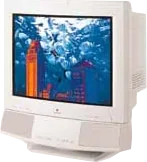
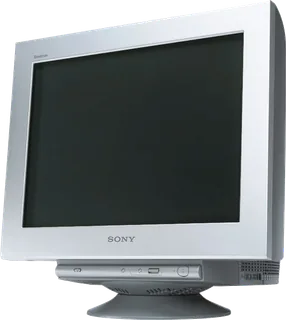
Apple AppleVision 850AV vs Sony GDM-F520
Better figure, where one is clearly better
| AppleAppleVision 850AV | SonyGDM-F520 | |
|---|---|---|
| Overview | ||
| Released | 1997 | 2001 |
| Display | ||
| Screen size | 19″ | 19.8″ |
| Panel | CRT (Nominal 20-inch Trinitron CRT, 19-inch viewable image, 0.26 mm stripe pitch and 0.25 mm grille pitch per Service Source; no fixed native pixel matrix) | CRT (Flat FD Trinitron aperture-grille CRT; marketed as a 21-inch tube with a 19.8-inch viewable image. No fixed pixel matrix or native refresh rate.) |
| Colour modes | DigitalColor internal calibration to original factory measurements, with ambient-light and phosphor-age adjustments; ColorSync support. Maker TIL specifies variable white point 4100–9300 K and gamma controls. | PROFESSIONAL, STANDARD and DYNAMIC Picture Effect modes; EASY, PRESET, EXPERT and sRGB colour settings; 5000 K, 6500 K and 9300 K presets with 5000–11000 K adjustment in EASY |
| Pixel pitch | – | Uniform 0.22 mm aperture-grille pitch across the screen; not an LCD pixel pitch |
| Supported signal modes | Service Source lists 640 × 480 at 60, 67, 72, 75 or 85 Hz; 800 × 600 at 56, 60, 72, 75 or 85 Hz; 832 × 624 at 75 Hz; 1024 × 768 at 60, 70, 75 or 85 Hz, plus 87 Hz interlaced;1152 × 870 at 75 Hz; 1280 × 1024 at 75 or 85 Hz; and 1600 × 1200 at 75 Hz. Horizontal scan range 30–94 kHz and vertical range 48–120 Hz. These are supported signal modes, not native resolution or native refresh; availability depends on computer and video card. | Sony specifies a maximum 2048 × 1536 at 85 Hz and recommends 1600 × 1200 at 85 Hz. Horizontal scan range 30–137 kHz; vertical scan range 48–170 Hz. These are supported timings, not native resolution or refresh. Maximum viewable area approximately 403.8 × 302.2 mm; standard image area 388 × 291 mm (4:3) or 364 × 291 mm (5:4). |
| Screen coating | Multilayer antireflection panel and antistatic coating | High Contrast AR screen coating |
| Calibration | – | RGB gain/bias, horizontal/vertical convergence, top/bottom vertical convergence, corner landing, geometry and moiré controls; automatic/manual degaussing and Image Restoration after a 30-minute warm-up |
| Connections | ||
| Video inputs | DA-15 | VGA |
| USB-C charging | None | None |
| USB ports | – | 4 × USB-A |
| Speakers | Yes | – |
| Other connections | Captive Macintosh DA-15 analogue RGB video cable with ADB connection; supplied PC VGA adaptor and two ADB pass-through device ports. Built-in directional microphone, microphone input and stereo headphone connector. | One HD15 VGA input and one analogue RGB video input comprising five BNC connectors (R, G, B, horizontal sync and vertical sync). Separate/composite sync and sync-on-green supported; DDC Plug & Play is available over HD15 only. |
| USB hub detail | – | One square USB-B upstream connector and four rectangular USB-A downstream connectors on the right side; hub operates while the monitor is on or in power-saving mode |
| Speaker detail | Stereo speakers with ported bass-reflex enclosure; Service Source states greater than 90 dB SPL at 1 kHz at 0.5 m, and 80 Hz–17 kHz ±6 dB response. These are maker audio claims. TIL's ambiguous 5 volts RMS wording is not converted to watts. | – |
| Design | ||
| Stand adjusts | Tilt, swivel | Tilt, swivel |
| Weight with stand | 35 kg | 30 kg |
| Tilt | −5° to +15° | 5° down to 15° up |
| Swivel | At least ±45° | 90° left or right |
| Size with stand | Service Source 553 × 484 × 545 mm, each ±3 mm (height × width × depth); archived TIL instead gives 55.5 × 48.5 × 59.5 cm. Both are maker figures with differing depth. | Approximately 497 × 499 × 487 mm (W × H × D) |
| Weight detail | Service Source gives 35 kg (77 lb); archived TIL gives 35.4 kg (78 lb) for the display and 41.9 kg (92.1 lb) fully boxed. Main field retains Service Source monitor weight; shipping weight is not substituted. | Approximately 30 kg for the complete monitor; Sony's instructions say not to remove the stand |
| Controls | Front power, brightness, contrast and five on-screen control buttons; bass, treble, volume, microphone and speaker mute. Additional picture controls through Mac Monitors & Sound panel or Windows on-screen controls. Automatic power-on degauss. | Front input selector, Picture Effect button, menu button and up/down/push control button; automatic sizing/centring, control lock and nine menu languages |
| Power and support | ||
| Power use | Service Source 190 W maximum; archived TIL instead 180 W operating maximum, less than 30 W standby and 5 W with speakers off or 30 W with speakers on in suspend/CPU energy-saving | Up to 145 W in normal operation and up to 3 W in active-off deep sleep, without USB peripherals connected |
| Power supply | Service Source 90–264 V AC, 47–63 Hz; TIL instead separates 90–132 and 198–264 V bands. Mains frequency is not display refresh. | International operating instructions specify 100–240 V AC, 50–60 Hz, 2.0–1.0 A; Japanese archive specifies 100 V AC. Use the appropriate supplied regional mains lead. |
| Software | System 7.1 or later, 68040 or later Macintosh processors for AppleVision software; Windows 95 compatibility via supplied adaptor. Maker 5 May 1997 press release expected 850AV availability in June, while non-AV 850 was immediately available; actual first retail month remains unverified, so year 1997 is retained. Service Source says November 1997 ColorSync AV rename alone changed no product hardware. No duplicate renamed model or inferred successor link. Brightness and contrast ratio unpublished. | DDC2B/DDC2Bi over HD15, with stored preset/user timings and GTF support; exact signal support also depends on the graphics card |
| Certifications | TCO 92, MPR II, EPA Energy Star and VESA DPMS; later TCO 95 non-AV ColorSync housing change does not apply to this AV model according to Service Source | ENERGY STAR, TCO'99 and MPR II in the international operating instructions; Japanese archive also lists VCCI Class B and FCC Class B |
| In the box | – | Power cord, HD15 video-signal cable, USB cable, Power Mac G3/G4 adapter and operating instructions (international manual; regional contents may vary) |
More comparisons
- Apple AppleVision 850AV vs Apple Studio Display (2026)
- Apple AppleVision 850AV vs Apple Studio Display XDR
- Apple Cinema Display (20-inch, DVI) vs Sony GDM-F520
- Apple Cinema Display (20-inch, ADC) vs Sony GDM-F520
- Apple Studio Display (21-inch CRT, 1999) vs Sony GDM-F520
- Apple Multiple Scan 20 Display vs Sony GDM-F520
- Apple AppleVision 850 vs Sony GDM-F520
- Sony GDM-F520 vs Sony GDM-FW900
- Apple AppleVision 750 Display vs Apple AppleVision 850AV
- Apple AppleVision 850 vs Apple AppleVision 850AV
- Apple AppleVision 1710AV vs Apple AppleVision 850AV
- Apple AppleVision 850AV vs Apple Multiple Scan 20 Display